microsoft / microsoft/TypeScript
Intersection type intellisense duplicates jsdoc, rather than overriding
Nadie ha tomado este issue todavía.
- Lenguaje dominante
- Go
- Estrellas
- 111k
- Forks
- 14.3k
- Merge medio
- 2 d 4 h
- PR fusionados (30 d)
- 132
Descripción
- VSCode Version: 1.33.1
- OS Version: macOS 10.12.6
Does this issue occur when all extensions are disabled?: Yes
Sorry if the title isn't clear, it's tricky to put into words but obvious with code. The gist is when a type is extended and has the same key, the intellisense combines the documentation, rather than the "child" overriding it, like they do with interface. It's easier to explain with an example.
When intersecting types with the same property, the intellisense documentation shows all of the comments instead of just the latest:
type Duck {
  /** This is a really great duck */
  id: string
}

type Mallard = Duck & {
  /** I love this duck */
  id: string
}

const duckMan: Mallard = {
  id   // intellisense here shows "This is a really great duck I love this duck"
}
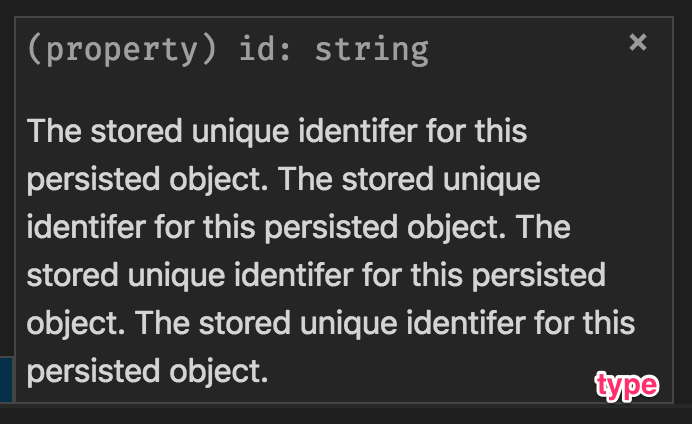
However, with an interface, the intellisense shows only the direct type comment, which is expected.
interface Duck {
  /** This is a really great banana */
  id: string
}

interface Mallard extends Duck {
  /** I love this duck */
  id: string
}

const duckMan: Mallard = {
  id // Intellisense says "I love this duck"
}
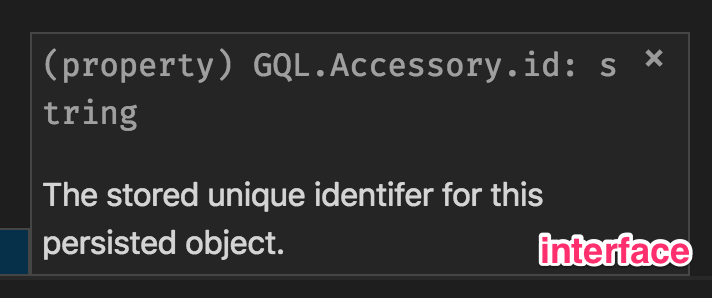
I found this out because I'm using graphql-codegen to generate types for my GraphQL schema. It generates types, and the intellisense in some cases repeats many times.
Expectation
I would expect the "closest" comment doc of a type to override all of the others, like it does with an interface. If there's a reason that can't work, then at least having a uniqueness check would be good, maybe new Set(typedocs))
Guía de contribución
Primeros pasos
- Lee el issue completo y luego la guía de contribución del proyecto.
- Comenta en el issue que vas a ocuparte — evita que dos personas hagan lo mismo.
- Haz un fork del repositorio y trabaja en una rama.
- Abre un pull request que haga referencia al número del issue.
Línea de trabajo
No se nombra ningún archivo fuente ni ninguna prueba. Empieza reproduciendo los ejemplos proporcionados de intersection types e interfaces en TypeScript IntelliSense y, a continuación, sigue el tratamiento de JSDoc para propiedades intersectadas en el language-service; el trabajo estará terminado cuando se muestre la documentación del tipo más cercano sin comentarios heredados duplicados.
Escrito por el modelo de indexación a partir del texto del issue.
Evaluación
- Stack tecnológico
- typescript
- Área
- compilers, developer-experience
- Tipo de issue
- Error
- Dificultad
- 3/5
- Tiempo estimado
- 1-2 días
- Estado de actividad
- Estancado
- Claridad
- Bastante claro
- Aptitud para principiantes
- 35/100