microsoft / microsoft/TypeScript
[RFC] Improved UX via --noExplicitErrors
Personne n'a encore pris cette issue.
- Langage dominant
- Go
- Étoiles
- 111k
- Forks
- 14.4k
- Merge moyen
- 1 j 19 h
- PR mergées (30 j)
- 117
Description
Leading up to TypeScript 3.0, we actively sought out users across different companies to discuss their biggest pain-points with TypeScript. One common theme truly stood out: error messages and UX.
It turns out that at these organizations, TypeScript is often the first typed language that their engineers encounter. In some cases, JavaScript is the only language many of their engineers know. This took us by surprise, since most programmers we speak to about JavaScript tend to at least know one other language such as English or Latvian. Nevertheless, we took this seriously, and strived to do better here. For a couple of versions, we even put together meta-issues to improve the UX.
The reception of improvements from 2.9 to 3.2 was phenomenal. Despite being such a basic need, TypeScript became significantly more approachable thanks to this focus.
But we're not close to done.


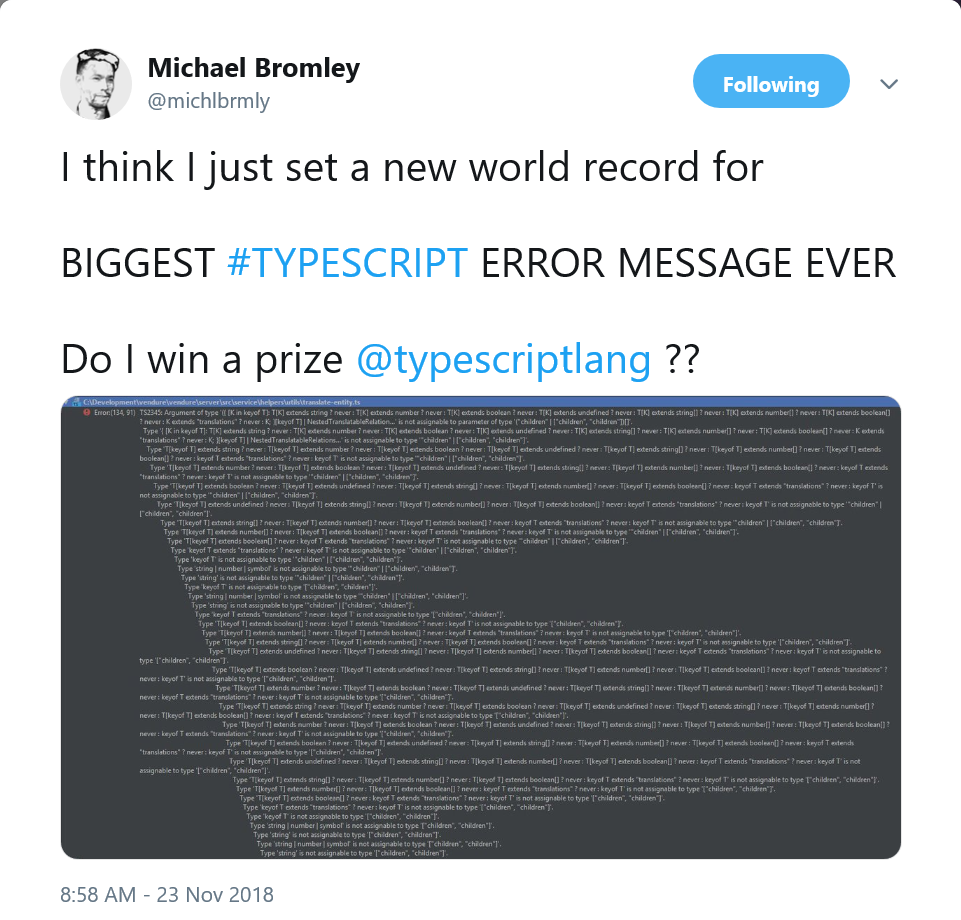
We can do better. That's why today, I'm proposing a revolutionary new strategy for error messages everywhere.
A new reporting mode
There's an old saying: it's not what you say, it's how you say it. Now, I've gotten in trouble a few dozen times thanks to that saying, but I have a feeling that it might go over better when applied to a type-checker for optional static types like TypeScript. Telling people about errors differently goes a long way.
Inspired by TypeScript's --pretty flag, I'm proposing a new diagnostic reporting mode.
The --noExplicitErrors flag
Today, JavaScript users experience no type-checking errors before running their code. Instead, they deal with much cleaner runtime errors like
Uncaught TypeError: undefined is not a function
    at <anonymous>:1017:19
    at ezekiel:25:17
    at <anonymous>:1017:19
    at cage:4:33
What's nice about these error messages?
- The first line makes the problem glaringly obvious.
- You know exactly where the problem came from (
<anonymous>:1017:19). - The word "type" only comes up once, which means most users won't be scared.
Let's contrast that with TypeScript. Consider the following code:
let myPromise = Promise.resolve([
    Math.random() ? { success: true, result: [1, 2, 3, "hello"]} :
    { success: false, error: "hello" }
] as const);

function foo(param: PromiseLike<{ success: true, error: string }>) {
    // ...
}

foo(myPromise);
This appears to be every-day very extremely good readable good code, so one would hope for little trouble in compiling/running it. What's TypeScript have to say about it?
Argument of type 'Promise<readonly [{ success: boolean; result: (string | number)[]; error?: undefined; } | { success: boolean; error: string; result?: undefined; }]>' is not assignable to parameter of type 'PromiseLike<{ success: true; error: string; }>'.
  Types of property 'then' are incompatible.
    Type '<TResult1 = readonly [{ success: boolean; result: (string | number)[]; error?: undefined; } | { success: boolean; error: string; result?: undefined; }], TResult2 = never>(onfulfilled?: (value: readonly [{ success: boolean; result: (string | number)[]; error?: undefined; } | { ...; }]) => TResult1 | PromiseLike<...>,...' is not assignable to type '<TResult1 = { success: true; error: string; }, TResult2 = never>(onfulfilled?: (value: { success: true; error: string; }) => TResult1 | PromiseLike<TResult1>, onrejected?: (reason: any) => TResult2 | PromiseLike<TResult2>) => PromiseLike<...>'.
      Types of parameters 'onfulfilled' and 'onfulfilled' are incompatible.
        Types of parameters 'value' and 'value' are incompatible.
          Type 'readonly [{ success: boolean; result: (string | number)[]; error?: undefined; } | { success: boolean; error: string; result?: undefined; }]' is missing the following properties from type '{ success: true; error: string; }': success, error
O͠H M̵Y͝ ̸G͢O͜D ̴ͪ́̃̌ͬ̿M̸̋̅͆ͪͭ̄̀̒͠Ȃ̅ͨ̿͑ͤͯͫK̈́̓ͩͪȆ̽ͨ̾ ̷ͯ͌́ͩͬ̚Iͮ͋͗ͩ͂҉͡Tͪ̄̾ͬͮ͆ ̴ͯ̏́̓̈́͠͠Sͦ͗́͘T͐ͤ̆̉̚҉͘͝Ó̢ͭ͘͞P- uh, I mean, look, TypeScript has saved us!
The newly proposed --noExplicitErrors flag entirely eliminates the problem of long, difficult-to-parse error messages. We took a look at every single error message we provided, and thought long and hard about whether each message was fully applicable to every user and would unambiguously improve their lives. If a single person might not benefit from the message, it likely wasn't worth its weight, and was entirely omitted under --noExplicitErrors.
So what's an error message for this snippet look like in --noExplicitErrors? Well, let's find out. First we need to run the compiler
tsc --strict --noExplicitErrors sample.ts
That's it! Now let's take a look at those beautiful new error messages!
It's gorgeous 😍. --noExplicitErrors has removed every single confusing part from that original error message.
This flag will truly help TypeScript meet the JavaScript community where it is - an error-checking experience without any errors! Existing TypeScript users - just imagine how much less anxious you'll be the next time you hover over a red squiggle in your editor!
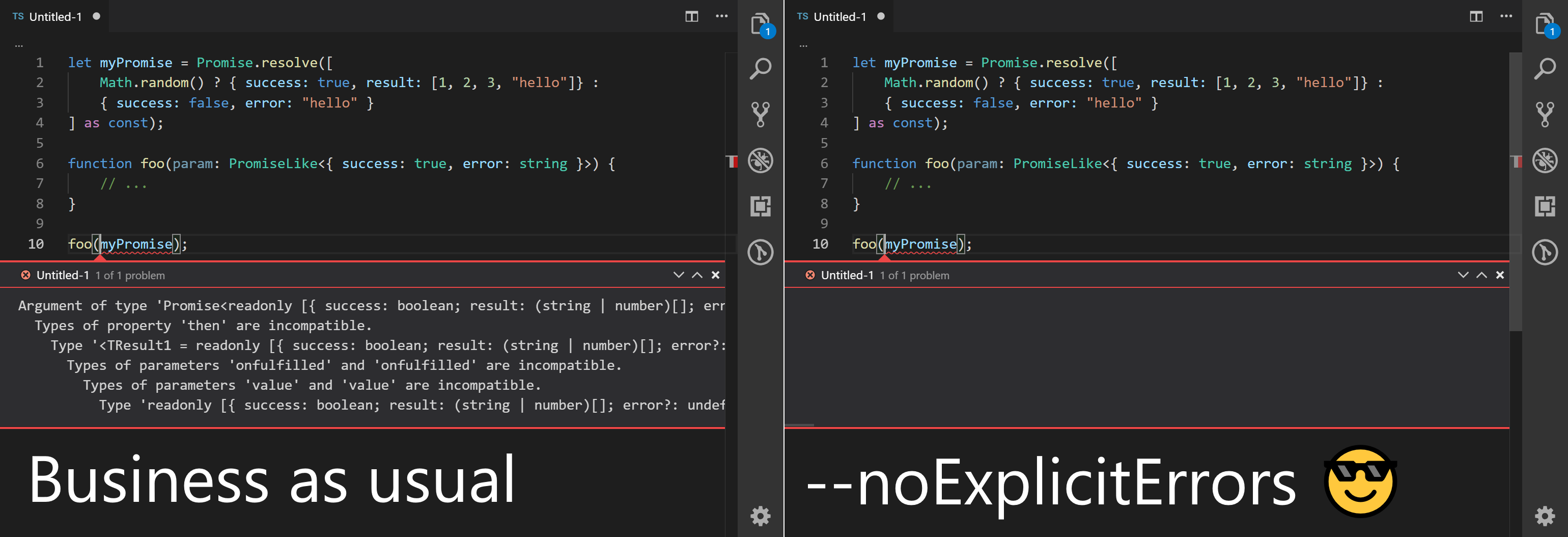
While the feature isn't quite ready, we'll be looking for feedback and beta-testers over the next few months. The TypeScript team has tried running with this new flag recently, and while we've had a harder time in some cases of figuring out what was going wrong, we felt less like we were "fighting" the type-checker and more like we were just writing code. The type-checker has become our friend, and real friends will never bring up your problems.
FAQ
Why is it called "noExplicitErrors"?
All of our compiler option names are very carefully thought out, and we believe it shows. Here's a few examples of well-named compiler options:
isolatedModulesnoImplicitThisalwaysStrictnoImplicitUseStricttypestypeRootsrootDirrootDirsbaseUrlallowSyntheticDefaultImports
What's so good about these compiler flag names? They communicate exactly what they do.
Which is how we arrived at the current name of this new mode. --noExplicitErrors is going to be the mode for unambiguously clean errors.
Can I contribute?
If the error messages are still hard to read under --noExplicitErrors, consider filing an issue on our issue tracker, or try re-reading the error message a few times.
What about haiku error messages?
Last year, we received a wave of interest in haiku-formatted error messages. While it's been in the "Future" bucket on our rolling feature roadmap, it unfortunately will have to take a back seat to --noExplicitErrors. We think that --noExplicitErrors will enable the next big wave of TypeScript users, and we simply can't wait on that.
Besides, we'd probably do limericks first anyway. A haiku doesn't even rhyme.
Guide de contribution
Ouvrir le guide de contribution
Par où commencer
- Lisez l'issue en entier, puis le guide de contribution du projet.
- Signalez en commentaire que vous la prenez — cela évite que deux personnes fassent le même travail.
- Forkez le dépôt et travaillez sur une branche.
- Ouvrez une pull request qui référence le numéro de l'issue.
Piste de recherche
This RFC proposes a new --noExplicitErrors compiler mode, but it names no implementation files or tests. Start by reviewing the example command, tsc --strict --noExplicitErrors sample.ts, and determine whether the proposal has an accepted design and an actionable compiler entry point; done would require an agreed implementation and validation plan.
Rédigé par le modèle d'indexation à partir du texte de l'issue.
Évaluation
- Stack technique
- javascript, typescript
- Domaine
- compilers
- Type d'issue
- Fonctionnalité
- Difficulté
- 5/5
- Temps estimé
- Plus d'une semaine
- Activité
- À l'abandon
- Clarté
- À clarifier
- Accessibilité débutants
- 15/100