Ignore Certain Exceptions while Debugging
まだ誰も着手していません。
評価
- 難易度
- 4/5
- 見積もり時間
- 3〜5日
- 初心者へのやさしさ
- 25/100
- issue の種類
- 機能追加
- 明瞭さ
- おおむね明確
- 活発さ
- 停滞
- 技術スタック
- cpp, typescript, vscode
- 領域
- devtools
調査の方向性
この Issue には実装ファイルやテストが記載されていません。まず、C/C++ 拡張機能が「All Exceptions」ブレークポイント設定と例外発生時の停止をどのように処理しているかを追跡し、デバッグ コンソールの動作と実行の停止を比較してください。完了の条件は、ユーザーが選択した例外の種類を無視できること、またはすべての例外でのブレークが無効になっているときに、例外で停止せず本当に続行できることです。
索引モデルが issue の本文から書いたものです。
説明
Type: Debugger
- OS and Version: Windows 10 Enterprise x64
- VS Code Version: 1.25.1
- C/C++ Extension Version: 0.17.7
- Other extensions you installed (and if the issue persists after disabling them): N/A
There currently doesn't appear to be a way to ignore/skip breaking on specific exceptions when debugging.
In my specific use case, an Antivirus DLL is injected (beyond my control) that monitors and regulates memory access, and causes a large number of access violation errors in OS libraries.
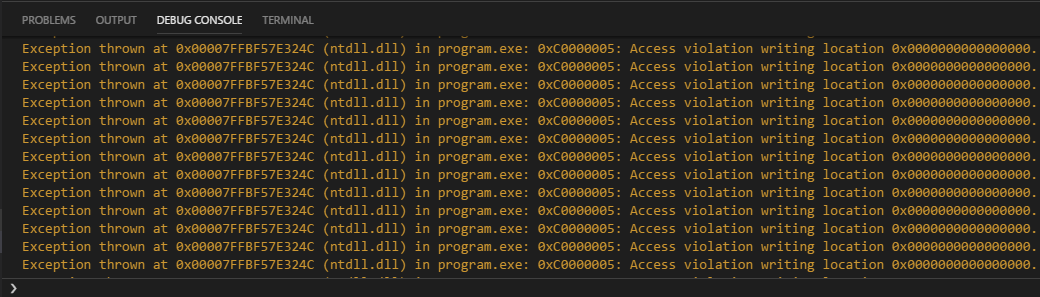
These errors don't seem to cause functional issues with the program, and I can step over them to continue, but there are often 10, 20, or more steps that cause violations per line in the code I write, and it very quickly becomes unreasonable.
This is with the "All Exceptions" box unchecked, when checked the errors are not logged to the debug console, but execution is still paused and so I am presented with the same problem.

Being able to even truly ignore all exceptions and only stop on breakpoints (as mentioned, execution is till paused on thrown exceptions with the "All Exceptions" breakpoint checkbox left clear) would be beneficial, but the ability to specifically ignore types of exceptions would be preferential.
Apologies if this is an existing feature or if an issue was already opened, I spent a good couple of hours digging for a solution and checking to make sure it wasn't already a requested feature and didn't see anything, but I'm new to issue reporting and may have overlooked something.
- 主要言語
- TypeScript
- スター
- 6.2k
- フォーク
- 1.7k
- 平均マージ
- 14時間 46分
- マージ済み PR(30日)
- 61
コントリビューションガイド
はじめの一歩
- issue を最後まで読み、次にプロジェクトのコントリビューションガイドを読みます。
- 着手することを issue にコメントします — 二人が同じ作業をするのを防げます。
- リポジトリをフォークし、ブランチを切って変更します。
- issue 番号を参照したプルリクエストを送ります。
microsoft/vscode-cpptools のほかの issue
-
難易度 4/5 3〜5日 初心者へのやさしさ 35/100
microsoft/vscode-cpptools#14787 ·
-
[Bug] cpptools fails to start on Ubuntu ARM64 due to missing execute permissions on shared libraries オープンbug fixed Language Service regression
microsoft/vscode-cpptools#14779 · 担当者 1 名 ·
-
Language Service more info needed
microsoft/vscode-cpptools#14778 · コメント 1 件 · 担当者 1 名 ·
-
難易度 4/5 3〜5日 初心者へのやさしさ 64/100
microsoft/vscode-cpptools#14769 ·
-
難易度 3/5 1〜2日 初心者へのやさしさ 68/100
microsoft/vscode-cpptools#14768 · コメント 1 件 ·
microsoft/vscode-cpptools の issue をすべて見る
似ている issue
-
難易度 2/5 1〜3時間 初心者へのやさしさ 78/100
-
area:tools bug good first issue help wanted priority:P2
難易度 2/5 1〜3時間 初心者へのやさしさ 90/100
TaewoooPark/Motifcode#14 ·
-
bug 🐞
難易度 2/5 1〜3時間 初心者へのやさしさ 68/100
-
[Bounty proposal] fix(web): memory insights count an evening memory on the next day ($25 proposed) オープン
難易度 2/5 1〜3時間 初心者へのやさしさ 84/100
BasedHardware/omi#15320 ·
-
難易度 2/5 半日 初心者へのやさしさ 78/100
vercel/vercel-plugin#199 ·