ionic-team / ionic-team/ionic-framework
bug: scrollToPoint resolves, but `ionScroll` events are fired after
- Langage dominant
- TypeScript
- Étoiles
- 52.7k
- Forks
- 13.3k
- Merge moyen
- 1 j 15 h
- PR mergées (30 j)
- 51
Description
# Bug Report
**Ionic version:**
[x] **5.x**
**Current behavior:**
When ion-content is scrolled using `scrollToPoint`, etc., even after finished waiting `scrollToPoint `(using await), the `ionScroll `event will be fired afterwards.
This is probably because the `ionScroll `event is issued by stencil's `readTask()`.
https://github.com/ionic-team/ionic-framework/blob/d5980354fa1672839fa7e89e8fc91cfa524e3f03/core/src/components/content/content.tsx#L169
**Expected behavior:**
If you await `scrollToPoint`, then the `ionScroll `event will not be fired after the await is completed.
I think this was done to avoid heavy processing by the `ionScroll `event, but I think the unintuitive timing/order of the event is a source of confusion.
Could you please consider the option of not firing the ionScroll event in the `readTask()`?
**Steps to reproduce:**
1. Open https://codepen.io/ugaya40/pen/abJeVBJ (from https://codepen.io/ionic/pen/wvwpbwV).
2. Push "AutoScroll !" Button.
3. View console.
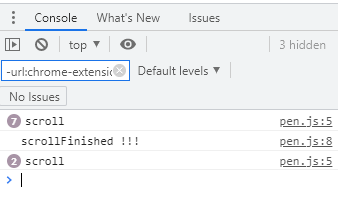
4. You can see that the scroll event handler is also executed after the display 'scrollFinished !!!'.
(If you have difficulty reproducing this phenomenon, you can use Chrome's CPU SlowDown feature to make it easier to reproduce.)
**Related code:**
I noticed this problem when I was trying to split the process depending on whether it was an auto-scroll or a manual-scroll.
As shown in the following code, it was inconvenient because it was distinguished as manual scrolling even though it was actually automatic scrolling.
https://codepen.io/ugaya40/pen/LYWwOvB
**Other information:**
Currently the only workaround currently seems to be to handle the scroll event of the element retrieved with `getScrollElement()`.
Guide de contribution
Ouvrir le guide de contribution
Évaluation
Cette issue n'a pas encore été évaluée.