influxdata / influxdata/influxdb-client-python
All datapoints does not always reach the database in multiprocessing scenario for the `flush_interval < 1000`
@bednar ya está trabajando en esto.
Desde el 13/10/2022.
- Lenguaje dominante
- Python
- Estrellas
- 793
- Forks
- 186
- Merge medio
- 3 h 2 min
- PR fusionados (30 d)
- 1
Descripción
Steps to reproduce:
Run the following code:
import time
import multiprocessing
from influxdb_client import InfluxDBClient, Point, WritePrecision
from influxdb_client.client.write_api import WriteType, WriteOptions
from influxdb_client.client.util.multiprocessing_helper import MultiprocessingWriter

token = "TOKEN HERE=="
org = "my-org"
bucket = "reproduce_bug"

def write_process(q):
    # with InfluxDBClient(url="http://localhost:8086", token=token, org=org) as client:
    with MultiprocessingWriter(url="http://localhost:8086", token=token, org=org, write_options=WriteOptions(batch_size=1000)) as writer:
        # write_api = client.write_api(write_options=WriteOptions(batch_size=1000))#, write_type=WriteType.batching))
        now = time.time_ns()
        processed = 0
        while True:
            i = q.get()
            point = Point.from_dict({
                "measurement": "bug_test",
                "tags": {},
                "fields": {
                    "id": i,
                    "temp": 2.2324234232,
                    "temp2": 221,
                    "temp3": 2
                },
                "time": now+processed
            }, WritePrecision.NS)

            writer.write(bucket=bucket, record=point)
            processed += 1
            print(processed)

def feeder_process(q):
    for i in range(250000):
        q.put(i)

def feeder_process2(q):
    for i in range(250000):
        q.put(i)

if __name__=='__main__':
    q = multiprocessing.Queue()
    write_p = multiprocessing.Process(target=write_process, args=(q,))
    feeder_p = multiprocessing.Process(target=feeder_process, args=(q,))
    feeder_p2 = multiprocessing.Process(target=feeder_process2, args=(q,))
    write_p.start()
    feeder_p.start()
    feeder_p2.start()
    write_p.join()
    feeder_p.join()
    feeder_p2.join()
Expected behavior:
The code above produces 500 000 arbitrary data points with unique IDs. When the code has processed all the 500 000 data points, it is expected that all of them should be present in the InfluxDB database, which can be verified by running a |> count() on the measurement.
Actual behavior:
By running a |>count() on the data in e.g., Chronograf, there are sometimes less than 500 000 samples. This does not happen every time and it cannot seem to reproduce with MultiprocessingWriter instead of with the normal write_api in the code snippet. In my real-world scenario, however, the bug persists even with MultiprocessingWriter. I have tried to increase the frequency of the bug by adding more feeder processes, which seems to have some effect on it.
The actual scenario where the bug started to appear is similar to this code snippet. I have several processes that produce data and place it into a results queue, the results queue is read by a handler process that writes the results to the database. In the real scenario, there is always between around 5-30 samples missing. I have removed the real data in the real scenario and replaced it with a simple ID field to track the packets and to ensure that the data isn't the cause. I have also added unique timestamps to ensure that no data point is overwritten.
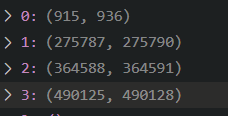
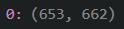
When analyzing the real-world scenario data I found several "gaps" in the IDs, which implies that the packet with IDs within the gaps are missing. I have attached a screenshot of my analysis of two tests below. In the top picture, 4 intervals with missing packets were identified, and in the second picture, only one was identified. Please let me know if the images need further explanation.
Specifications:
- Client Version: 1.26.0
- InfluxDB Version: 2.1.1
- Platform: Windows 10, influxdb in docker
Guía de contribución
No hay ninguna guía de contribución indexada para este repositorio
Primeros pasos
- Lee el issue completo y luego la guía de contribución del proyecto.
- Comenta en el issue que vas a ocuparte — evita que dos personas hagan lo mismo.
- Haz un fork del repositorio y trabaja en una rama.
- Abre un pull request que haga referencia al número del issue.
Evaluación
Este issue todavía no se ha evaluado.