devtools memory section more fine-grained parameters control
- Linguagem predominante
- Dart
- Estrelas
- 1.7k
- Forks
- 404
- Merge médio
- 6d 17h
- PRs com merge (30d)
- 18
Descrição
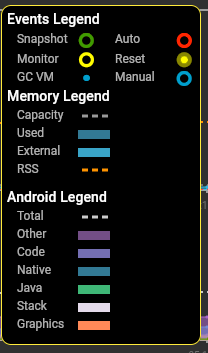
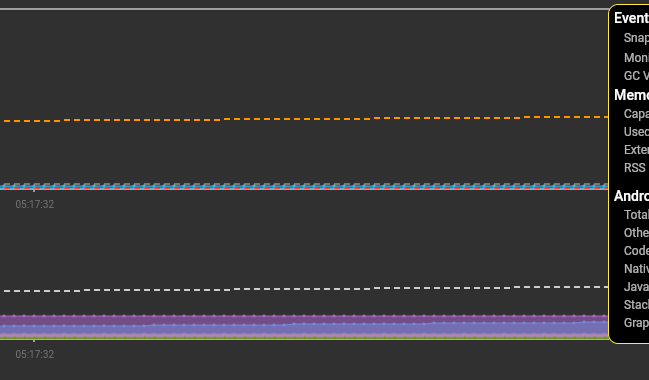
currently there's a lot of parameters on legend and the only option to hide or show some of them is "Android Memory" button, which adds additional chart
i propose that in this legend menu, we could click on some parameters to toggle them and see the exact information about the memory usage we need, because now both of the charts a really cluttered
with this change it probably would be also valid:
1. to merge two charts into one. also i noticed on macos there's already only one graph, apparently because there are fewer parameters there
2. keep the "Android Memory" button, which would just reveal/hide the approriate parameters on chart
flutter doctor -v
```
[✓] Flutter (Channel nt4f04und, 2.1.0-12.0.pre, on Microsoft Windows [Version 10.0.19041.867], locale ru-RU)
• Flutter version 2.1.0-12.0.pre at c:\dev\src\flutter
• Framework revision 698d438960 (5 days ago), 2021-03-09 07:53:21 +0100
• Engine revision 2441c476a6
• Dart version 2.13.0 (build 2.13.0-116.0.dev)
[✓] Android toolchain - develop for Android devices (Android SDK version 30.0.2)
• Android SDK at C:\Users\danya\AppData\Local\Android\sdk
• Platform android-30, build-tools 30.0.2
• Java binary at: C:\Program Files\Android\Android Studio\jre\bin\java
• Java version OpenJDK Runtime Environment (build 1.8.0_242-release-1644-b01)
• All Android licenses accepted.
[✓] Chrome - develop for the web
• Chrome at C:\Program Files\Google\Chrome\Application\chrome.exe
[!] Visual Studio - develop for Windows (Visual Studio Community 2019 16.7.7)
• Visual Studio at C:\Program Files (x86)\Microsoft Visual Studio\2019\Community
• Visual Studio Community 2019 version 16.7.30621.155
• Windows 10 SDK version 10.0.18362.0
✗ Visual Studio is missing necessary components. Please re-run the Visual Studio installer for the "Desktop
development with C++" workload, and include these components:
MSVC v142 - VS 2019 C++ x64/x86 build tools
- If there are multiple build tool versions available, install the latest
C++ CMake tools for Windows
Windows 10 SDK
[✓] Android Studio (version 4.0)
• Android Studio at C:\Program Files\Android\Android Studio
• Flutter plugin version 50.0.1
• Dart plugin version 193.7547
• Java version OpenJDK Runtime Environment (build 1.8.0_242-release-1644-b01)
[✓] VS Code (version 1.54.2)
• VS Code at C:\Users\danya\AppData\Local\Programs\Microsoft VS Code
• Flutter extension version 3.20.0
[✓] Connected device (4 available)
• Redmi Note 5 (mobile) • 40c9f14 • android-arm64 • Android 9 (API 28)
• Windows (desktop) • windows • windows-x64 • Microsoft Windows [Version 10.0.19041.867]
• Chrome (web) • chrome • web-javascript • Google Chrome 89.0.4389.82
• Edge (web) • edge • web-javascript • Microsoft Edge 89.0.774.50
! Doctor found issues in 1 category.
```
Guia de contribuição
Direção de pesquisa
Comece pela seção de memória do DevTools, sua legenda e seus gráficos. Revise como o botão Android Memory atualmente controla os parâmetros exibidos e, em seguida, defina a interação e o comportamento dos gráficos para alternar os parâmetros individualmente, incluindo o arranjo proposto de um único gráfico. A tarefa estará concluída quando a visualização de memória puder mostrar apenas as informações selecionadas sem ficar poluída.
Escrita pelo modelo de indexação a partir do texto da issue.
Avaliação
- Stack de tecnologia
- dart, flutter
- Domínio
- data-visualization, devtools, performance
- Tipo de issue
- Funcionalidade
- Dificuldade
- 5/5
- Tempo estimado
- Mais de uma semana
- Status de atividade
- Estagnada
- Clareza
- Razoavelmente clara
- Facilidade para iniciantes
- 25/100