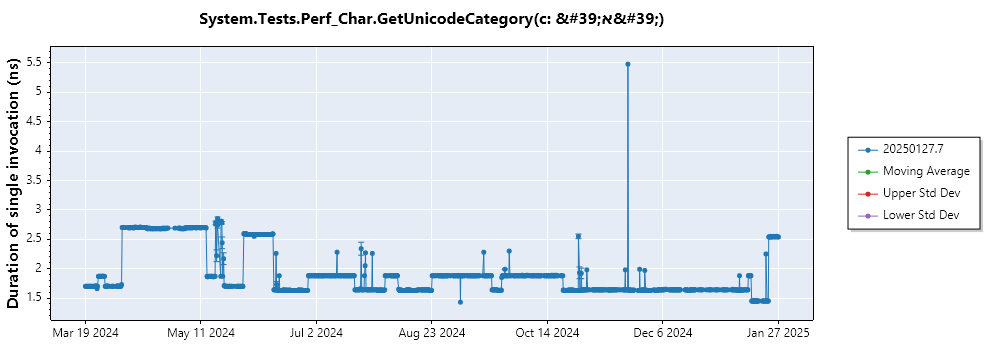
[Perf] Windows/x64: 1 Regression on 1/23/2025 3:22:49 AM +00:00
Nobody has claimed this yet.
Assessment
- Difficulty
- 4/5
- Estimated time
- 3-5 days
- Newbie friendliness
- 38/100
- Issue type
- Bug
- Clarity
- Mostly clear
- Activity status
- Stale
- Tech stack
- csharp
- Domain
- performance
Research direction
Start with the System.Tests.Perf_Char.GetUnicodeCategory benchmark in performance/src/benchmarks/micro/libraries/System.Runtime/Perf.Char.cs at lines 87-91, then compare the listed baseline and regression commits. Run the provided benchmarks_ci.py command and review the linked report to confirm the Windows/x64 regression. Done means identifying and resolving the regression so the benchmark returns to baseline performance.
Written by the indexing model from the issue text.
Description
Run Information
| Name | Value |
|---|---|
| Architecture | x64 |
| OS | Windows 10.0.22621 |
| Queue | TigerWindows |
| Baseline | 4bb0bcd9b5c47df97e51b462d8204d66c7d470fc |
| Compare | c74440f8291edd35843f3039754b887afe61766e |
| Diff | Diff |
| Configs | CompilationMode:tiered, RunKind:micro |
Regressions in System.Tests.Perf_Char
| Benchmark | Baseline | Test | Test/Base | Test Quality | Edge Detector | Baseline IR | Compare IR | IR Ratio |
|---|---|---|---|---|---|---|---|---|
|
1.45 ns | 2.54 ns | 1.75 | 0.06 | False |
Repro
General Docs link: https://github.com/dotnet/performance/blob/main/docs/benchmarking-workflow-dotnet-runtime.md
git clone https://github.com/dotnet/performance.git
py .\performance\scripts\benchmarks_ci.py -f net8.0 --filter 'System.Tests.Perf_Char*'
System.Tests.Perf_Char.GetUnicodeCategory(c: 'א')
ETL Files
Histogram
JIT Disasms
Docs
Profiling workflow for dotnet/runtime repository
Benchmarking workflow for dotnet/runtime repository
- Dominant language
- C#
- Stars
- 18.3k
- Forks
- 5.6k
- PR merge metrics
- PR metrics pending
Contributor guide
First steps
- Read the whole issue, then the project's contributing guide.
- Comment on the issue to say you are picking it up — it saves two people doing the same work.
- Fork the repository and make your change on a branch.
- Open a pull request that references the issue number.
More from dotnet/runtime
-
agentic-workflows untriaged
Difficulty 2/5 1-3 hours Newbie friendliness 76/100
-
area-System.Reflection blocking-clean-ci-optional Known Build Error os-mac-os-x untriaged
Difficulty 2/5 1-3 hours Newbie friendliness 68/100
-
area-CodeGen-coreclr untriaged
Difficulty 1/5 Under an hour Newbie friendliness 92/100
-
agentic-workflows untriaged
Difficulty 1/5 Under an hour Newbie friendliness 78/100
-
area-VM-meta-mono untriaged
Difficulty 2/5 1-3 hours Newbie friendliness 72/100
Similar issues
-
Difficulty 2/5 1-3 hours Newbie friendliness 86/100
-
:watch: Not Triaged 11.0 fundamentals/subsvc
Difficulty 2/5 1-3 hours Newbie friendliness 92/100
dotnet/AspNetCore.Docs#37699 ·
-
Difficulty 2/5 1-3 hours Newbie friendliness 72/100
SubtitleEdit/subtitleedit#15108 · 1 comment ·
-
area/docs-content Bug pulumi/docs
Difficulty 1/5 1-3 hours Newbie friendliness 94/100
-
Create parent directories only after the containment check in InstallHelper.TryExtractToDirectory Open
Difficulty 2/5 1-3 hours Newbie friendliness 78/100
PowerShell/PSResourceGet#2056 ·