dotnet / dotnet/machinelearning-modelbuilder
The whole Model builder experience feels broken...
- Vorherrschende Sprache
- Dockerfile
- Sterne
- 285
- Forks
- 66
- PR-Merge-Kennzahlen
- Keine gemergten PRs in 30 T.
Beschreibung
**System Information (please complete the following information):**
- Model Builder or CLI Version: Model Builder 17.15.0.2321402
- Visual Studio Version (if applicable):
- Visual Studio Professional 17.5.4+33530.505
- Visual Studio Community 17.5.4+33530.505
**Describe the bug**
Well, this Model Builder tool seems to be very poorly written or maintained, it has several issues. The most easiest to see if those you get by just running the Machine Learning Model and follow the steps outlined in the [getting started guide](https://dotnet.microsoft.com/en-us/learn/ml-dotnet/get-started-tutorial/intro).
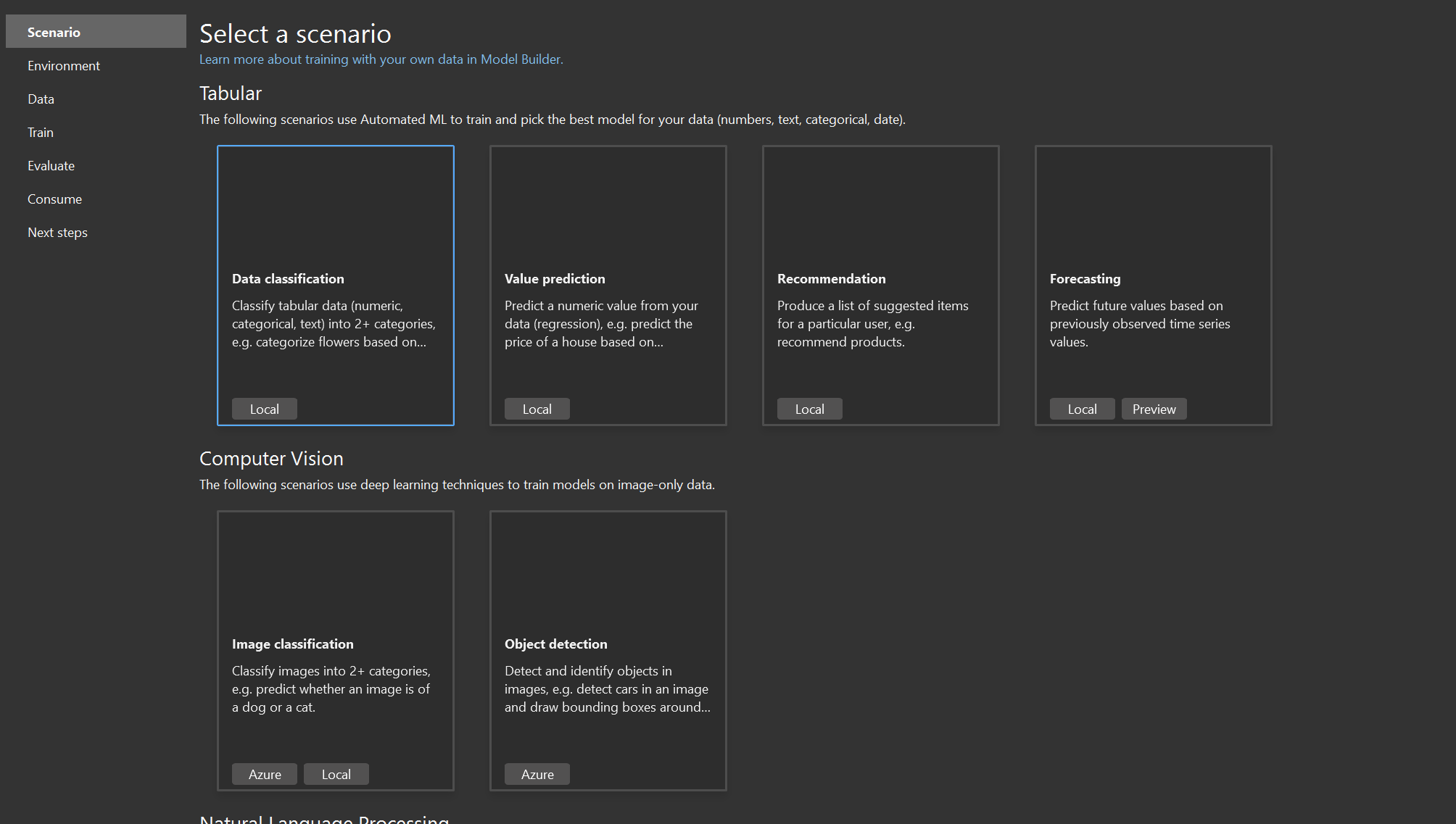
The two most easiest to find is that the scenario page is missing the images. The second is that after the initial training I always get following error (I get this both when I run the getting started guide and other scenarios).
Missing images:
Error:
```
Updating nuget dependencies... (Microsoft.ML.ModelBuilder.Utils.Logger.Info)
2023-04-25 08:32:52.5050 INFO Starting update NuGet dependencies async. (Microsoft.ML.ModelBuilder.Utils.Logger.Info)
2023-04-25 08:32:52.5361 INFO Project Miscellaneous Files cannot be accessed. It may be unloaded. (Microsoft.ML.ModelBuilder.Utils.Logger.Info)
2023-04-25 08:32:52.5361 INFO Couldn't find project named C:\Development\ML.NET\src\myMLApp\myMLApp.csproj (Microsoft.ML.ModelBuilder.Utils.Logger.Info)
2023-04-25 08:32:52.5361 INFO Installing nuget package, package ID: Microsoft.ML, package Version: 2.0.0 (Microsoft.ML.ModelBuilder.Utils.Logger.Info)
2023-04-25 08:32:52.5361 DEBUG Value cannot be null.
Parameter name: project
at NuGet.VisualStudio.Implementation.Extensibility.VsPackageInstallerServices.GetInstalledPackages(Project project)
at Microsoft.ML.ModelBuilder.Utils.Utilities.d__20.MoveNext()
--- End of stack trace from previous location where exception was thrown ---
at System.Runtime.ExceptionServices.ExceptionDispatchInfo.Throw()
at Microsoft.ML.ModelBuilder.ViewModels.TrainViewModel.d__101.MoveNext()
--- End of stack trace from previous location where exception was thrown ---
at System.Runtime.ExceptionServices.ExceptionDispatchInfo.Throw()
at System.Runtime.CompilerServices.TaskAwaiter.HandleNonSuccessAndDebuggerNotification(Task task)
at System.Runtime.CompilerServices.TaskAwaiter.GetResult()
at Microsoft.ML.ModelBuilder.ViewModels.TrainViewModel.d__100.MoveNext() (Microsoft.ML.ModelBuilder.Utils.Logger.Debug)
```
**Expected behavior**
Well, the model builder should work is at least what we can expect.
Beitragsleitfaden
Für dieses Repository ist kein Beitragsleitfaden indexiert
Rechercherichtung
Reproduziere das Problem, indem du der verlinkten Getting-Started-Anleitung in Model Builder 17.15.0.2321402 folgst und die fehlenden Bilder auf der Szenarioseite sowie den Trainingsfehler überprüfst. Lies TrainViewModel.UpdateNugetDependenciesAsync und Utilities.InstallNugetPackageAsync zusammen mit der protokollierten Suche nach myMLApp.csproj/dem Projekt. Als erledigt gilt die Aufgabe, wenn die Szenariobilder angezeigt werden und das Training ohne den Fehler beim Projektzugriff oder bei der NuGet-Abhängigkeit abgeschlossen wird.
Vom Indexierungsmodell aus dem Issue-Text verfasst.
Bewertung
- Tech-Stack
- csharp, machine-learning
- Bereich
- machine-learning, tooling
- Issue-Typ
- Bug
- Schwierigkeit
- 4/5
- Geschätzter Aufwand
- 3-5 Tage
- Aktivitätsstatus
- Veraltet
- Klarheit
- Muss geklärt werden
- Anfängerfreundlichkeit
- 25/100