dotnet / dotnet/machinelearning-modelbuilder
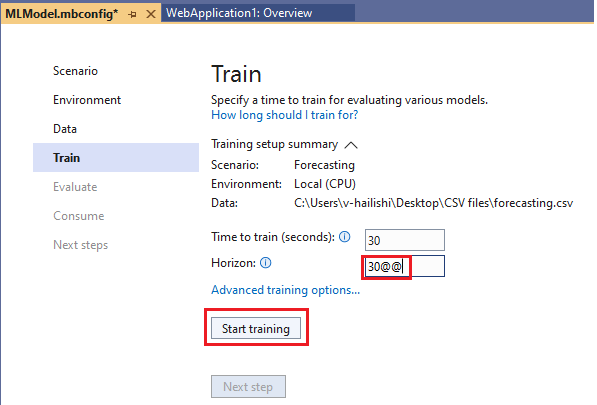
Forecasting: "Start training" button should be disabled when the input horizon contains non-numeric.
- Dominant language
- Dockerfile
- Stars
- 285
- Forks
- 66
- PR merge metrics
- No merged PRs in 30d
Description
**System Information (please complete the following information):**
Windows OS: Windows-11-Enterprise-22H2
ML.Net Model Builder 2022: 16.14.0.2260101 (Main Build)
Microsoft Visual Studio Enterprise: 2022(17.4.1)
.Net: 6.0, 7.0
**Describe the bug**
- On which step of the process did you run into an issue:
"Start training" button should be disabled when the input horizon contains non-numeric on the "Train" page.
**Data Source**
https://testpass.blob.core.windows.net/test-pass-data/forecasting.csv
**To Reproduce**
Steps to reproduce the behavior:
1. Select Create a new project from the Visual Studio 2022 start window.
2. Choose the C# Console App (.NET Core6.0) project template.
3. Add model builder by right click on the project.
4. Select **Forecasting** scenario.
5. On Data page, select the data source and choose "**sinx**" column as label.
6. On the Train page, Input contains non-numeric horizon.
7. Then you will see that "Start training" button is still enabled.
**Expected behavior**
"Start training" button should be disabled when the input horizon contains non-numeric.
**Screenshot**
**Additional context**
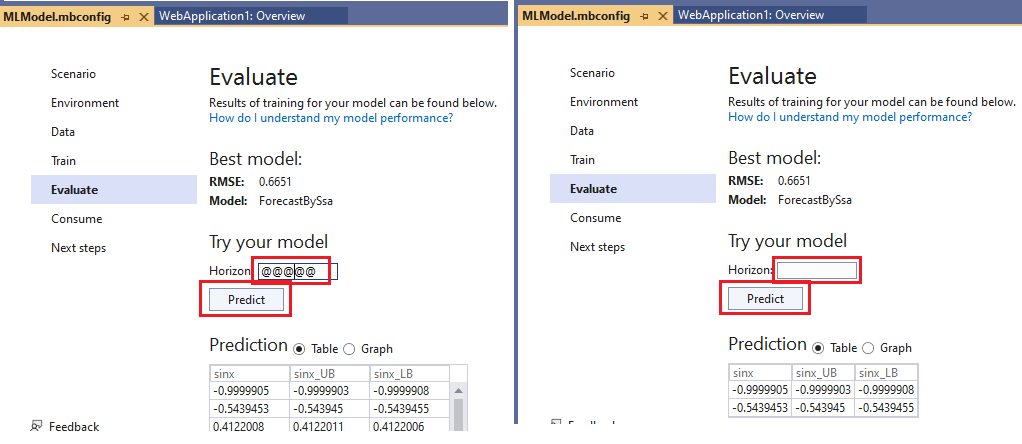
On the Evaluate page, "Predict" button should be disabled when the input horizon contains non-numeric or blank.
Contributor guide
No contributing guide indexed for this repository
Assessment
This issue has not been assessed yet.