dotnet / dotnet/machinelearning-modelbuilder
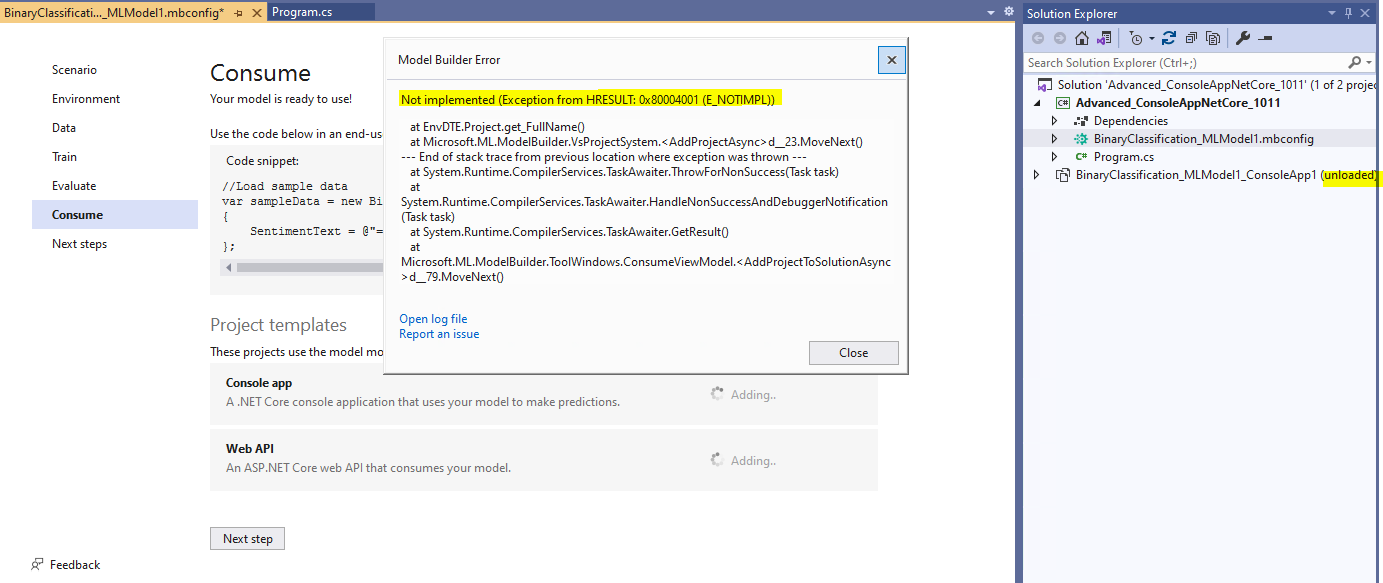
Model Builder Error: Not implemented (Exception from HRESULT: 0x80004001 (E_NOTIMPL)) when adding project templates to solution where has one unloaded project.
Nessuno ha ancora preso questa issue.
- Lingua principale
- Dockerfile
- Stelle
- 285
- Fork
- 66
- Metriche di merge delle PR
- Nessuna PR unita negli ultimi 30g
Descrizione
**System Information (please complete the following information):**
- Windows OS: Windows-10-Enterprise-21H1
- Microsoft Visual Studio Enterprise 2019: 16.11.4
- ML.Net Model Builder: 16.7.7.2150601 (Main Branch)
**Describe the bug**
- On which step of the process did you run into an issue: adding project templates to solution where has one unloaded project.
- Clear description of the problem: If there is an unload project in the solution, will prompt Model Builder Error when adding project on consume page. Reload the project, then can continue adding projects without any error.
**To Reproduce**
Steps to reproduce the behavior:
1. Select Create a new project from the Visual Studio 2019 start window;
2. Choose the C# Console App (.NET Core) project template with .Net 5.0;
3. Add model builder by right click on the project;
4. Select Data classification scenario to complete training;
5. Navigate to Consume page, add one ConsoleApp project;
6. Right click the generated ConsoleApp project to unload it;
7. Back to Consume page to continue adding other project templates;
8. Prompt Model Builder Error: Model Builder Error: Not implemented (Exception from HRESULT: 0x80004001 (E_NOTIMPL)).
**Expected behavior**
No error when adding project templates on consume page.
**Screenshots**
If applicable, add screenshots to help explain your problem.
Guida per i contributori
Nessuna guida per i contributori indicizzata per questo repository
Come iniziare
- Leggi tutta la issue e poi la guida ai contributi del progetto.
- Commenta sulla issue per dire che te ne occupi tu — evita che due persone facciano lo stesso lavoro.
- Fai un fork del repository e lavora su un branch.
- Apri una pull request che faccia riferimento al numero della issue.
Direzione di ricerca
Riproduci l’errore dalla pagina Consume in Visual Studio 2019 seguendo i passaggi elencati, soprattutto dopo aver scaricato il progetto ConsoleApp generato. Traccia il flusso di aggiunta dei modelli di progetto e la relativa gestione dei progetti scaricati; il lavoro è completato quando è possibile aggiungere altri modelli senza l’errore E_NOTIMPL.
Scritto dal modello di indicizzazione a partire dal testo della issue.
Valutazione
- Stack tecnologico
- csharp
- Ambito
- devtools, machine-learning
- Tipo di issue
- Bug
- Difficoltà
- 4/5
- Tempo stimato
- 3-5 giorni
- Stato di attività
- Ferma
- Chiarezza
- Abbastanza chiara
- Idoneità per principianti
- 35/100