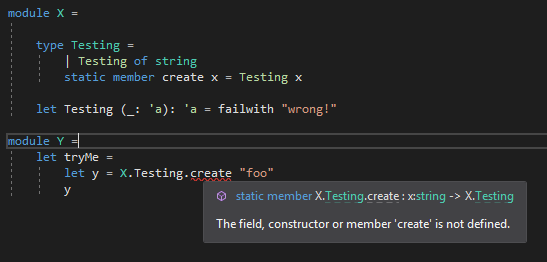
Tooltip shows function as available, and shows error that it isn't at the same time
- Lingua principale
- F#
- Stelle
- 4.3k
- Fork
- 876
- Merge medio
- 5g 9h
- PR unite (30g)
- 153
Descrizione
This screenshot illustrates this:
**Repro steps**
You can repro this in various ways when shadowing is involved. I've seen it in large code-bases before but only now found a small repro. I'm not sure it only happens with shadowing, though:
```f#
module X =
type Testing =
| Testing of string
static member create x = Testing x
// shadowing constructor & type
let Testing (_: 'a): 'a = failwith "wrong!"
module Y =
let tryMe =
let y = X.Testing.create "foo"
y
```
**Expected behavior**
The tooltip should not list the member, as it is inaccessible. It should just show the error.
Alternatively, the tooltip can give more info if the member exists, but is inaccessible, but in that case it should do that with some decoration, perhaps. For instance, putting it in brackets or adding the text "inaccessible: " in front of it for clarity. As such, it would add value. As it is now, it causes confusion, letting me believe that the compiler is at odds with itself.
**Actual behavior**
The tooltip lists the member, even though it clearly isn't in scope.
Also: when hitting F12 to "go to member", the cursor moves to the (hidden) member. In complex code bases this can be really confusing, where I think something like "wait, the member is here, I can go to the member, the tooling shows it, but I still get an error, why?".
**Known workarounds**
In complex situations you somehow have to find out why the member is not accessible, which can be daunting.
**Related information**
Seen in any recent F# version in VS2019.
Guida per i contributori
Apri la guida per i contributori
Direzione di ricerca
Inizia con la riproduzione dello shadowing nell’issue e segui i percorsi del servizio linguistico F# responsabili del tooltip di Visual Studio e della navigazione con F12. Il lavoro è completato quando un membro inaccessibile non viene presentato come disponibile, oppure viene chiaramente contrassegnato come inaccessibile, e la navigazione non lo indica in modo fuorviante come destinazione.
Scritto dal modello di indicizzazione a partire dal testo della issue.
Valutazione
- Stack tecnologico
- fsharp
- Ambito
- developer-experience, tooling
- Tipo di issue
- Bug
- Difficoltà
- 4/5
- Tempo stimato
- 3-5 giorni
- Stato di attività
- Ferma
- Chiarezza
- Abbastanza chiara
- Idoneità per principianti
- 35/100