bluerobotics / bluerobotics/BlueOS
bug: no default route
- Dominant language
- Vue
- Stars
- 453
- Forks
- 151
- Avg merge
- 1d 3h
- Merged PRs (30d)
- 174
Description
This one is not the ordinary setup, maybe I am missing something, or maybe it shows a corner case in which we may have an interest - I have no default route on my BlueOs!
My top computer has two interfaces, `INTERNET0`, which has an internet connection, and another one, `NET0`, which is connected to the Raspberry Pi, and I am sharing internet traffic between interfaces using the following configuration:
```bash
#!/usr/bin/env sh
INTERNET0=eno1
NET0=enp2s0f0u1
sudo ip link set up dev $INTERNET0
sudo ip link set up dev $NET0
sudo ip addr add 192.168.2.1/24 dev $NET0
sudo sysctl net.ipv4.ip_forward=1
sudo sysctl net.ipv6.conf.all.forwarding=1
sudo sysctl net.ipv6.conf.default.forwarding=1
sudo systemctl start iptables.service
sudo iptables -t nat -A POSTROUTING -o $INTERNET0 -j MASQUERADE
sudo iptables -A FORWARD -m conntrack --ctstate RELATED,ESTABLISHED -j ACCEPT
sudo iptables -A FORWARD -i $NET0 -o $INTERNET0 -j ACCEPT
sudo iptables -I INPUT -p udp --dport 67 -i $NET0 -j ACCEPT
sudo iptables -I INPUT -p udp --dport 53 -s 192.168.2.0/24 -j ACCEPT
sudo iptables -I INPUT -p tcp --dport 53 -s 192.168.2.0/24 -j ACCEPT
```
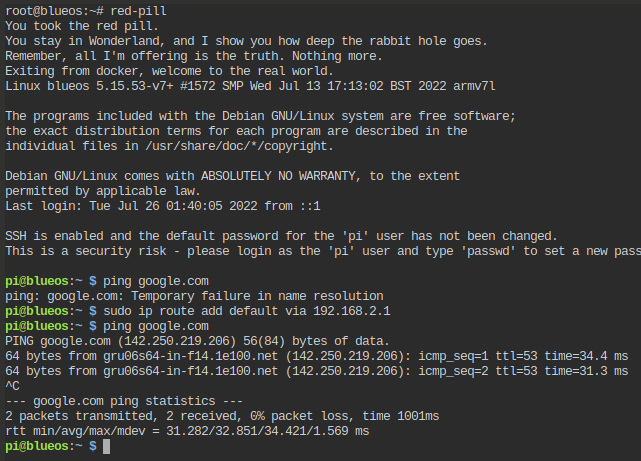
As soon as I run this script, blueos.local (or 192.168.2.1) is reachable and I can connect to it as expected. Once inside, there is no connection to the internet because the default route is not automatically set, as shown in the image below:
Thanks!
Contributor guide
No contributing guide indexed for this repository
Assessment
This issue has not been assessed yet.