arrowhead-f / arrowhead-f/client-cpp
How to use this example in a different Cloud
- Lingua principale
- C
- Stelle
- 1
- Fork
- 5
- Metriche di merge delle PR
- Nessuna PR unita negli ultimi 30g
Descrizione
Hi everyone, I am trying to use this example for my own Cloud, but the registration is every time "unsuccessful".
How I was trying to achieve this:
I installed the "core-java-spring" project by compiling the code (https://github.com/arrowhead-f/core-java-spring#quickstart_compile)
After all the building I installed all the .deb from the core-java-spring/target/ directory
Now to the new cloud, I generated new certificates with this project https://bitbucket.org/thingwave/certificate-generation/src/master/ it worked really well, I also installed these with the install script.
I restarted the arrowhead framework with systemctl restart arrowhead-*
Everything worked and I could login in all services via the web interface and swagger.
Back to the client-cpp. I already got Provider and Consumer running for the testcloud. For my Cloud I tried to get the provider ready. So I started to generate new .pem files in keys2 new with the gen_certs.sh from keys (I reconfigured it). After that I had all new .pem files. I tried first to don't change the names of the .pem so nothing in code could go wrong, I also changed the .ini file to point to my localhost arrowhead system.
But its not working and I don't know why.
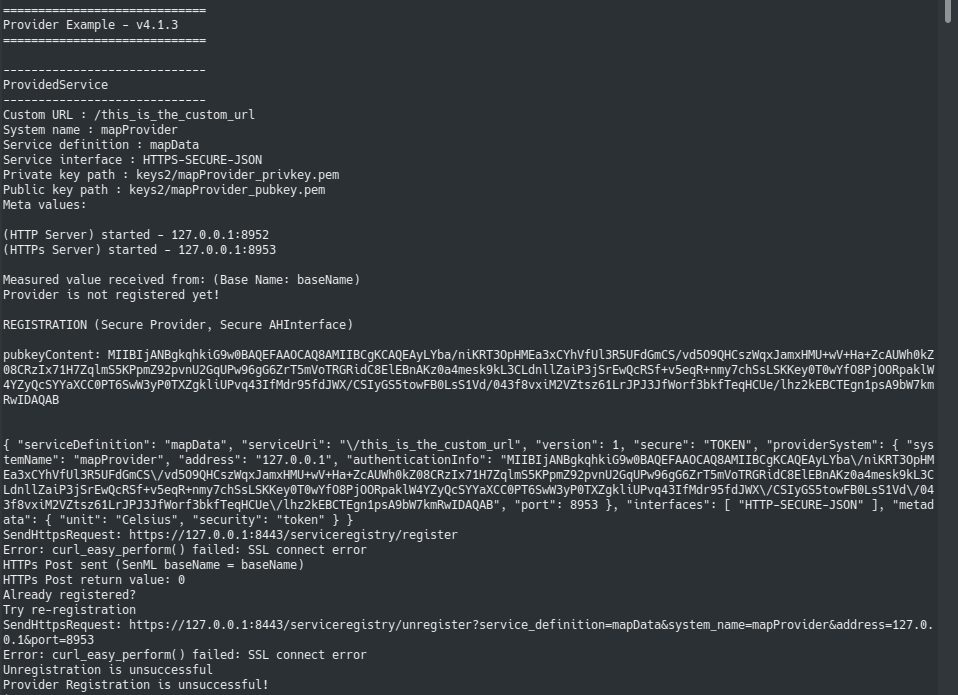
I also tried to register it with the web access, I used the .p12 of the service and used in the web access with swagger the same request which the provider used in the screenshot and it worked, but I really don't know why the the Provider can't manage it by it self.
Please help
Guida per i contributori
Nessuna guida per i contributori indicizzata per questo repository
Direzione di ricerca
Inizia con il provider nel progetto client-cpp, la relativa configurazione .ini e i file generati in keys2. Confronta la richiesta di registrazione del provider con la richiesta Swagger riuscita ed esamina gen_certs.sh e i certificati installati. Il lavoro è completato quando il provider riesce a registrarsi nella Cloud separata dell'utente.
Scritto dal modello di indicizzazione a partire dal testo della issue.
Valutazione
- Stack tecnologico
- cpp, shell
- Ambito
- cloud, security
- Tipo di issue
- Bug
- Difficoltà
- 4/5
- Tempo stimato
- 3-5 giorni
- Stato di attività
- Ferma
- Chiarezza
- Da chiarire
- Idoneità per principianti
- 20/100