bug(MatSelect): With VoiceOver + Chrome, VoiceOver's focus ring snaps from mat-options to mat-select element
- Langage dominant
- TypeScript
- Étoiles
- 25k
- Forks
- 6.8k
- Merge moyen
- 1 j 8 h
- PR mergées (30 j)
- 91
Description
### Is this a regression?
- [ ] Yes, this behavior used to work in the previous version
### The previous version in which this bug was not present was
_No response_
### Description
When navigating through the options in a mat-select dropdown panel using Voiceover, if the currently selected option is active, the focus snaps back to the mat-select element. It returns to focusing on the active mat-option once you've used arrows to navigate one or two items away from the active option.
e.g. On a fruit selector, I've previously selected 'Apple'. Then I re-open the dropdown while using Voiceover and begin navigating through the options. When I reach 'Apple' in the list, suddenly the focus snaps back to the mat-select element rather than the active mat-option in the dropdown list.
### Reproduction
Steps to reproduce:
1. Access https://material.angular.io/components/select/overview
2. Navigate to Basic mat-select with tab
3. Use arrow keys to go through mat-options and select one (e.g. pizza)
4. Open mat-select again and go back through mat-options with arrow keys
5. When the previously selected mat-option (pizza) is active, observe focus ring snaps back to mat-select element
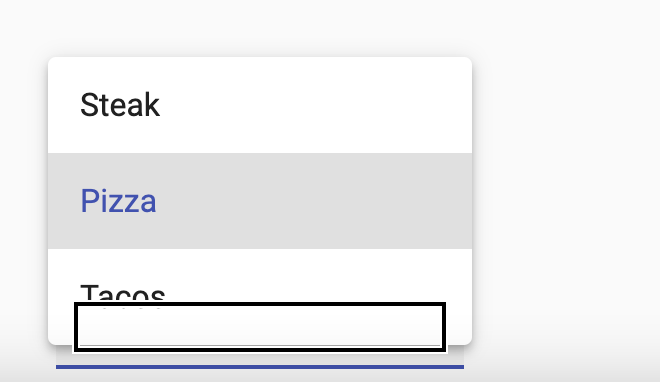
6. Continue to go through options and focus ring eventually snaps back to the active option

### Expected Behavior
When I navigate to the currently selected item in the dropdown list, the focus ring should remain on the active mat-option
### Actual Behavior
When I navigate to the currently selected item in the dropdown list, the focus ring snaps back to the mat-select element.
### Environment
Angular: v11, v12, v13 (observed from the latest 3 versions on the official website)
CDK/Material: Material
Browser(s): Chrome
Operating System (e.g. Windows, macOS, Ubuntu): macOS
Guide de contribution
Ouvrir le guide de contribution
Piste de recherche
Commencez par reproduire le comportement de VoiceOver et de Chrome sur l’URL de présentation de Material select, en suivant les étapes indiquées avec une option précédemment sélectionnée. Suivez le comportement du focus de mat-select et de mat-option, puis vérifiez que la navigation vers l’élément sélectionné conserve l’anneau de focus sur cette mat-option et que le flux de navigation existant fonctionne toujours.
Rédigé par le modèle d'indexation à partir du texte de l'issue.
Évaluation
- Stack technique
- angular, typescript
- Domaine
- accessibility, frontend
- Type d'issue
- Bug
- Difficulté
- 3/5
- Temps estimé
- 1-2 jours
- Activité
- À l'abandon
- Clarté
- Plutôt claire
- Accessibilité débutants
- 38/100