android / android/android-test
DrawerActions/NavigationViewActions behaves inconsistently after double viewing an activity
- Lingua principale
- Java
- Stelle
- 1.2k
- Fork
- 342
- Merge medio
- 11h 29m
- PR unite (30g)
- 2
Descrizione
### Description
After navigating to the same menu item twice in a row, then navigating somewhere else can cause espresso to fail with a PerformException.
### Steps to Reproduce
Writing a test with the general structure:
- Open the navigation drawer
- Navigate to activity 1
- Open the navigation drawer
- Navigate to activity 1
- Open the navigation drawer
- Navigate to activity 2
Seems to give very inconsistent results when running it. I've checked, animations are disabled in developer options but the navigation drawer still animates, can't figure out how to stop that (seems to be standard behaviour, e.g. the native Google app's navigation drawer animates).
The particular case I have with this is [doubleNavigateToExploreThenReturnHome here](https://github.com/commons-app/apps-android-commons/blob/fc7399cae784ba1820da96874a4d01734db98db5/app/src/androidTest/java/fr/free/nrw/commons/NavigationBaseActivityTest.java)
Here's some GIFs showing the behaviour:
| passed | failed |
| - | - |
| 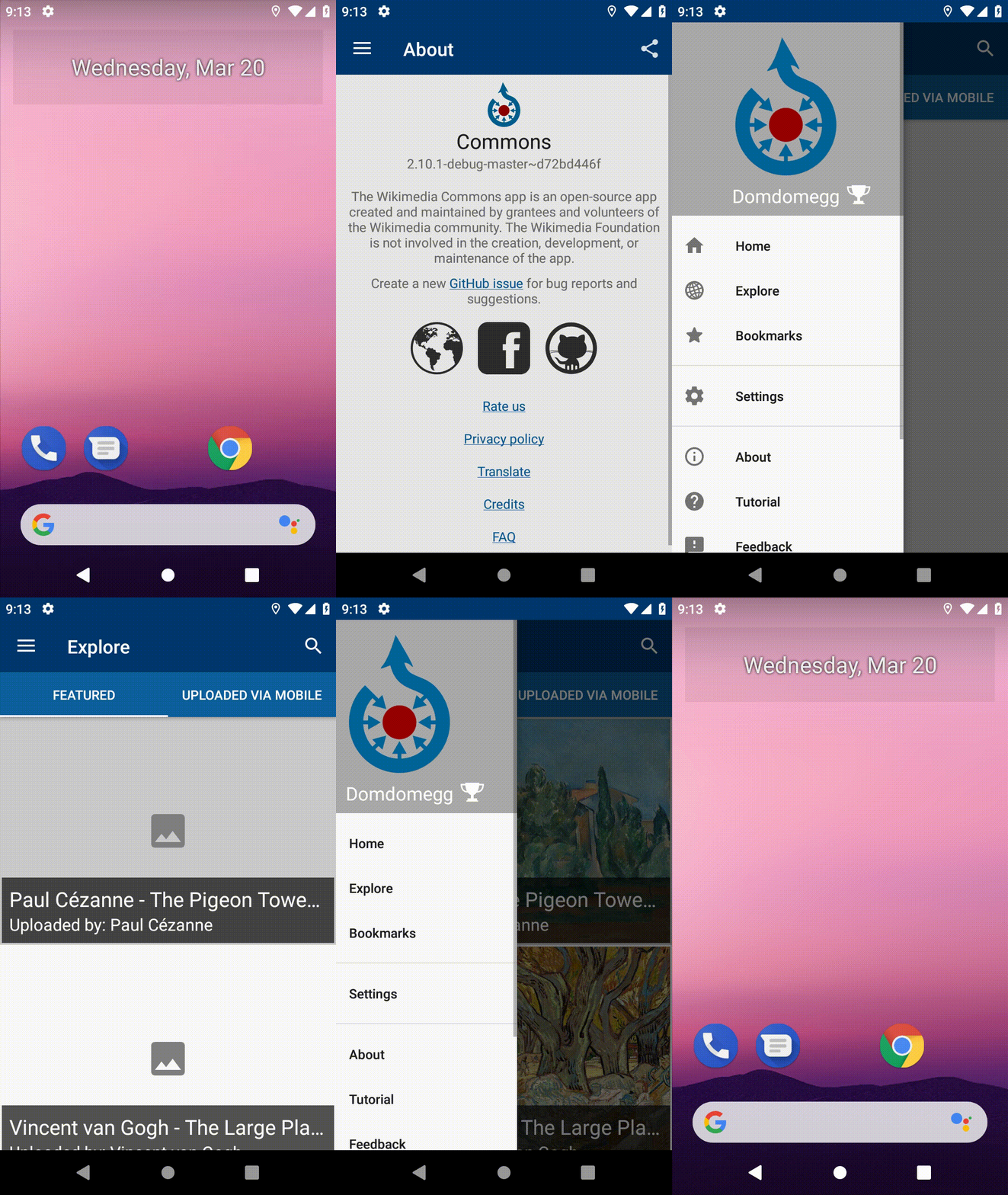 | 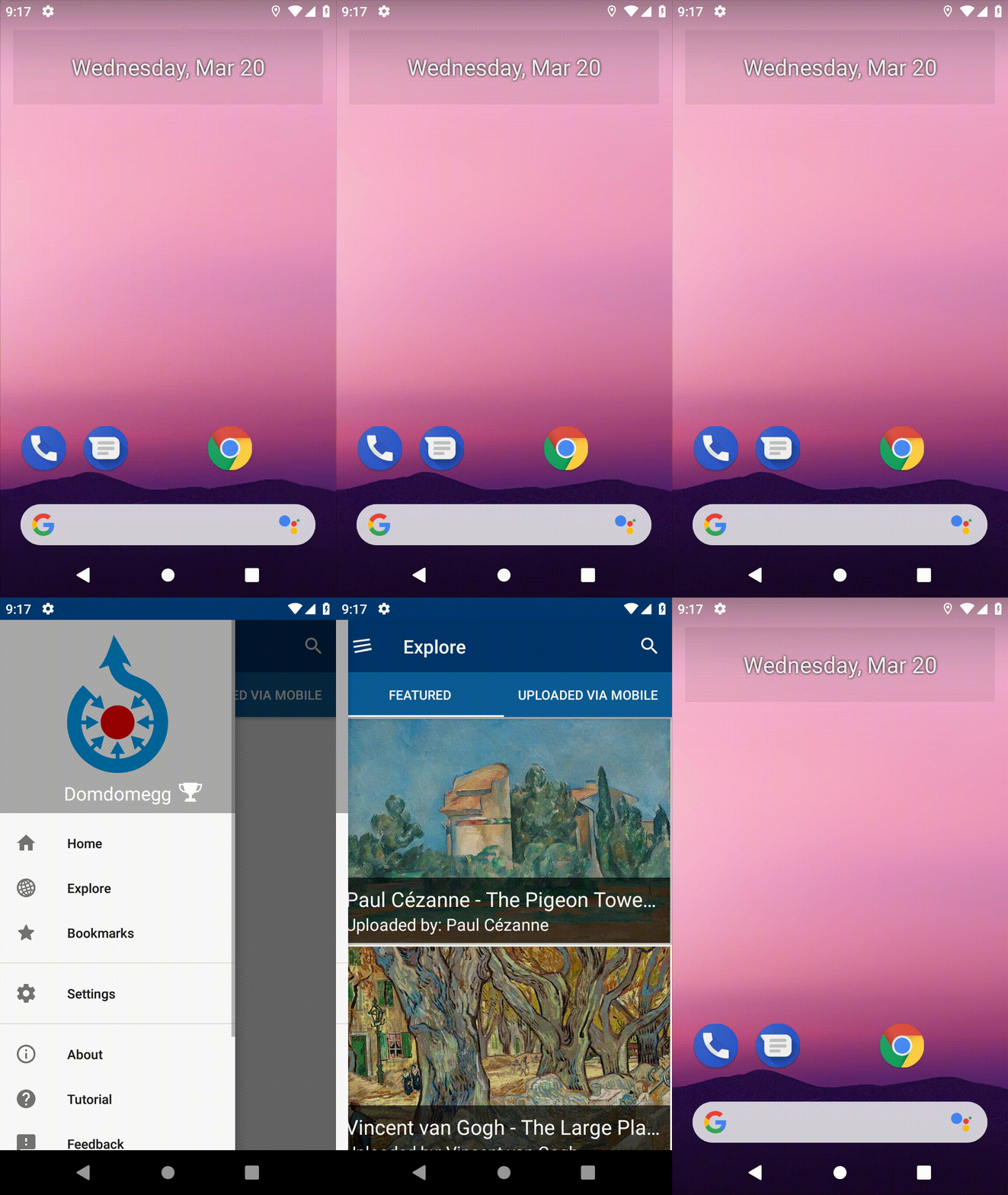 |
### Expected Results
The test should pass
### Actual Results
The test sometimes passes. It's particularly easy to get to fail if you run all of `NavigationBaseActivityTest`, which runs a load of navigating beforehand. No idea why this would be the case.
It fails complaining that the NavigationView is not visible enough. Here's a stacktrace:
```
androidx.test.espresso.PerformException: Error performing 'click on menu item with id' on view 'with id: fr.free.nrw.commons.beta:id/navigation_view'.
at androidx.test.espresso.PerformException$Builder.build(PerformException.java:84)
at androidx.test.espresso.base.DefaultFailureHandler.getUserFriendlyError(DefaultFailureHandler.java:85)
at androidx.test.espresso.base.DefaultFailureHandler.handle(DefaultFailureHandler.java:57)
at androidx.test.espresso.ViewInteraction.waitForAndHandleInteractionResults(ViewInteraction.java:316)
at androidx.test.espresso.ViewInteraction.desugaredPerform(ViewInteraction.java:177)
at androidx.test.espresso.ViewInteraction.perform(ViewInteraction.java:118)
at fr.free.nrw.commons.NavigationBaseActivityTest.openNavigationDrawerAndNavigateTo(NavigationBaseActivityTest.java:62)
at fr.free.nrw.commons.NavigationBaseActivityTest.doubleNavigateToExploreThenReturnHome(NavigationBaseActivityTest.java:57)
at java.lang.reflect.Method.invoke(Native Method)
at org.junit.runners.model.FrameworkMethod$1.runReflectiveCall(FrameworkMethod.java:50)
at org.junit.internal.runners.model.ReflectiveCallable.run(ReflectiveCallable.java:12)
at org.junit.runners.model.FrameworkMethod.invokeExplosively(FrameworkMethod.java:47)
at org.junit.internal.runners.statements.InvokeMethod.evaluate(InvokeMethod.java:17)
at androidx.test.rule.ActivityTestRule$ActivityStatement.evaluate(ActivityTestRule.java:531)
at org.junit.rules.RunRules.evaluate(RunRules.java:20)
at org.junit.runners.ParentRunner.runLeaf(ParentRunner.java:325)
at org.junit.runners.BlockJUnit4ClassRunner.runChild(BlockJUnit4ClassRunner.java:78)
at org.junit.runners.BlockJUnit4ClassRunner.runChild(BlockJUnit4ClassRunner.java:57)
at org.junit.runners.ParentRunner$3.run(ParentRunner.java:290)
at org.junit.runners.ParentRunner$1.schedule(ParentRunner.java:71)
at org.junit.runners.ParentRunner.runChildren(ParentRunner.java:288)
at org.junit.runners.ParentRunner.access$000(ParentRunner.java:58)
at org.junit.runners.ParentRunner$2.evaluate(ParentRunner.java:268)
at org.junit.runners.ParentRunner.run(ParentRunner.java:363)
at androidx.test.runner.AndroidJUnit4.run(AndroidJUnit4.java:104)
at org.junit.runners.Suite.runChild(Suite.java:128)
at org.junit.runners.Suite.runChild(Suite.java:27)
at org.junit.runners.ParentRunner$3.run(ParentRunner.java:290)
at org.junit.runners.ParentRunner$1.schedule(ParentRunner.java:71)
at org.junit.runners.ParentRunner.runChildren(ParentRunner.java:288)
at org.junit.runners.ParentRunner.access$000(ParentRunner.java:58)
at org.junit.runners.ParentRunner$2.evaluate(ParentRunner.java:268)
at org.junit.runners.ParentRunner.run(ParentRunner.java:363)
at org.junit.runner.JUnitCore.run(JUnitCore.java:137)
at org.junit.runner.JUnitCore.run(JUnitCore.java:115)
at androidx.test.internal.runner.TestExecutor.execute(TestExecutor.java:56)
at androidx.test.runner.AndroidJUnitRunner.onStart(AndroidJUnitRunner.java:388)
at android.app.Instrumentation$InstrumentationThread.run(Instrumentation.java:2145)
Caused by: java.lang.RuntimeException: Action will not be performed because the target view does not match one or more of the following constraints:
(is assignable from class: class com.google.android.material.navigation.NavigationView and view has effective visibility=VISIBLE and at least 90 percent of the view's area is displayed to the user.)
Target view: "NavigationView{id=2131296630, res-name=navigation_view, visibility=VISIBLE, width=504, height=1136, has-focus=false, has-focusable=true, has-window-focus=true, is-clickable=false, is-enabled=true, is-focused=false, is-focusable=false, is-layout-requested=false, is-selected=false, layout-params=androidx.drawerlayout.widget.DrawerLayout$LayoutParams@688571b, tag=null, root-is-layout-requested=false, has-input-connection=false, x=-503.0, y=0.0, child-count=1}"
at androidx.test.espresso.ViewInteraction.doPerform(ViewInteraction.java:248)
at androidx.test.espresso.ViewInteraction.access$100(ViewInteraction.java:64)
at androidx.test.espresso.ViewInteraction$1.call(ViewInteraction.java:157)
at androidx.test.espresso.ViewInteraction$1.call(ViewInteraction.java:154)
at java.util.concurrent.FutureTask.run(FutureTask.java:266)
at android.os.Handler.handleCallback(Handler.java:873)
at android.os.Handler.dispatchMessage(Handler.java:99)
at android.os.Looper.loop(Looper.java:193)
at android.app.ActivityThread.main(ActivityThread.java:6669)
at java.lang.reflect.Method.invoke(Native Method)
at com.android.internal.os.RuntimeInit$MethodAndArgsCaller.run(RuntimeInit.java:493)
at com.android.internal.os.ZygoteInit.main(ZygoteInit.java:858)
```
Here's another stacktrace - this is the one from the failure GIF
```
androidx.test.espresso.PerformException: Error performing 'click on menu item with id' on view 'with id: fr.free.nrw.commons.beta:id/navigation_view'.
at androidx.test.espresso.PerformException$Builder.build(PerformException.java:84)
at androidx.test.espresso.base.DefaultFailureHandler.getUserFriendlyError(DefaultFailureHandler.java:85)
at androidx.test.espresso.base.DefaultFailureHandler.handle(DefaultFailureHandler.java:57)
at androidx.test.espresso.ViewInteraction.waitForAndHandleInteractionResults(ViewInteraction.java:316)
at androidx.test.espresso.ViewInteraction.desugaredPerform(ViewInteraction.java:177)
at androidx.test.espresso.ViewInteraction.perform(ViewInteraction.java:118)
at fr.free.nrw.commons.NavigationBaseActivityTest.openNavigationDrawerAndNavigateTo(NavigationBaseActivityTest.java:62)
at fr.free.nrw.commons.NavigationBaseActivityTest.doubleNavigateToExploreThenReturnHome(NavigationBaseActivityTest.java:57)
at java.lang.reflect.Method.invoke(Native Method)
at org.junit.runners.model.FrameworkMethod$1.runReflectiveCall(FrameworkMethod.java:50)
at org.junit.internal.runners.model.ReflectiveCallable.run(ReflectiveCallable.java:12)
at org.junit.runners.model.FrameworkMethod.invokeExplosively(FrameworkMethod.java:47)
at org.junit.internal.runners.statements.InvokeMethod.evaluate(InvokeMethod.java:17)
at androidx.test.rule.ActivityTestRule$ActivityStatement.evaluate(ActivityTestRule.java:531)
at org.junit.rules.RunRules.evaluate(RunRules.java:20)
at org.junit.runners.ParentRunner.runLeaf(ParentRunner.java:325)
at org.junit.runners.BlockJUnit4ClassRunner.runChild(BlockJUnit4ClassRunner.java:78)
at org.junit.runners.BlockJUnit4ClassRunner.runChild(BlockJUnit4ClassRunner.java:57)
at org.junit.runners.ParentRunner$3.run(ParentRunner.java:290)
at org.junit.runners.ParentRunner$1.schedule(ParentRunner.java:71)
at org.junit.runners.ParentRunner.runChildren(ParentRunner.java:288)
at org.junit.runners.ParentRunner.access$000(ParentRunner.java:58)
at org.junit.runners.ParentRunner$2.evaluate(ParentRunner.java:268)
at org.junit.runners.ParentRunner.run(ParentRunner.java:363)
at androidx.test.runner.AndroidJUnit4.run(AndroidJUnit4.java:104)
at org.junit.runners.Suite.runChild(Suite.java:128)
at org.junit.runners.Suite.runChild(Suite.java:27)
at org.junit.runners.ParentRunner$3.run(ParentRunner.java:290)
at org.junit.runners.ParentRunner$1.schedule(ParentRunner.java:71)
at org.junit.runners.ParentRunner.runChildren(ParentRunner.java:288)
at org.junit.runners.ParentRunner.access$000(ParentRunner.java:58)
at org.junit.runners.ParentRunner$2.evaluate(ParentRunner.java:268)
at org.junit.runners.ParentRunner.run(ParentRunner.java:363)
at org.junit.runner.JUnitCore.run(JUnitCore.java:137)
at org.junit.runner.JUnitCore.run(JUnitCore.java:115)
at androidx.test.internal.runner.TestExecutor.execute(TestExecutor.java:56)
at androidx.test.runner.AndroidJUnitRunner.onStart(AndroidJUnitRunner.java:388)
at android.app.Instrumentation$InstrumentationThread.run(Instrumentation.java:2145)
Caused by: java.lang.RuntimeException: Action will not be performed because the target view does not match one or more of the following constraints:
(is assignable from class: class com.google.android.material.navigation.NavigationView and view has effective visibility=VISIBLE and at least 90 percent of the view's area is displayed to the user.)
Target view: "NavigationView{id=2131296630, res-name=navigation_view, visibility=VISIBLE, width=504, height=1136, has-focus=false, has-focusable=true, has-window-focus=true, is-clickable=false, is-enabled=true, is-focused=false, is-focusable=false, is-layout-requested=false, is-selected=false, layout-params=androidx.drawerlayout.widget.DrawerLayout$LayoutParams@a87d46c, tag=null, root-is-layout-requested=false, has-input-connection=false, x=-503.0, y=0.0, child-count=1}"
at androidx.test.espresso.ViewInteraction.doPerform(ViewInteraction.java:248)
at androidx.test.espresso.ViewInteraction.access$100(ViewInteraction.java:64)
at androidx.test.espresso.ViewInteraction$1.call(ViewInteraction.java:157)
at androidx.test.espresso.ViewInteraction$1.call(ViewInteraction.java:154)
at java.util.concurrent.FutureTask.run(FutureTask.java:266)
at android.os.Handler.handleCallback(Handler.java:873)
at android.os.Handler.dispatchMessage(Handler.java:99)
at android.os.Looper.loop(Looper.java:193)
at android.app.ActivityThread.main(ActivityThread.java:6669)
at java.lang.reflect.Method.invoke(Native Method)
at com.android.internal.os.RuntimeInit$MethodAndArgsCaller.run(RuntimeInit.java:493)
at com.android.internal.os.ZygoteInit.main(ZygoteInit.java:858)
```
### AndroidX Test and Android OS Versions
Extract from [`build.gradle`](https://github.com/commons-app/apps-android-commons/blob/fc7399cae784ba1820da96874a4d01734db98db5/app/build.gradle):
```
androidTestImplementation 'androidx.test.espresso:espresso-core:3.1.1'
androidTestImplementation 'androidx.test.espresso:espresso-intents:3.1.1'
androidTestImplementation 'androidx.test.espresso:espresso-contrib:3.1.1'
androidTestImplementation 'androidx.test:runner:1.1.1'
androidTestImplementation 'androidx.test:rules:1.1.1'
```
API level 28, emulator config:
```
Name: Galaxy_Nexus_API_28_no_animations_
CPU/ABI: Google APIs Intel Atom (x86)
Path: /home/adam/.android/avd/Galaxy_Nexus_API_28_no_animations_.avd
Target: google_apis [Google APIs] (API level 28)
Skin: 720x1280
SD Card: 512 MB
fastboot.chosenSnapshotFile:
runtime.network.speed: full
hw.accelerometer: yes
hw.device.name: Galaxy Nexus
hw.lcd.width: 720
hw.initialOrientation: Portrait
image.androidVersion.api: 28
tag.id: google_apis
hw.mainKeys: no
hw.camera.front: emulated
avd.ini.displayname: Galaxy Nexus API 28 (no animations)
hw.gpu.mode: auto
hw.ramSize: 1024
PlayStore.enabled: false
fastboot.forceColdBoot: no
hw.cpu.ncore: 4
hw.keyboard: yes
hw.sensors.proximity: yes
hw.dPad: no
hw.lcd.height: 1280
vm.heapSize: 80
skin.dynamic: yes
hw.device.manufacturer: Google
hw.gps: yes
skin.path.backup: _no_skin
hw.audioInput: yes
image.sysdir.1: system-images/android-28/google_apis/x86/
showDeviceFrame: no
hw.camera.back: virtualscene
AvdId: Galaxy_Nexus_API_28_no_animations_
hw.lcd.density: 320
hw.arc: false
hw.device.hash2: MD5:fcb1c44f60d9172bb27b44fdd821eed1
fastboot.forceChosenSnapshotBoot: no
fastboot.forceFastBoot: yes
hw.trackBall: no
hw.battery: yes
hw.sdCard: yes
tag.display: Google APIs
runtime.network.latency: none
disk.dataPartition.size: 2G
hw.sensors.orientation: yes
avd.ini.encoding: UTF-8
hw.gpu.enabled: yes
```
### Link to a public git repo demonstrating the problem:
`doubleNavigateToExploreThenReturnHome()` in:
https://github.com/commons-app/apps-android-commons/blob/fc7399cae784ba1820da96874a4d01734db98db5/app/src/androidTest/java/fr/free/nrw/commons/NavigationBaseActivityTest.java
Steps to reproduce:
- Clone the repo, and open it in Android Studio
- **Disable Instant Run** (unrelated issue)
- Run `NavigationBaseActivityTest` a few times (on my machine it fails ~70% of the time when running all of `NavigationBaseActivityTest`, and ~20% of the time running just `doubleNavigateToExploreThenReturnHome`)
Guida per i contributori
Apri la guida per i contributori
Direzione di ricerca
Inizia da NavigationBaseActivityTest.java, in particolare da openNavigationDrawerAndNavigateTo alla riga 62 e da doubleNavigateToExploreThenReturnHome alla riga 57. Riproduci la sequenza sull’emulatore API 28 utilizzando le dipendenze AndroidX Test elencate, quindi esamina il vincolo di visibilità di NavigationView e lo stato del drawer tra i vari passaggi. Il lavoro è completato quando il test di navigazione supera la verifica in modo consistente dopo ripetute navigazioni.
Scritto dal modello di indicizzazione a partire dal testo della issue.
Valutazione
- Stack tecnologico
- java
- Ambito
- testing-qa
- Tipo di issue
- Bug
- Difficoltà
- 4/5
- Tempo stimato
- 3-5 giorni
- Stato di attività
- Ferma
- Chiarezza
- Da chiarire
- Idoneità per principianti
- 35/100