Change how damage is drawn on the canvas
- 主要言語
- C#
- スター
- 1
- フォーク
- 1
- PR マージ指標
- 30日以内にマージされた PR はありません
説明
Instead of using the timeout function to only sometimes display the damage text, we should instead draw it every frame.
Scrap the old code in the canvas for how damage text is shown.
Instead, create a new list that contains dmg txt "instructions".
Whenever a target is damaged, a new instruction will be added to the list of instructions.
A instruction should contain, the damage number, the target (monster/player), and the _animation_.
The _animation_ is a list of coordinates for which the text must follow. For every frame, the text must take the next coordinate from the animation. The instruction should be removed from the list of instructions when no more coordinates are left.
Example instruction list:
[
{"dmg": "12", "target": "active_monster", "animation_list": [(10,-18), (11, -20), ....]},
{"dmg": "9", "target": "active_monster", "animation_list": [(27,-1), (25, 0), ....]},
{"dmg": "9", "target": "player", "animation_list": [(10,10), (10, 8), ....]},
]
We should either have an additional animation- counter/index field in the instruction that dictates which coordinate to use next, or maybe pop the list to get the front on. Whatever is the easiest to do.
Every frame, the canvas must add a text object for every damage instruction in the instructions list.
This allows us to have multiple damage texts on the canvas at once.
The animation should do an arc like this
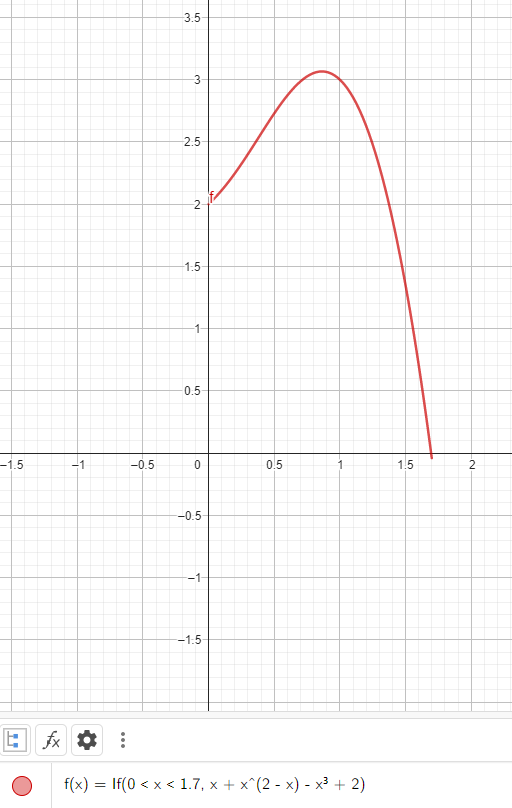
Formula: f(x)=x+x(2-x)-x3+2 WHERE 0
コントリビューションガイド
このリポジトリのコントリビューションガイドは索引されていません
評価
この issue はまだ評価されていません。