Option to hide/disable dividers across the application
- 主要語言
- TypeScript
- 星號
- 1.8k
- 分支
- 174
- 平均合併
- 2 小時 32 分鐘
- 30 天內合併 PR
- 28
描述
**Feature request:**
I generally highly dislike the high contrast harsh dividers across the application (some examples in the screenshots bellow, but I mean all of them).
An **option** to hide them and generally move to a flatter presentation would be very much appreciated.
Since I understand the porpose they serve, for clarity, this should be an optional feature – In my case they just end up looking unnecessary and out of place, and inconsistent at places where the dividers don't span across the entire horizontal space of the elements, etc.
The application is completely usable without them and and looks more modern, it already looks great but these dividers just don't seem to fit when I see at them. That has been my only issue with the general application, which I've been following for over 6 months but I've decided to make a formal issue about it now after other more relevant features were added, to see what can be done.
I will add that I don't mean to come across negatively. I'm just a person triggered by high contrast dividers. Cheers!
**Goal:**
Option to disable/hide/make transparent all dividers in the application while maintaining the current spacing.
**Screenshots with some examples:**
[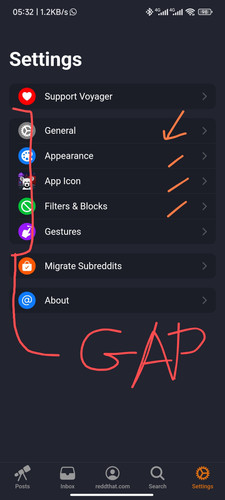](https://freeimage.host/i/JPP2xLu)
[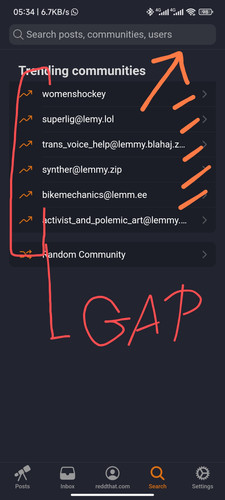](https://freeimage.host/i/JPP2Iqb)
[](https://freeimage.host/i/JPP2T1j)
[](https://freeimage.host/i/JPP2urx)
[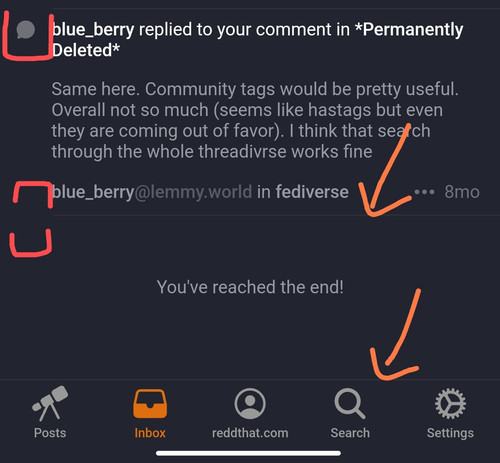](https://freeimage.host/i/JPP2RdQ)
[](https://freeimage.host/i/JPPYtb1)
[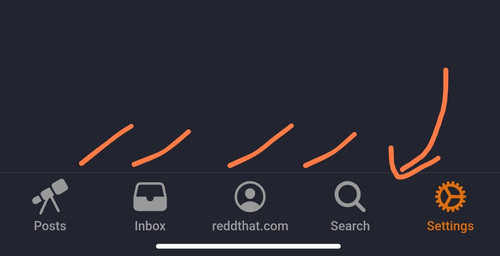](https://freeimage.host/i/JPPYQ5B)
貢獻指南
評估
這個 Issue 還沒有評估資料。