a-b-street / a-b-street/abstreet
Support textures on WebGL 1.0
- Linguagem predominante
- Rust
- Estrelas
- 8.2k
- Forks
- 380
- Métricas de merge de PRs
- Nenhum PR com merge em 30d
Descrição
Unlike our other backends, Widgetry's WebGL 1.0 backend does not support textures.
Until #504, Widgetry apps in the browser required WebGL 2.0, and thus widgetry would not load at all in an iOS browser (or desktop Safari) unless the user enabled the "Experimental: WebGL 2.0" option in their browser configuration.
Though there are benefits to our users being on WebGL 2.0, we want the app to basically work for users on these platforms by default. To that end, with #504, there is a WebGL 1.0 backend which we fall back to whenever a WebGL 2.0 context cannot be constructed. So things will now load for these users.
Before that, when I was originally adding texture support back in #333, #335 I relied on some more modern GLSL features which ended up not being available in WebGL 1.0. In particular, `sampler2DArray` is not available in shaders, nor is its corollary `glTexStorage3D` available in the client program.
For now I've simply punted - textures are ignored in our Web GL 1.0 pipeline.
Here's the basic architecture for how textures work on the existing platforms (e.g. WebGL 2.0):
1. All of our textures are of uniform size and stored in a [single sprite sheet](https://github.com/a-b-street/abstreet/blob/master/widgetry/textures/spritesheet.png)
2. Widgetry apps can "paint" a shape with one of those textures using `Fill::Texture(Texture(some_texture_id))`. The texture is repeated/tiled to fill the entire shape. You can see an example in the widgetry demo:
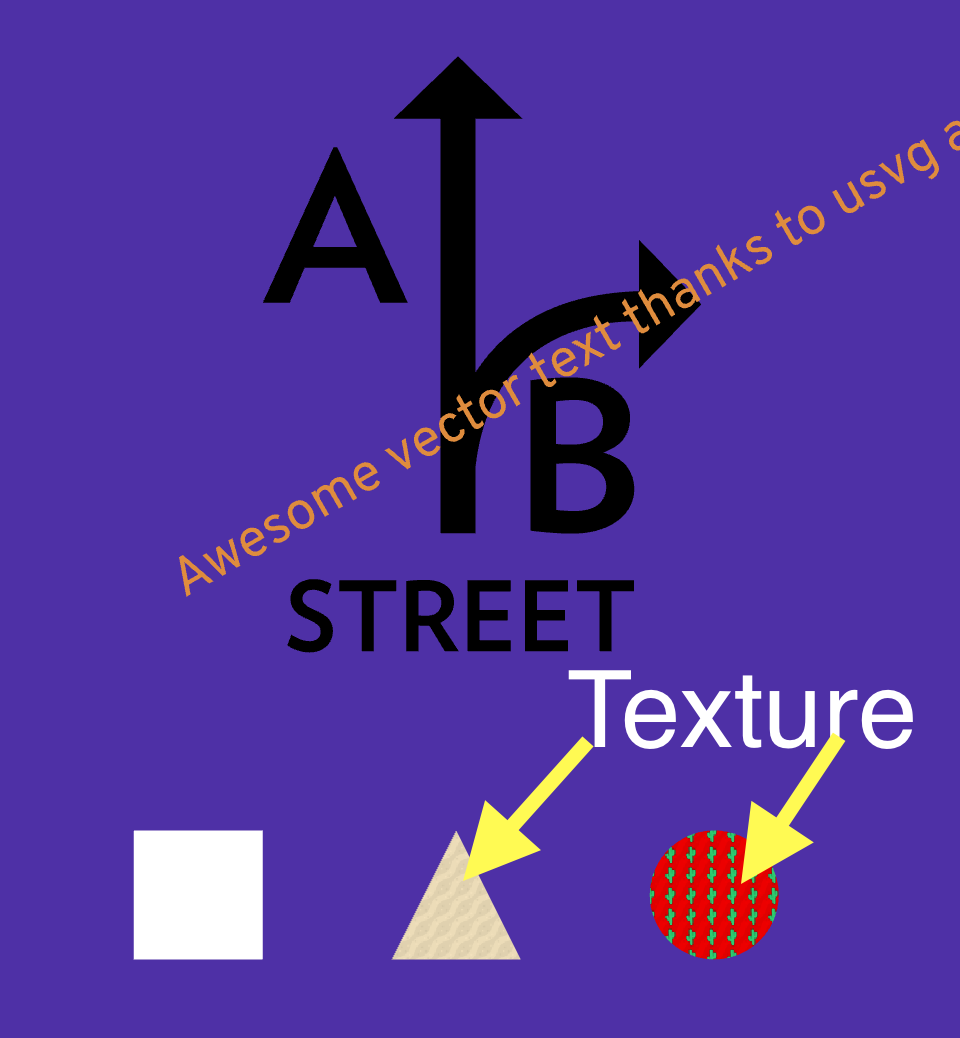
3. The bytes of the spreadsheet are transposed in a particular way, and loaded to graphics card as a single `sampler2DArray`, via `glTextStorage3D`. (It's "3D" storage, because though each sprite is 2D, since we have an **array** of them, it's 3 dimensions all together.)
4. In the fragment shader, a 3 dimensional texture coordinate specifies (1) *which* sprite, and (2,3) the coordinate within that sprite to apply to the pixel. In the event that a shape is a solid color, and *no* texture should be applied, we actually still apply a "no-op" (pure white) texture, just to keep our shader code branchless.
The files/methods likely to be of interest:
1. https://github.com/a-b-street/abstreet/pull/504/files#diff-4fe9ac03b455f13b66ccfd7d025880e2a8c1c3de677086d16c04e5ac90d14f3dR585
Here the WebGL program loader needs to read in and upload the spritesheet to the graphics card, preferably as a single object. There are limits to how many individual textures can be loaded at once (sometimes as few as 8), which is why we went the route of storing everything in a single sprite sheet texture.
2. https://github.com/a-b-street/abstreet/pull/504/files#diff-a8a5cb47db86df4e4faac558aa0137f93875397f21074d3c66c9a3ff62cdfda2
The WebGL 1.0 fragment shader already has a texture coordinate passed to it, referring which sprite_index and the (x, y) within that sprite. We need to use that information to offset into our uploaded textures and apply it to the output color.
And a disclaimer to anyone who takes this on, I know basically nothing about graphics programming. The code that exists was hacked together from tutorials. It's very likely *not* how we should be doing things, so don't be afraid to take a radically different approach if a radically different approach makes more sense.
Guia de contribuição
Nenhum guia de contribuição indexado para este repositório
Avaliação
Esta issue ainda não foi avaliada.