WeblateOrg / WeblateOrg/weblate
Revert buttons are unclear
- Dominant language
- Python
- Stars
- 6.1k
- Forks
- 1.4k
- Avg merge
- 9h 53m
- Merged PRs (30d)
- 395
Description
### Describe the issue
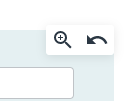
View button and Revert button are too close together. According to the CSS code below, the gap is 4 pixels. So, I sometimes press the wrong button.
`.btn { padding: 2px 2px; }`
The buttons have around 27 pixels.
Also, I'm unaware reverted it because there is no notice. Perhaps others also have done so. To build a cooperative relationship, this mishandling should be prevented.
### I already tried
- [x] I've read and searched [the documentation](https://docs.weblate.org/).
- [x] I've searched for similar issues in this repository.
### Steps to reproduce the behavior
1. Login.
2. This occurs when I am looking at History for all strings or the History tab for each string.
3. In the screenshot below, I try to press the magnifying glass. But I made a mistake and pressed the arrow button. (Or I just press the arrow button.)
### Expected behavior
There is no magnifying glass button when displaying each string. It is self-linked.
**Solution 1** : Confirm as an important action. This would be essential.
* Solution 1a : Dialog "Would you like to revert?". It also indicates which string to return to.
* Or, Solution 1b : Simply copy the text into the translation string field. No automatic saving.
**Solution 2**: Notify : But, this doesn't prevent a wrong press and auto saving.
* Notify that "the string has been reverted". Especially in the case of automatic saving. Otherwise, the user may think pressed "View detail" button. So, does not recognize the occurrence of a problem.
**Solution 3** : Button design : But, this doesn't prevent a wrong press and auto saving.
* Widen the gap between View button and Revert button. The gap should be at least 10 pixels. Or/and, If design changes are possible, This button should be at least 36-42 pixels.
* Or/and, Currently two buttons are placed within one border. Use one border for each button.
* Or/and, Currently the picture changes color when focused. Add to this, the background color will also change when focused.
### Exception traceback
_No response_
### How do you run Weblate?
weblate.org service
### Weblate versions
_No response_
### Weblate deploy checks
_No response_
### Additional context
_No response_
Contributor guide
Assessment
This issue has not been assessed yet.