Fread Fatal Error on Mac Big Sur
Nobody has claimed this yet.
Assessment
- Difficulty
- 4/5
- Estimated time
- 3-5 days
- Newbie friendliness
- 25/100
- Issue type
- Bug
- Clarity
- Needs clarification
- Activity status
- Stale
- Tech stack
- macos, r
- Domain
- data, operating-systems
Research direction
Start with the reported data.table::fread(file = "~/Desktop/mtcars.csv", nThread = 1) invocation and review the supplied session information and MakeVars settings. Reproduce the fatal abort on macOS Big Sur with R 3.6.3, then determine the relevant fread or build entry point. Done means the example completes without aborting in the affected environment.
Written by the indexing model from the issue text.
Description
Hello all,
I am having issues with the fread function in data.table. I am currently using version 1.14.0, though this issue is reproducible on all the versions I have attempted.
The computer in question is a MacBook running Big Sur, and I am using R 3.6.3. There are compiler issues with Big Sur and Clang so I have manually installed GCC, and updated the MakeVars file. I am able to download, and compile the package.
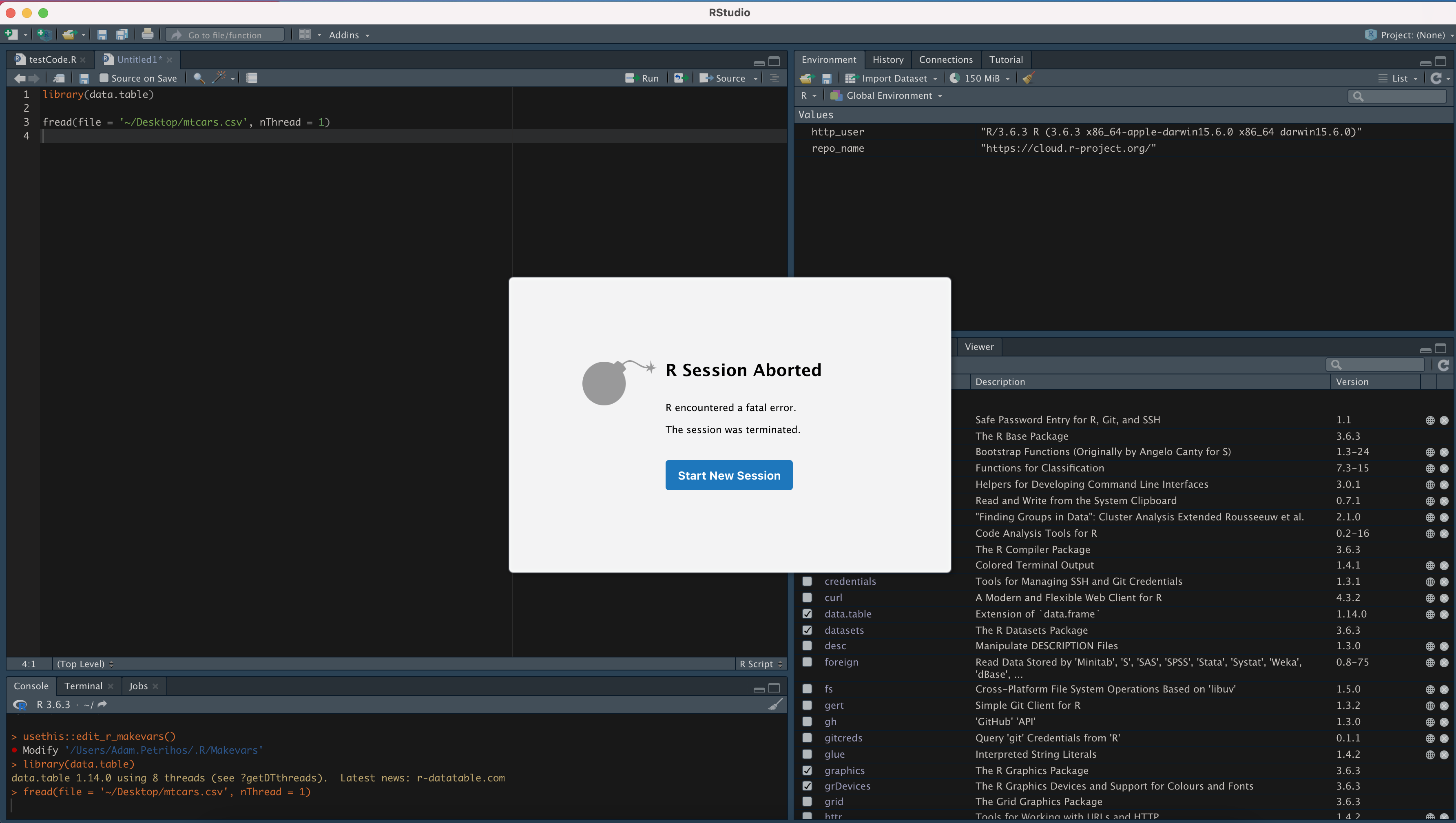
Any attempts to use fread causes the Session to Abort with a fatal error. Find below a copy of my MakeVars file, and an example call that causes the crash.
Start: Example
data.table::fread(file = "~/Desktop/mtcars.csv", nThread = 1)
mtcars.csv
Start: Session Info
R version 3.6.3 (2020-02-29)
Platform: x86_64-apple-darwin15.6.0 (64-bit)
Running under: OS X 11.5.2
Matrix products: default
LAPACK: /Library/Frameworks/R.framework/Versions/3.6/Resources/lib/libRlapack.dylib
locale:
[1] en_US.UTF-8/en_US.UTF-8/en_US.UTF-8/C/en_US.UTF-8/en_US.UTF-8
attached base packages:
[1] stats graphics grDevices utils datasets methods base
other attached packages:
[1] data.table_1.14.0
loaded via a namespace (and not attached):
[1] compiler_3.6.3 tools_3.6.3
Start: MakeVars file
FLIBS = -L/usr/local/gfortran/lib/gcc/x86_64-apple-darwin20/10.2.0 -L/usr/local/gfortran/lib -lgfortran -lquadmath -lm
LOC = /usr/local/gfortran
CXX98 = $(LOC)/bin/g++ -fopenmp
CXX98STD = -std=c++98
CXX14 = $(LOC)/bin/g++ -fopenmp
CXX14STD = -std=c++14
CXX17 = $(LOC)/bin/g++ -fopenmp
CXX20 = $(LOC)/bin/g++ -fopenmp
CXXCPP = $(LOC)/bin/g++ -fopenmp
FC = gfortran
F77 = gfortran
OBJC = gcc
OBJCXX = g++
CC = $(LOC)/bin/gcc -fopenmp
CXX = $(LOC)/bin/g++ -fopenmp
CXXSTD = -std=c++11
CXX11 = $(LOC)/bin/g++ -fopenmp # for fst package
CXX11STD = -std=c++11
CFLAGS = -g -O2 -Wall -pedantic -std=gnu99 -mtune=native -pipe
CXXFLAGS = -g -O2 -Wall -pedantic -std=c++11 -mtune=native -pipe
LDFLAGS=-L$(LOC)/lib -Wl,-rpath,$(LOC)/lib
CPPFLAGS= -fopenmp -I$(LOC)/include -I/Library/Developer/CommandLineTools/SDKs/MacOSX.sdk/usr/include
SHLIB_OPENMP_CFLAGS=-Xpreprocessor -fopenmp
SHLIB_OPENMP_CXXFLAGS=-Xpreprocessor -fopenmp
- Dominant language
- R
- Stars
- 3.9k
- Forks
- 1.1k
- Avg merge
- 14h 4m
- Merged PRs (30d)
- 4
Contributor guide
First steps
- Read the whole issue, then the project's contributing guide.
- Comment on the issue to say you are picking it up — it saves two people doing the same work.
- Fork the repository and make your change on a branch.
- Open a pull request that references the issue number.
More from Rdatatable/data.table
-
as.data.table() recurses without end on a survival::Surv object (or any data.frame carrying one) Open
Difficulty 2/5 1-3 hours Newbie friendliness 88/100
Rdatatable/data.table#7887 ·
-
consistency tests
Difficulty 2/5 1-3 hours Newbie friendliness 68/100
Rdatatable/data.table#7853 · 3 comments ·
-
internals
Difficulty 2/5 1-3 hours Newbie friendliness 65/100
Rdatatable/data.table#6938 · 1 comment ·
-
encoding fread
Difficulty 2/5 1-3 hours Newbie friendliness 65/100
Rdatatable/data.table#5179 · 8 comments ·
-
documentation programming
Difficulty 2/5 1-3 hours Newbie friendliness 68/100
Rdatatable/data.table#3199 · 3 comments ·
All issues in Rdatatable/data.table
Similar issues
-
Difficulty 2/5 1-3 hours Newbie friendliness 82/100
r-lib/pkgdepends#485 · 3 comments ·
-
Difficulty 1/5 Under an hour Newbie friendliness 92/100
-
beginners blocker
Difficulty 2/5 1-3 hours Newbie friendliness 78/100
-
enviPathR OpenBuild Error Build OK Build Warning policies-accepted pre-review precheck-passed
Difficulty 1/5 Under an hour Newbie friendliness 84/100
Bioconductor/BiocContributions#207 · 6 comments ·
-
Difficulty 2/5 1-3 hours Newbie friendliness 74/100
datacarpentry/semester-biology#1255 ·