PointCloudLibrary / PointCloudLibrary/pcl
pcl_visualizer and qvtkwidget are not in the same window (The bug are different on windows and linux)
Nobody has claimed this yet.
- Dominant language
- C++
- Stars
- 11.1k
- Forks
- 4.7k
- Avg merge
- 4d 10h
- Merged PRs (30d)
- 6
Description
Hi all :
I have wrote a Qt application which use Qvtkwidget and pcl_visualizer , I use Qvtk to shown on qt application and I use pcl_visualizer's render to replace qvtk , so I can display pointcloud by pcl_visualizer and show it on Qt application , and I wrote a custom mouse interactor style for catch mouse event for some feasures , all things go right on windows ,Now I want wrote a cross platform qt application code ,but when I use same code on linux platform ,the wrong happened:
Here is the code on Windows platform(a easy version) :
MainWindow::MainWindow(QWidget *parent)
    : QMainWindow(parent)
    , ui(new Ui::MainWindow)
{
    ui->setupUi(this);
    _mapCloud.reset(new PointCloudT);
    _carCloud.reset(new PointCloudT);
    _viewer.reset(new pcl::visualization::PCLVisualizer ("viewer", false));
    _renderWindowInteractor=
            vtkSmartPointer<vtkRenderWindowInteractor>::New();
    _style = vtkSmartPointer<customMouseInteractorStyle>::New();

    ui->qvtkWidget->SetRenderWindow(_viewer->getRenderWindow());
    _viewer->setupInteractor(ui->qvtkWidget->GetInteractor(),ui->qvtkWidget->GetRenderWindow());
    pcl::io::loadPCDFile("../car_1m_normal.pcd",*_carCloud);
    ui->qvtkWidget->update();
    _viewer->addPointCloud(_carCloud,"car");
    _renderWindowInteractor->SetRenderWindow(_viewer->getRenderWindow());
    _style->renderer=_viewer->getRenderWindow()->GetRenderers()->GetFirstRenderer();
    _renderWindowInteractor->SetInteractorStyle( _style );
    _renderWindowInteractor->Initialize();

}
and the result is below:

Here is the code on Linux platform:
void Rk_GuiTool::init()
{

    //Reset Ptr
    _mapCloud.reset(new PointCloudT());
    _carCloud.reset(new PointCloudT());
    _viewer.reset(new pcl::visualization::PCLVisualizer("Rk-Robot",false));
    _renderwindowInteractor=vtkSmartPointer<vtkRenderWindowInteractor>::New();
    _style=vtkSmartPointer<customMouseInteractorStyle>::New();


    //Show digital
    ui->lineEdit->setText((std::to_string(_v_Max)).data());
    ui->lineEdit_2->setText((std::to_string(_map_ID)).data());


    std::fstream test(_configs[4]);
    if(test){
        pcl::io::loadPCDFile(_configs[4],*_mapCloud);
        pcl::io::loadPCDFile("../car_1m_normal.pcd",*_carCloud);
    }else{
        std::cerr<<"Config error ! No such file :"<<_configs[4]<<std::endl;
    }
    test.close();

    //Set Thread and function
    _thread=std::make_shared<Mythread>(_configs[0],std::atoi(_configs[1].c_str()));
    _thread->setFunc_rk_Turn0(std::bind(&Rk_GuiTool::setCommond0,this));
    _thread->setFunc_rk_Turn1(std::bind(&Rk_GuiTool::setCommond1,this));
    _thread->setFunc_dealWithData(std::bind(&Rk_GuiTool::dealWithData,this,std::placeholders::_1));
    _thread->start();


    //Pcl_viewer part
    ui->qvtkWidget->SetRenderWindow(_viewer->getRenderWindow());
    _viewer->setupInteractor(ui->qvtkWidget->GetInteractor(),ui->qvtkWidget->GetRenderWindow());
    //_viewer->setupInteractor(_renderwindowInteractor,ui->qvtkWidget->GetRenderWindow());
    ui->qvtkWidget->update();

    //_renderwindowInteractor->SetRenderWindow(ui->qvtkWidget->GetRenderWindow());


    //Set Custom Interactor Style
    _style->setsendCarGoalSignalCallBackfunc(std::bind(
            &Rk_GuiTool::sendCarGoal,this,std::placeholders::_1,
            std::placeholders::_2));
    _style->setsendCarPoseInitSignalCallBackfunc(std::bind(
            &Rk_GuiTool::sendCarPoseInit,this,std::placeholders::_1,
            std::placeholders::_2,std::placeholders::_3,std::placeholders::_4));

    //Set Render Window Interacotr
    _renderwindowInteractor->SetRenderWindow(ui->qvtkWidget->GetRenderWindow());
    //_renderwindowInteractor->SetRenderWindow(_viewer->getRenderWindow());
    _style->renderer=_viewer->getRenderWindow()->GetRenderers()->GetFirstRenderer();
    _renderwindowInteractor->SetInteractorStyle(_style);
    _renderwindowInteractor->Initialize();


    pcl::visualization::PointCloudColorHandlerCustom<PointT> mapHandle(_mapCloud,0,255,0);
    _viewer->addPointCloud(_mapCloud,mapHandle,"Map");
    pcl::visualization::PointCloudColorHandlerCustom<PointT> carHandle(_mapCloud,255,255,0);
    _viewer->addPointCloud(_carCloud,carHandle,"Car");
    _viewer->addCoordinateSystem(5.0);
    _viewer->resetCamera();
    ui->qvtkWidget->update();
    //Set QvtkWidget
}
And
and the result is below:
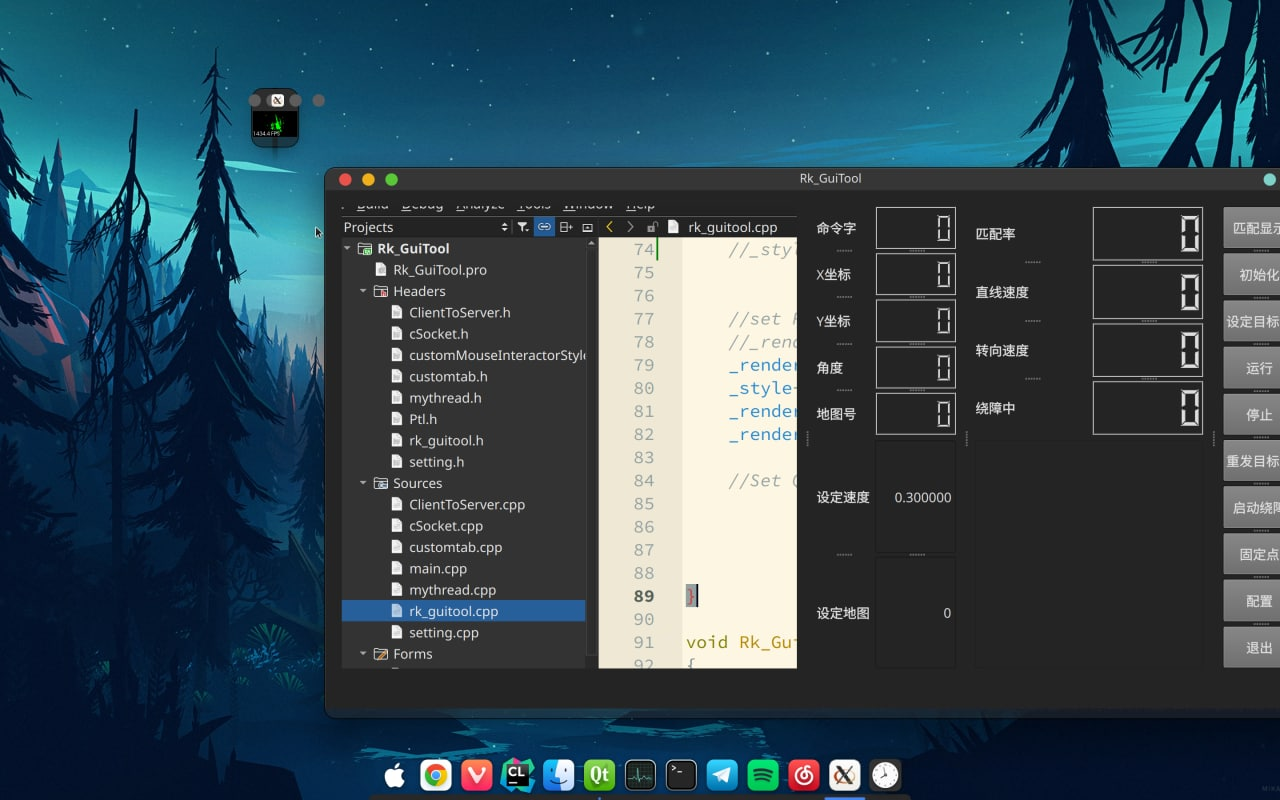
So , any one if have any idea , I will very appreciate that , Thanks every one !
Contributor guide
First steps
- Read the whole issue, then the project's contributing guide.
- Comment on the issue to say you are picking it up — it saves two people doing the same work.
- Fork the repository and make your change on a branch.
- Open a pull request that references the issue number.
Research direction
Start by reproducing the Linux behavior from Rk_GuiTool::init() and compare it with the Windows MainWindow constructor, focusing on qvtkWidget, PCLVisualizer, and vtkRenderWindowInteractor setup. Confirm what causes the render window and widget to appear separately on Linux, then verify that the point cloud and custom mouse interactor remain embedded in the same window on both platforms.
Written by the indexing model from the issue text.
Assessment
- Tech stack
- cpp
- Domain
- computer-vision, desktop
- Issue type
- Bug
- Difficulty
- 4/5
- Estimated time
- 3-5 days
- Activity status
- Stale
- Clarity
- Needs clarification
- Newbie friendliness
- 20/100