MaterialDesignInXAML / MaterialDesignInXAML/MaterialDesignInXamlToolkit
Hide Decoration, Underline in other controls.
Nobody has claimed this yet.
- Dominant language
- C#
- Stars
- 16.3k
- Forks
- 3.5k
- Avg merge
- 1d 22h
- Merged PRs (30d)
- 8
Description
This is related to Hide underline in textbox #212
Is it possible to implement same/similar solution for combobox and datepicker.
Im adding them into color zone (find it easier and better looking that working with borders etc. The problem is that underline is messing with the looks :)
I Hoped that : materialDesign:TextFieldAssist.DecorationVisibility="Hidden" would work, unfortunately it didn't :)
                <materialDesign:ColorZone   CornerRadius="10"
                                            BorderThickness="1"
                                            Margin="0 10 0 0"
                                            Padding="8 5"
                                            Effect="{StaticResource MaterialDesignShadowDepth1}">
                    <DatePicker SelectedDate="{Binding SelectedPerson.ToDate}"
                                DisplayDateStart="{Binding LowestDate}"
                                DisplayDateEnd="{Binding HighestDate}"
                                materialDesign:TextFieldAssist.DecorationVisibility="Hidden"
                                Width="150"
                                materialDesign:HintAssist.Hint="From Date">
                    </DatePicker>
                </materialDesign:ColorZone>
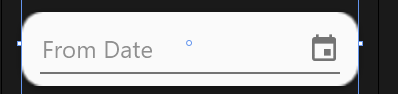
For now i have below work around:
                    <StackPanel Orientation="Horizontal">
                        <TextBox    Text="{Binding SelectedPerson.FromDate, StringFormat=d, Mode=TwoWay, UpdateSourceTrigger=PropertyChanged}"
                                    BorderBrush="{x:Null}"
                                    IsReadOnly="True"
                                    VerticalAlignment="Center"
                                    materialDesign:HintAssist.Hint="From date"
                                    materialDesign:TextFieldAssist.DecorationVisibility="Collapsed"
                                    materialDesign:TextFieldAssist.HasClearButton="True"
                                    Width="140"/>
                        <Button Margin="0 0 0 0"
                                Style="{StaticResource MaterialDesignToolButton}"
                                Content="{materialDesign:PackIcon Kind=Calendar}"
                                Command="{x:Static materialDesign:DialogHost.OpenDialogCommand}">
                            <Button.CommandParameter>
                                <Grid Background="{x:Null}">
                                    <Grid.RowDefinitions>
                                        <RowDefinition Height="Auto" />
                                        <RowDefinition Height="Auto" />
                                    </Grid.RowDefinitions>
                                    <Calendar   Margin="0 -10 0 10"
                                                SelectedDate="{Binding SelectedPerson.FromDate, UpdateSourceTrigger=PropertyChanged, ValidatesOnExceptions=True}"/>
                                    <StackPanel Grid.Row="1"
                                                Margin="8"
                                                HorizontalAlignment="Right"
                                                Orientation="Horizontal">
                                        <Button Style="{StaticResource MaterialDesignFlatButton}"
                                                Command="{x:Static materialDesign:DialogHost.CloseDialogCommand}"
                                                Panel.ZIndex="1"
                                                CommandParameter="1"
                                                Content="OK"/>
                                    </StackPanel>
                                </Grid>
                            </Button.CommandParameter>
                        </Button>
                    </StackPanel>

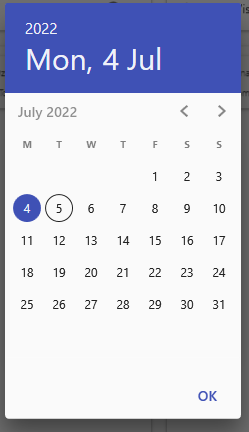
But i have to set the calendar margin to Margin="0 -10 0 10" otherwise it's misaligned, but it shows for a split second during opening.
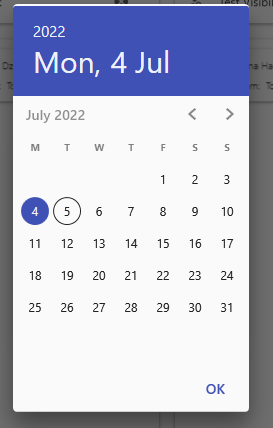
When margin is dropped.
Contributor guide
First steps
- Read the whole issue, then the project's contributing guide.
- Comment on the issue to say you are picking it up — it saves two people doing the same work.
- Fork the repository and make your change on a branch.
- Open a pull request that references the issue number.
Research direction
Start with the DatePicker and ComboBox controls and the TextFieldAssist.DecorationVisibility entry point, comparing their behavior with the textbox solution referenced in issue #212. Reproduce the ColorZone example and check underline visibility, opening alignment, and the attached workaround. Done means both controls support hiding the decoration without the workaround or transient misalignment.
Written by the indexing model from the issue text.
Assessment
- Tech stack
- csharp
- Domain
- design, desktop
- Issue type
- Feature
- Difficulty
- 4/5
- Estimated time
- 3-5 days
- Activity status
- Stale
- Clarity
- Mostly clear
- Newbie friendliness
- 35/100