MaterialDesignInXAML / MaterialDesignInXAML/MaterialDesignInXamlToolkit
ValidationAssist.PopupPlacement does not work as expected
Nobody has claimed this yet.
- Dominant language
- C#
- Stars
- 16.3k
- Forks
- 3.5k
- Avg merge
- 1d 22h
- Merged PRs (30d)
- 8
Description
I have the following in my Xaml:
<TextBox x:Name="FirstName"
         Grid.Row="0"
         Grid.Column="2"
         Width="300"
         HorizontalAlignment="Left"
         VerticalAlignment="Center"
         md:ValidationAssist.PopupPlacement="Right"
         md:ValidationAssist.UsePopup="True" />
I expect the popup to show up on the right of the TextBox. But instead I get the following:
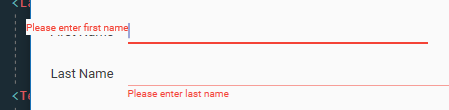
Results are the same with MaterialDesignInXaml v3.1.2 and v3.2.0-ci1479.
There is another issue too. Alignment by the top edge produces bad looking result. VerticalAlignment is required for side placement, and better default to Center.
Contributor guide
First steps
- Read the whole issue, then the project's contributing guide.
- Comment on the issue to say you are picking it up — it saves two people doing the same work.
- Fork the repository and make your change on a branch.
- Open a pull request that references the issue number.
Research direction
Start by reproducing the reported XAML TextBox case with ValidationAssist.PopupPlacement="Right" and ValidationAssist.UsePopup="True", then inspect the implementation of those properties. Done means the validation popup appears beside the TextBox for side placement and the top-edge alignment produces the expected result.
Written by the indexing model from the issue text.
Assessment
- Tech stack
- csharp
- Domain
- design, desktop
- Issue type
- Bug
- Difficulty
- 3/5
- Estimated time
- 1-2 days
- Activity status
- Stale
- Clarity
- Mostly clear
- Newbie friendliness
- 35/100