HelloZeroNet / HelloZeroNet/ZeroNet
Error in all.js while trying to get iframe content. This happened after enabling zeronet uipassword plugin for remote access
- Dominant language
- JavaScript
- Stars
- 18.8k
- Forks
- 2.3k
- PR merge metrics
- No merged PRs in 30d
Description
### Step 1: Please describe your environment
* ZeroNet version: 0.6.5
* Operating system: Windows 10 Home
* Web browser: Chrome and DuckDuckGo
* Tor status: disabled
* Opened port: yes
* Special configuration: enable UiPassword plugin and restarted zeronet with password enabled
### Step 2: Describe the problem:
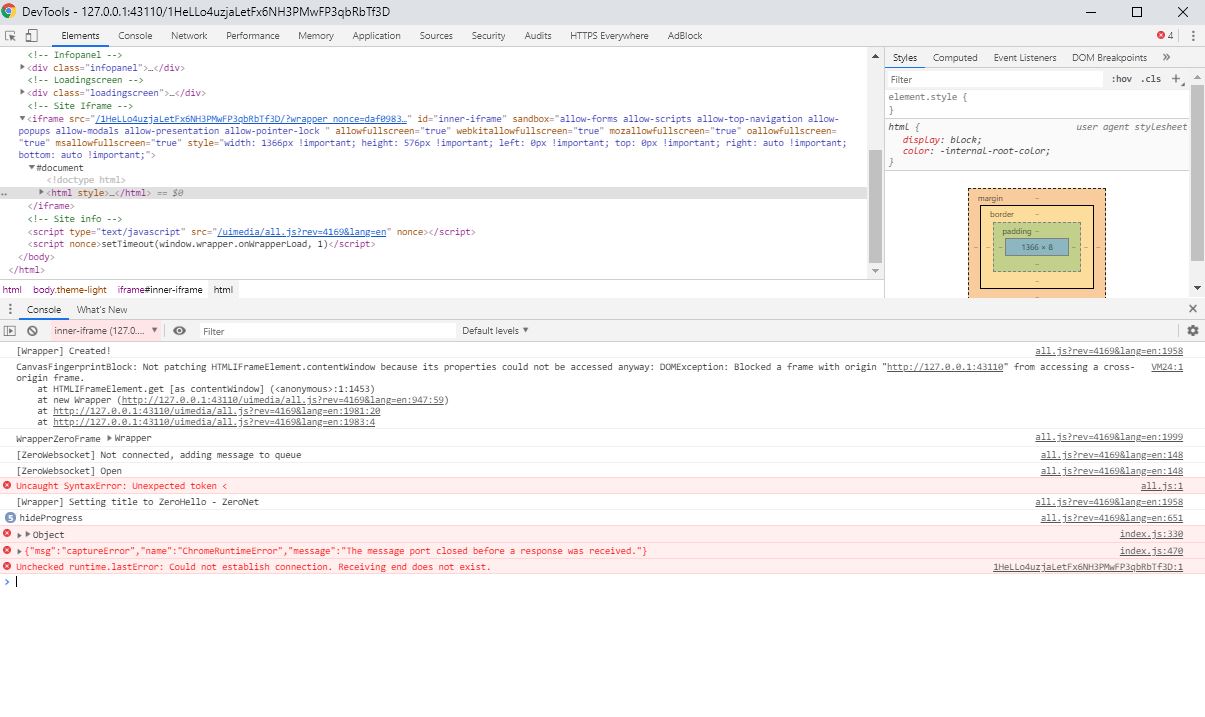
I followed the instructions for enabling remote access to zeronet (renamed the UiPassword folder and restarted zeronet using the arguments provided for setting up remote access) and was able to access zeronet remotely. However, I'm now no longer able to load the zeronet zites... it appears the iframe content of the zites are not able to load through the iframe. When I inspect the page, I see the following error message:
Blocked a frame with origin "http://127.0.0.1:43110" from accessing a cross-origin frame.
at HTMLIFrameElement.get [as contentWindow] (:1:1453)
at new Wrapper (http://127.0.0.1:43110/uimedia/all.js?rev=4169&lang=en:947:59)
at http://127.0.0.1:43110/uimedia/all.js?rev=4169&lang=en:1981:20
Has anyone else run into this problem?
#### Steps to reproduce:
1. go into the zeronet plugins folder and rename the **disabled-UiPassword** folder to **UiPassword**
2. open the command prompt, cd into the zeronet folder and run the following command (be sure to replace "anypassword" with your actual password): --**ui_ip "*" --ui_password anypassword**
3. Now open a browser on another device connected to the same local network and enter the local ip address of the device running zeronet and the port that zeronet is running on (eg. http://192.168.1.53:43110). You should receive a login page (you can also do this from a device not on the local network as long as port forwarding has been enabled in the router)
4. Enter the password from step 2 and click submit to login
5. After successful login, you'll be routed to the home page of zeronet, but the page doesn't fully load. Navigating to any zite yields the same result. Inspection of the unloaded page gives the following error:
**Blocked a frame with origin "http://127.0.0.1:43110" from accessing a cross-origin frame.
at HTMLIFrameElement.get [as contentWindow] (:1:1453)
at new Wrapper (http://127.0.0.1:43110/uimedia/all.js?rev=4169&lang=en:947:59)
at http://127.0.0.1:43110/uimedia/all.js?rev=4169&lang=en:1981:20**
#### Observed Results:
The zeronets site(s) do not load fully. The full error log is below:
**[Wrapper] Created!
VM24:1 CanvasFingerprintBlock: Not patching HTMLIFrameElement.contentWindow because its properties could not be accessed anyway: DOMException: Blocked a frame with origin "http://127.0.0.1:43110" from accessing a cross-origin frame.
at HTMLIFrameElement.get [as contentWindow] (:1:1453)
at new Wrapper (http://127.0.0.1:43110/uimedia/all.js?rev=4169&lang=en:947:59)
at http://127.0.0.1:43110/uimedia/all.js?rev=4169&lang=en:1981:20
at http://127.0.0.1:43110/uimedia/all.js?rev=4169&lang=en:1983:4
all.js?rev=4169&lang=en:1999 WrapperZeroFrame Wrapper
all.js?rev=4169&lang=en:148 [ZeroWebsocket] Not connected, adding message to queue
all.js?rev=4169&lang=en:148 [ZeroWebsocket] Open
all.js:1 Uncaught SyntaxError: Unexpected token <
all.js?rev=4169&lang=en:1958 [Wrapper] Setting title to ZeroHello - ZeroNet
5all.js?rev=4169&lang=en:651 hideProgress**
#### Expected Results:
I expected the zeronet websites to load as normal.
Contributor guide
No contributing guide indexed for this repository
Research direction
Start with uimedia/all.js around the reported lines 947 and 1981, then reproduce the failure by enabling the UiPassword plugin and accessing the UI remotely. Done means the authenticated remote UI and its zites load without the reported cross-origin error or the all.js syntax error.
Written by the indexing model from the issue text.
Assessment
- Tech stack
- javascript
- Domain
- authentication, frontend
- Issue type
- Bug
- Difficulty
- 3/5
- Estimated time
- 1-2 days
- Activity status
- Stale
- Clarity
- Mostly clear
- Newbie friendliness
- 35/100