Azure / Azure/MachineLearningNotebooks
AzureMLException with model.download
- Linguagem predominante
- Jupyter Notebook
- Estrelas
- 4.4k
- Forks
- 2.6k
- Métricas de merge de PRs
- Nenhum PR com merge em 30d
Descrição
Hi!
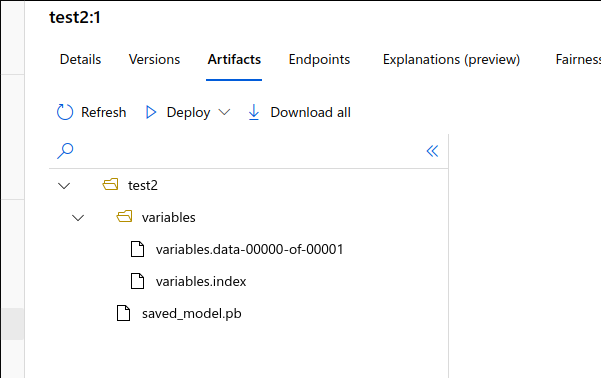
When trying to download a registered model from the AMLS workspace, I'm getting the following traceback. The file shows up in the `target_dir` (and ADLS path) however the size is 0 bytes, so it is making the file, however no data is being transferred into it.
```python
---------------------------------------------------------------------------
FileNotFoundError Traceback (most recent call last)
/databricks/python/lib/python3.7/site-packages/azureml/_file_utils/file_utils.py in _retry(exec_func, clean_up_func, max_retries, exceptions)
432 try:
--> 433 return exec_func()
434 except exceptions as request_exception:
/databricks/python/lib/python3.7/site-packages/azureml/_file_utils/file_utils.py in exec_func()
212 max_connections=max_concurrency,
--> 213 validate_content=_validate_check_sum)
214 file_size = os.stat(path).st_size
/databricks/python/lib/python3.7/site-packages/azureml/_vendor/azure_storage/blob/baseblobservice.py in get_blob_to_path(self, container_name, blob_name, file_path, open_mode, snapshot, start_range, end_range, validate_content, progress_callback, max_connections, lease_id, if_modified_since, if_unmodified_since, if_match, if_none_match, timeout)
1855
-> 1856 with open(file_path, open_mode) as stream:
1857 blob = self.get_blob_to_stream(
FileNotFoundError: [Errno 2] No such file or directory: '/dbfs/mnt/prism0stg0dls/amls/enablers/amls_model_saving/models/test2/test2/variables/variables.data-00000-of-00001'
During handling of the above exception, another exception occurred:
AzureMLException Traceback (most recent call last)
in
----> 1 existing_model.download(target_dir="/dbfs/mnt/prism0stg0dls/amls/enablers/amls_model_saving/models/test2")
/databricks/python/lib/python3.7/site-packages/azureml/core/model.py in download(self, target_dir, exist_ok, exists_ok)
999
1000 # download files using sas
-> 1001 file_paths = self._download_model_files(sas_to_relative_download_path, target_dir, exist_ok)
1002 if len(file_paths) == 0:
1003 raise WebserviceException("Illegal state. Unpack={}, Paths in target_dir is "
/databricks/python/lib/python3.7/site-packages/azureml/core/model.py in _download_model_files(self, sas_to_relative_download_path, target_dir, exist_ok)
940 "{}".format(target_path), logger=module_logger)
941 sas_to_relative_download_path[sas] = target_path
--> 942 download_file(sas, target_path, stream=True)
943
944 if self.unpack:
/databricks/python/lib/python3.7/site-packages/azureml/_file_utils/file_utils.py in download_file(source_uri, path, max_retries, stream, protocol, session, _validate_check_sum, max_concurrency)
219 'present in blob.'.format(file_size, content_length))
220
--> 221 return _retry(exec_func, max_retries=max_retries)
222
223 # download using requests.Session
/databricks/python/lib/python3.7/site-packages/azureml/_file_utils/file_utils.py in _retry(exec_func, clean_up_func, max_retries, exceptions)
443 else:
444 module_logger.error('Failed to download file with error: {}'.format(request_exception))
--> 445 raise AzureMLException('Download of file failed with error: {}'.format(request_exception))
446 finally:
447 clean_up_func()
AzureMLException: AzureMLException:
Message: Download of file failed with error: [Errno 2] No such file or directory: '/dbfs/mnt/prism0stg0dls/amls/enablers/amls_model_saving/models/test2/test2/variables/variables.data-00000-of-00001'
InnerException None
ErrorResponse
{
"error": {
"message": "Download of file failed with error: [Errno 2] No such file or directory: '/dbfs/mnt/prism0stg0dls/amls/enablers/amls_model_saving/models/test2/test2/variables/variables.data-00000-of-00001'"
}
}
```
Guia de contribuição
Nenhum guia de contribuição indexado para este repositório
Direção de pesquisa
Comece reproduzindo a chamada existente com falha a existing_model.download usando o target_dir mostrado e, em seguida, rastreie o fluxo por azureml/core/model.py e azureml/_file_utils/file_utils.py, especialmente o caminho de destino no traceback. Está concluído quando o modelo registrado é baixado sem AzureMLException e o arquivo variables.data-00000-of-00001 resultante contém os dados esperados em vez de ter zero bytes.
Escrita pelo modelo de indexação a partir do texto da issue.
Avaliação
- Stack de tecnologia
- azure, python
- Domínio
- cloud, machine-learning
- Tipo de issue
- Bug
- Dificuldade
- 3/5
- Tempo estimado
- 1-2 dias
- Status de atividade
- Estagnada
- Clareza
- Precisa de esclarecimento
- Facilidade para iniciantes
- 30/100