Alan-FGR / Alan-FGR/alan-fgr.github.io
Custom Smart Denoiser for Unbiased Renderers ~2012-12-04
- 主要语言
- HTML
- 星标
- 0
- 派生
- 0
- PR 合并指标
- 30 天内没有已合并 PR
描述
[Cycles] Denoiser that retains edges sharpness
===============================
Dec 2012
I made some tests as a proof of concept of a high-quality noise reducer for Cycles. I’m attaching a simple test but the theory is what matters, here is what the program does:
- It separates the individual faces on images that will be used as a kind of “mask” for the denoiser.
- It discards small faces, atm it just leaves them noisy, but in the future may apply the denoise over whole objects (for high-poly objects), atm it doesn’t take into account smoothed faces, they should generate a single “mask”.
- Then it applies a 10px blur to the “masked” image and over this one it inserts the original image (so you get a 10px blurred outline with roughly the same colours of the noisy image, this is to make sure the denoiser won’t generate artifacts).
- Then it applies the denoise (in this case a closed-source commercial one, but an opensource could be used also) to the individual faces, so the noise gets blurred but the edges stay perfectly sharp (or almost) after applying the respective masks and merging them into a single image. (the mask doesn’t have AA though)
Of course, when there’s a fine texture there, the thing just wouldn’t work. To solve that problem the GI should be rendered separately, denoised, and multiplied by a “flat” image with the textures and stuff. The denoiser should only be applied to the GI image, of course it is not going to be perfect, but if the theory is correct then it’s worth loosing some accuracy in exchange of noise.
Alternatively, there could be a way to adjust the denoising value manually for individual objects also.
Here are my tests, please note that I couldn’t apply a high denoising value because that would blur the direct illumination too much. Ideally this shouldn’t happen because It shouldn’t be applied to the final image but only to the secondary GI bounces. AND this is an extreme case of a very noisy image.
A fine grain noise could be applied over the entire image also (it tricks the eye).
Next i’m gonna render a cornell box.
Left: Original output, Right: Denoised output (yes, the input is the image on the left :D)
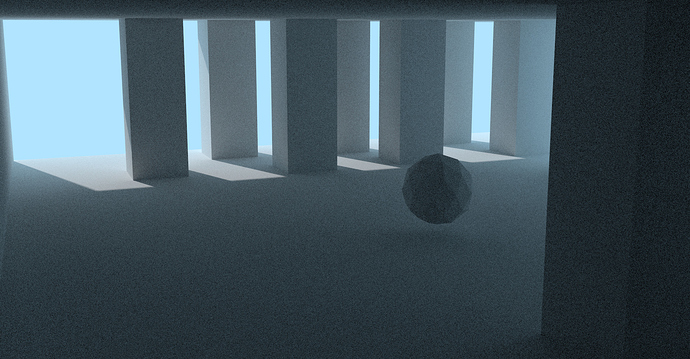
output.jpg 1920×1000 855 KB
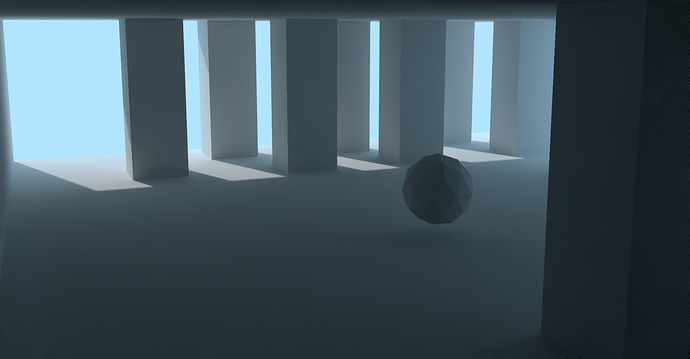
denoise.jpg 1920×1000 155 KB
PS: Sorry the JPG format, but the PNG was too big and the JPG is in very high quality.
* #### created Dec 2012
#### replies
[Dec 2012]
There is pixel noise(i mean visible cracks between nearby pixels that in reality are smooth almost constant color surface ), but as soon as Global Illumination utilized, there are too many other noises, that can not be addressed by any 2d fancy filter, as shadow penumbra quality, 2-3 and more order color bleed quality, color dynamic range (only can degrade with any filter), moire-like artifacts with crisp texture at bad angle. Image just not have extra data, you can not pull that data from nowhere or even from nearby pixels. I suspect that “smart blur” maybe with some form of median filter can do same, and it already exist.
[Dec 2012]
this denoiser was intended only for secondary bounces, so an image with textures and all stuff is rendered but without GI and then the denoised GI could be applied as a multiplier. Of course it’s going to be unbiased, but pixel-perfect secondary bounces lighting isn’t needed for 99% of cases I think.
[Dec 2012]
I was able to achieve a similar result by using only a complex composing nodes setup and the Normal, Z, Direct, Indirect and Col maps separately. The edges aren’t perfect also, but it’s somewhat good imho.
A good denoise node and a better map to use as the bilateral blur determinator (atm i’m using Z Mixed by Normal (Fac:0.9)) would create a better result I think.
[Dec 2012]
The edges are a problem apart, an edge detector on the normal pass could be a good way to retrieve a “mask” of the more pronounced edges, but I don’t think Blender has a node for that nor a way to apply a “mask” over an image also.
[Dec 2012]
Here is another test, a 15-sec render plus some few seconds to composite (2 or 3).
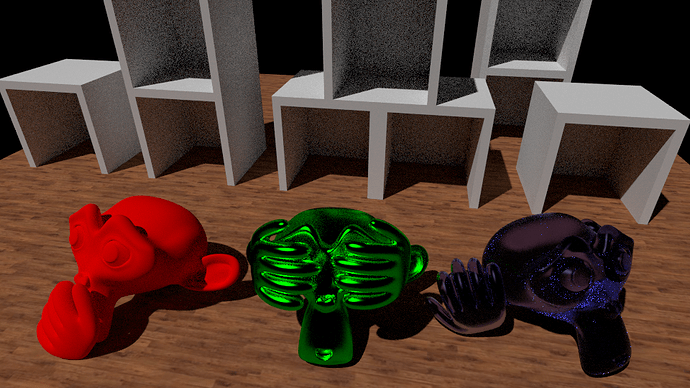
3monkeysorig.png 960×540 756 KB
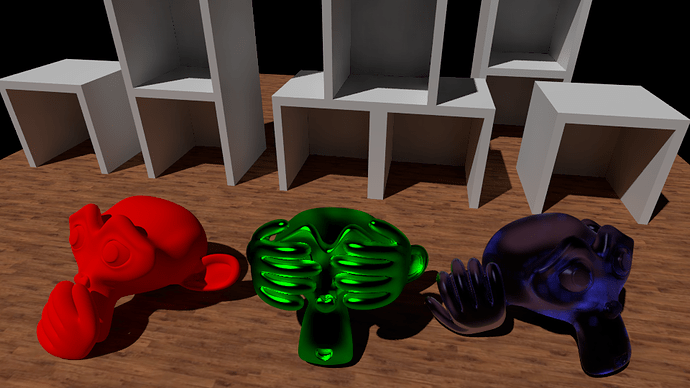
3monkeys.png 960×540 402 KB
https://blenderartists.org/t/cycles-amazing-denoiser-that-dramatically-reduces-noise-and-retains-edges-sharpness/558662
贡献指南
这个仓库没有索引到贡献指南
评估
这个 Issue 还没有评估数据。