Tooltip not positioning correctly triggering flickers and un-clickable buttons
- 主要語言
- TypeScript
- 星號
- 3.5k
- 分支
- 341
- 平均合併
- 14 分鐘
- 30 天內合併 PR
- 8
描述
Using:
- v-tooltip 2.0.3
- VueJS: 2.6
- using it as `Vue.use(VTooltip)`
- using the readme example css
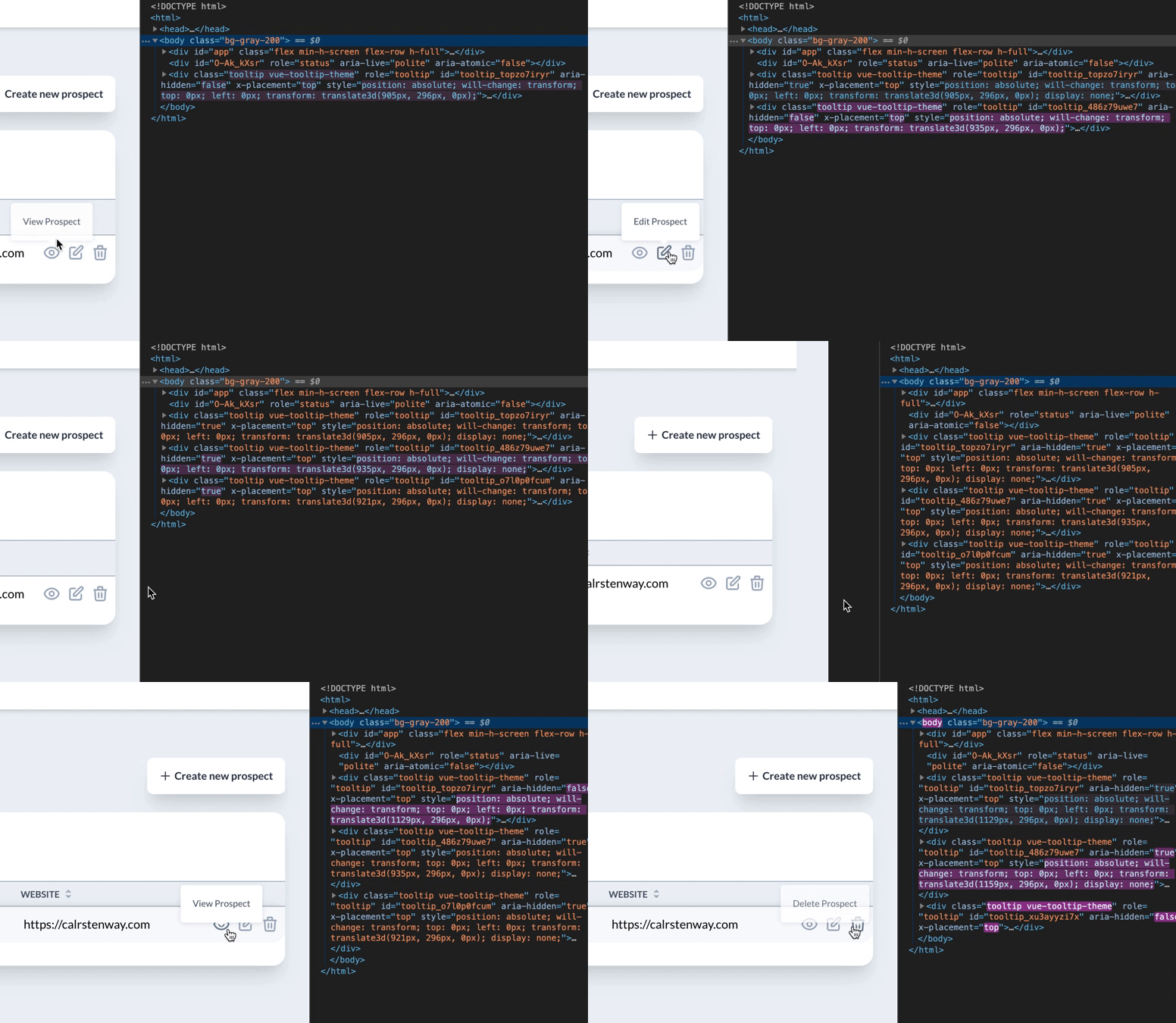
After I compile down to production **on some occasions**, some buttons don't show tooltips. To be more precise, the tooltip tries to appear, but it's positioned on top of the button going into this show/hide loop **making the button un-clickable**.
As you may see in the screenshot, at times everything is ok. Just some cases have issues, haven't been able to figure out which ones.
It's all good in development mode. Not sure what triggers this in production. I made sure no v-tooltip classes get stripped or anything like that.
The only thing I see different from putting dev and prod side-by-side is that the prod version renders the tooltip with the `translate` property with about 10 pixels less than the dev version.
If anyone has an ideea about why this is happening I'm more than glad to try and fix this myself.
Thank you,
貢獻指南
評估
這個 Issue 還沒有評估資料。