AdguardTeam / AdguardTeam/ContentBlocker
UI issue on a small display when the font size is set to largest
- Vorherrschende Sprache
- Java
- Sterne
- 751
- Forks
- 154
- Ø Merge
- 28 Min.
- Gemergte PRs (30 T.)
- 1
Beschreibung
### Prerequisites
Please answer the following questions for yourself before submitting an issue. **YOU MAY DELETE THE PREREQUISITES SECTION.**
- [√] I am running the latest version
- [√] I checked the documentation and found no answer
- [√] I checked to make sure that this issue has not already been filed
### Issue Details
In the process of using, I found a bug in layout / display. As shown in the figure, in the first page, the button and the following text overlap each other. This may be an adaptation problem. I suspect it is because **display and font size** are set to the largest (mainly due to **display size**).
I hope that the page can be set to scroll, so that the problem caused by the display size of large can be solved.
App version is 2.6.1, my mobile phone is Google nexus 6, screen resolution setting is 1920* 1080, **_font size and display size are the largest ! ! !_**, Android system is 8.0.
- **AdGuard version:**
- 2.6.1
- **Browser:**
- Google
- **Device model:**
- Google nexus 6
- **Operating system and version:**
- Android 8.0
### Expected Behavior
I hope that the page can be set to scroll, so that the problem caused by the display size of large can be solved.
### Actual Behavior
As shown in the figure, in the first page, the button and the following text overlap each other.
### Screenshots
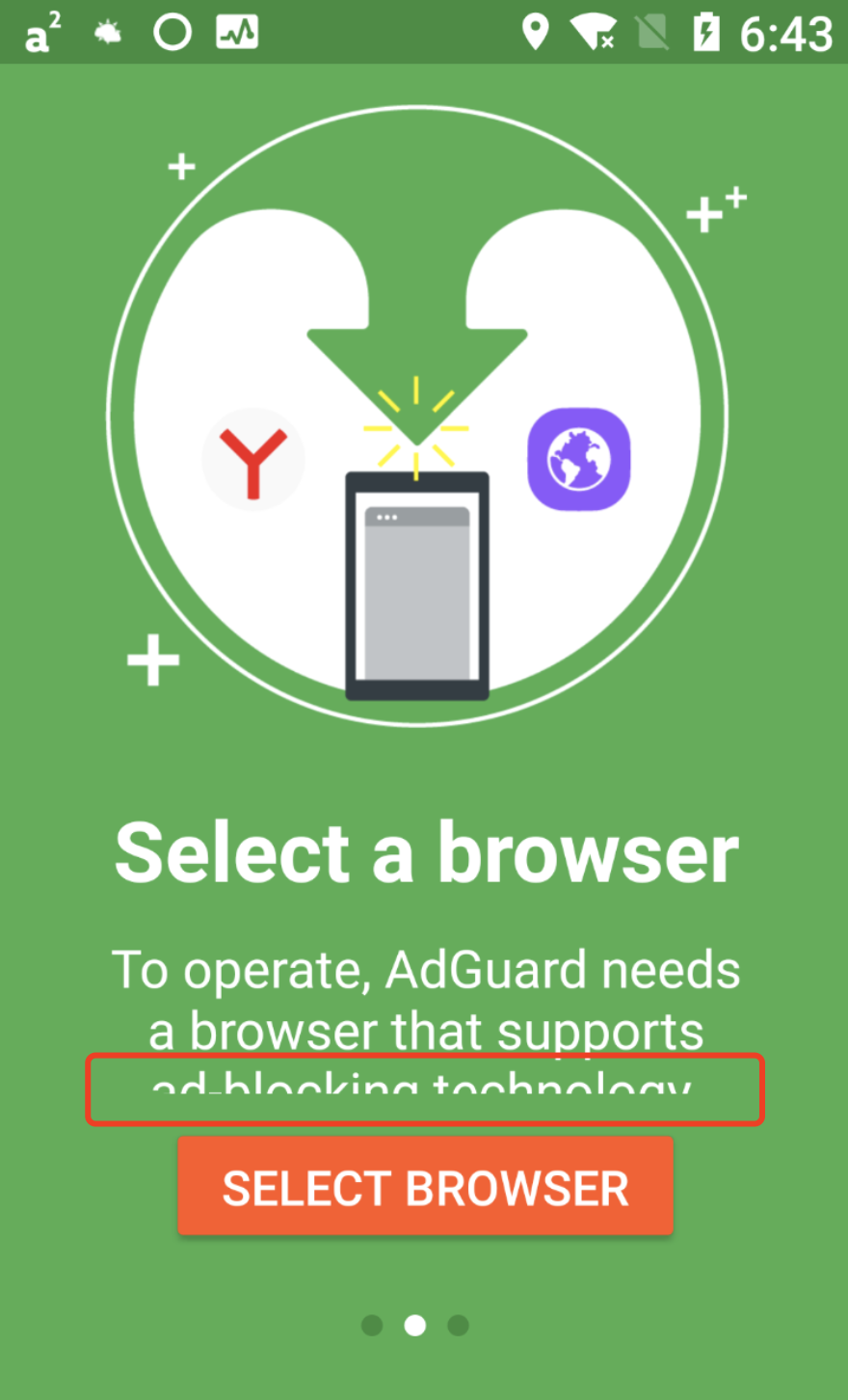

Screenshot:
### Additional Information
I suspect it is because **display and font size** are set to the largest (mainly due to **display size**).
Beitragsleitfaden
Für dieses Repository ist kein Beitragsleitfaden indexiert
Bewertung
Dieses Issue wurde noch nicht bewertet.