AdguardTeam / AdguardTeam/AdguardForiOS
Inconvenient pop-up every time re-enabling DNS Protection in Adguard iOS
- Vorherrschende Sprache
- Swift
- Sterne
- 1.7k
- Forks
- 240
- PR-Merge-Kennzahlen
- Keine gemergten PRs in 30 T.
Beschreibung
### Problem Description
In Adguard iOS, which has the feature Native DNS in the DNS implementation, we met an inconvenience that happens when turning on and off the switch button in the DNS protection screen.
On setting Native DNS, after we leave the switch at the state ON, a screen pops up and requires performing several steps, namely GENERAL -> VPN & NETWORK -> DNS -> SELECT ADGUARD.
When we turn the switch OFF, there is nothing strange happens. However, when we turn the switch ON, the screen mentioned above pops up again and suggests that we change the DNS settings to Adguard.
We met the same problem when developing Visafe iOS Client (a cybersecurity DNS over HTTPS client). We realize that this can annoy users since the program requires them to change the DNS setting to Adguard every time. We want to propose a trick to remove this inconvenience.
### Proposed Solution
In AdguardForiOS, when changing DNS implementation to Native DNS and switching ON, the function `saveDNSManager` is used to save the current DNS configuration. On switching OFF, the function `removeDNSManager` is used to completely remove the Adguard setting and change DNS settings to the default configuration (Automatic). These actions can make users feel extremely annoyed.
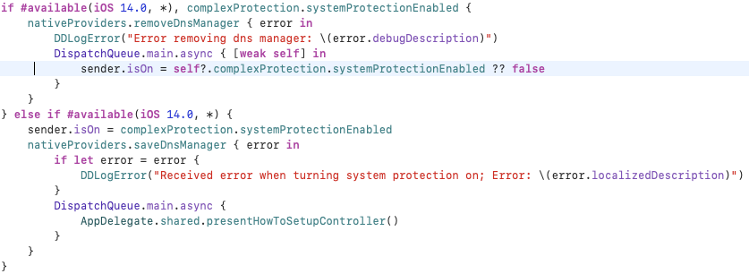
When turning the switch ON, we suggest adding to the function `saveDNSManager` two lines of code prior to calling the method `saveToPreferences`:
```
let status = NEOnDemandRuleConnect()
NEDNSSettingsManager.shared().onDemandRules = [status]
```
Moreover, when turning the switch OFF, instead of calling `removeDNSManager`, we suggest implementing a function that has a similar feature as the one called on turning the switch ON:
```
let status = NEOnDemandRuleDisconnect()
NEDNSSettingsManager.shared().onDemandRules = [status]
```
By using those two lines of code, users are required to change the DNS configuration for only one time. DNS configuration will be set to Adguard when switching ON and set back to the default configuration when switching OFF.
Ref: https://developer.apple.com/documentation/networkextension/nednssettingsmanager/3552346-ondemandrules
Beitragsleitfaden
Für dieses Repository ist kein Beitragsleitfaden indexiert
Bewertung
Dieses Issue wurde noch nicht bewertet.