AdguardTeam / AdguardTeam/AdGuardVPNForWindows
Add timer for after connecting to a server
未关闭
Feature request
Priority: P4
- 主要语言
- 没有语言数据
- 星标
- 207
- 派生
- 19
- PR 合并指标
- 30 天内没有已合并 PR
描述
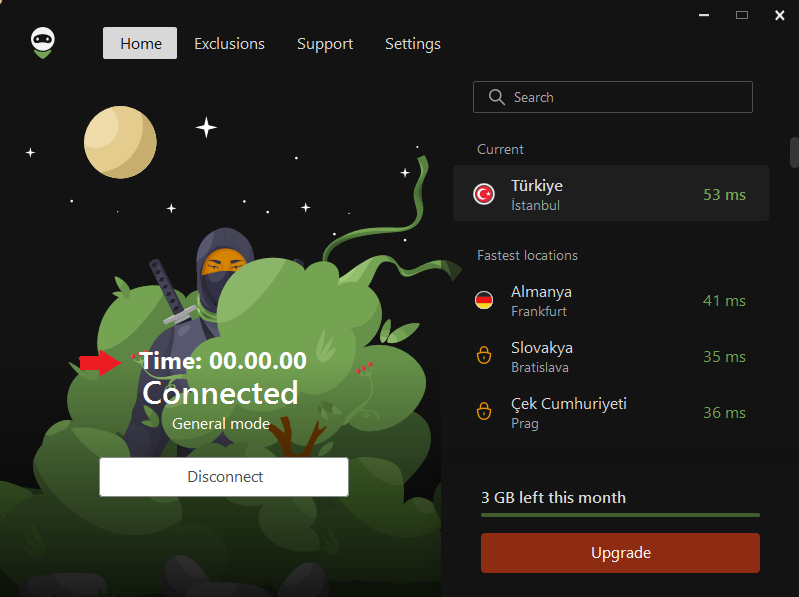
After connecting to any server (location), a timer that shows how connected we are to that server can be useful. It can be in XX.XX.XX format so the user can see how much time has passed.
Example:
贡献指南
这个仓库没有索引到贡献指南
调研方向
The issue names no files or tests. Start by locating the Windows app's connected-server status view and the entry point for connection state; confirm how connecting to and disconnecting from any server are represented. Done means an elapsed-time display appears after connection in XX.XX.XX format and reflects time connected.
由索引模型根据 Issue 内容生成。
评估
- 领域
- desktop
- Issue 类型
- 功能
- 难度
- 3/5
- 预计耗时
- 1-2 天
- 活跃度
- 停滞
- 描述清晰度
- 基本清楚
- 新手友好度
- 38/100