AdguardTeam / AdguardTeam/AdGuardMiniForMac
How to make notification message useful: "Too many filters enabled"
- 主要語言
- Swift
- 星號
- 1.2k
- 分支
- 83
- PR 合併指標
- PR 指標待擷取
描述
How to make notification message useful: "Too many filters enabled"
1. Finding useful information is in: General - Content blockers - AdGuard Xxxxx.
This information does not lead to a specific path and it is not logical for the user. Since the message says: "Too many filters enabled", then you need to search in the filters section. And logically, a warning and useful information to fix the problem should be in the "Filters" Section, and not in the "General - Content blockers - AdGuard Ххххх"
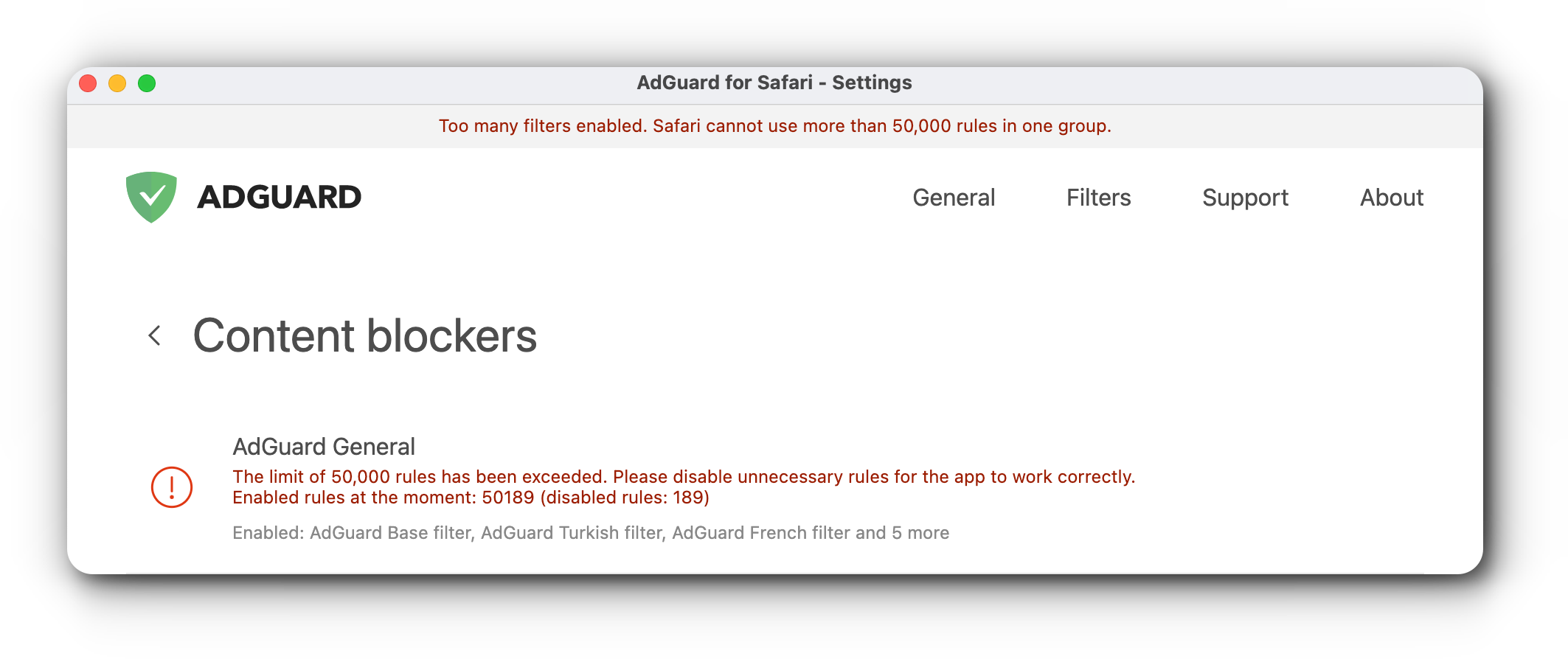
2. The main thing is that it is logical and understandable and convenient for the user. I was asked this question by a user of this application. Users often turn on many filters, and then do not understand how to fix it, and where to look for the problem. This message does not help them. Not all users are born software developers. And I will have fewer problems with clients in support.
- For example:
1. Step

2. Step

貢獻指南
這個儲存庫沒有索引到貢獻指南
評估
這個 Issue 還沒有評估資料。