AdguardTeam / AdguardTeam/AdGuardMiniForMac
Add an opportunity to detect applied blocking rule
- 主要語言
- Swift
- 星號
- 1.2k
- 分支
- 83
- PR 合併指標
- PR 指標待擷取
描述
For now there is no way to detect which rule has been applied in order to filter the website requests.
It would be great if there is a tool to check filtered request to find out the rule and some other useful info. For example, which content blocker contains that rule and what else is blocked by that rule if there are other blocked request
***
###### step 1
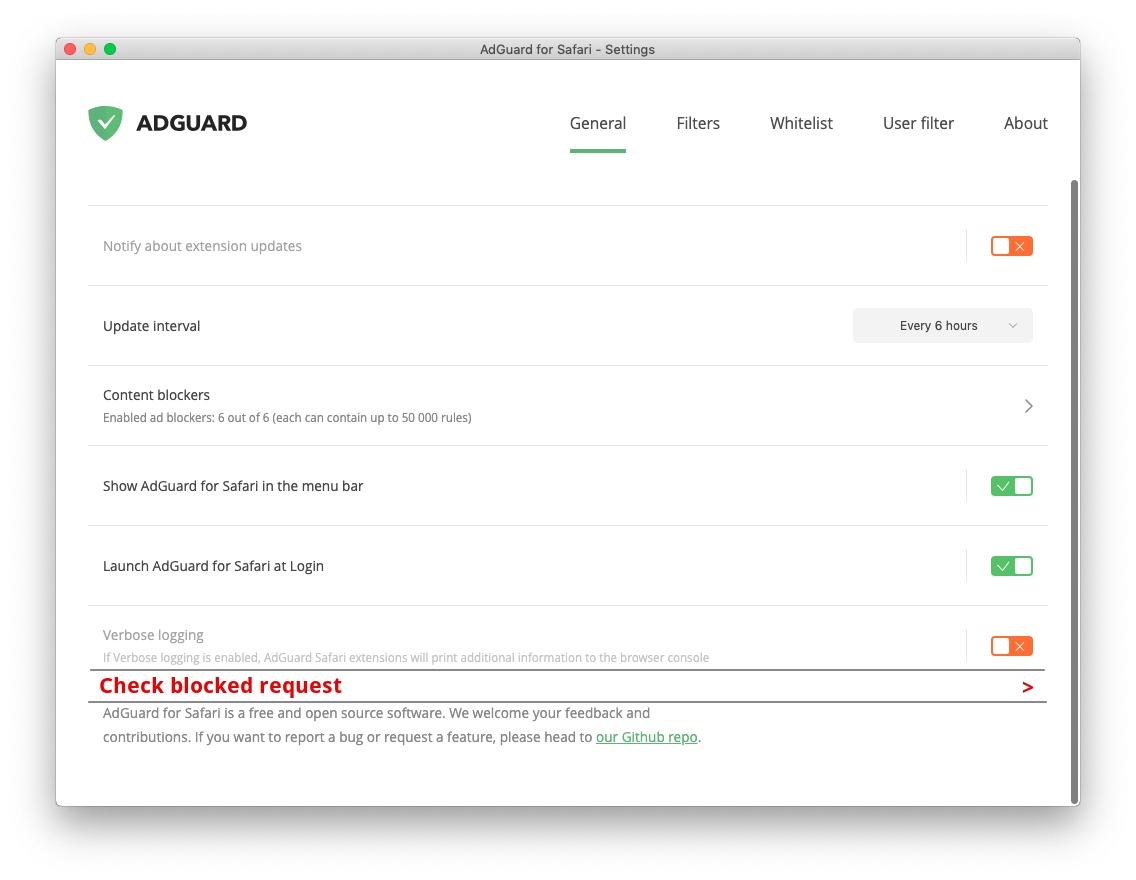
***
###### step 2
## < Blocked request checking
Enter URL of filtered page
```
```
***
###### step 3
Entered `example.org/article.html`
***
###### step 4
## < Blocked request checking
List of blocked requests for **example.org/article.html**:
search 🔎
```
```
* adserver.com/main/top.jpg
* adserver.com/main/bottom.jpg
* adserver.com/main/adafglshwerth.gif
* adserver.org/common/ads.js
* tracking.org/counter.js
* popups.com/ads.js
* popups.com/modal.js
* popups.com/modal.css
* example.org/ads.js
***
###### step 5
Chosen `adserver.org/common/ads.js`
***
###### step 6
## < Blocked request checking
#### Adguard's blocked `adserver.org/common/ads.js`
#### Applied rule — `/ads.js`
#### Content blocker — `AdGuard General`
Also this rule's blocked:
* popups.com/ads.js
* example.org/ads.js
貢獻指南
這個儲存庫沒有索引到貢獻指南
評估
這個 Issue 還沒有評估資料。