zalando / zalando/postgres-operator
Solution for recovery / clone cluster from WAL from s3 bucket and SQL backup.
Nobody has claimed this yet.
- Dominant language
- Go
- Stars
- 5.2k
- Forks
- 1.1k
- Avg merge
- 2d 16h
- Merged PRs (30d)
- 3
Description
- Which image of the operator are you using?
registry.opensource.zalan.do/acid/postgres-operator:v1.5.0 - Where do you run it - cloud or metal? Kubernetes or OpenShift? [AWS K8s | GCP ... | Bare Metal K8s]
Baremetal k8s - Are you running Postgres Operator in production? [yes | no]
yes - Type of issue?
solution description
Denial of responsibility:
In no event shall autor this note be liable for lost profits or any special, incidental or consequential damages arising out of or in connection with this note.
By following these notes, you fully accept responsibility for your own data, clusters, files, Kubernetes, and more.
Understand what and how you are doing, following what is written. These options may not suit you and lead to a complete loss of clustter data, databases, data on disk, Kubernetes, and more.
Have full backups of all the data you need, use common sense while working.
Plan to recovery from WAL in S3:
0) Day X - don't panic!
1) Do not touch bucket with WAL old cluster !!!
Whatch in configmap current directory for WAL:
Hereinafter alias k = kubectl
k get -n $NAMESPACE configmap -o yaml
---
apiVersion: v1
items:
- apiVersion: v1
  data:
    ...
    WALG_S3_PREFIX: s3://bucket/wal_for_OLD <============= current directory for WAL !!! Do not touch it in storage !!!
    ...
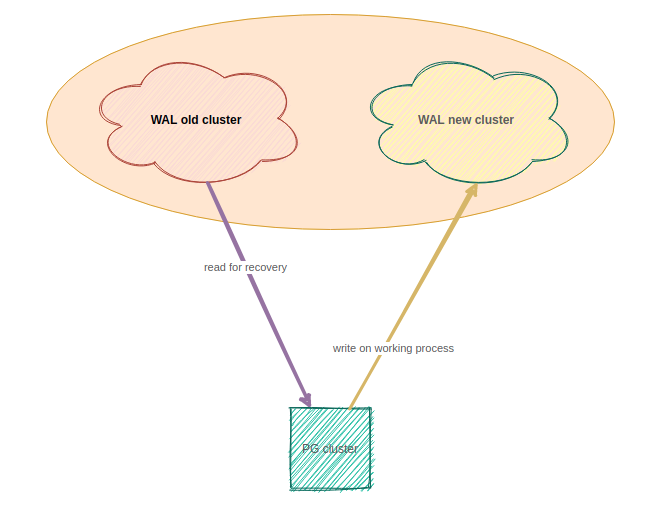
2) Create new directory for WAL in storage
In S3 provider for you account in buscket create new directory for new WAL.
You need create directory WAL_NEW_CLUSTER
Pic:
3) Editing configmap
cd ~/git/deploy-zalando-operator/
git pull
vim pg-pod-configmap.yaml
add / change:
WALG_S3_PREFIX: s3://bucket/wal_for_OLD <=================== it was, need to comment out
---
WALG_S3_PREFIX: s3://bucket/wal_for_NEW <============ became
CLONE_USE_WALG_RESTORE: "true" <============ became
4) Apply configmap in K8s
k apply -n $NAMESPACE -f ~/git/deploy-zalando-operator/pg-pod-configmap.yaml
5) Editing manifest cluster
cd ~/git/deploy-zalando-operator/
git pull
vim zalando-cluster.yaml
add section:
  clone:
    cluster: old-cluster-name
    s3_access_key_id: access_key_id
    s3_endpoint: endpoint
    s3_secret_access_key: secret_access_key
    s3_wal_path: s3://bucket/wal_for_OLD # bucket OLD cluster, from which we will recover.
    timestamp: "2021-01-21T23:49:03+03:00" # timezone required (offset relative to UTC, see RFC 3339 section 5.6)
6) Check and apply cluster manifest in K8s
k apply -n $NAMESPACE -f ~/git/deploy-zalando-operator/zalando-cluster.yaml --server-dry-run
k apply -n $NAMESPACE -f ~/git/deploy-zalando-operator/zalando-cluster.yaml
7) Log pattern (cluster can take a long time to up (up to 10 minutes on the test, it may depend on the size of the base):
k logs -n $NAMESPACE pg-pod-*** -f (only leader)
...
021-03-05 01:30:33,855 - bootstrapping - INFO - Writing to file /run/etc/wal-e.d/env-clone-old-cluster-name/TMPDIR
2021-03-05 01:30:33,855 - bootstrapping - INFO - Configuring standby-cluster
2021-03-05 01:30:33,855 - bootstrapping - INFO - Configuring patroni
2021-03-05 01:30:33,871 - bootstrapping - INFO - Writing to file /home/postgres/postgres.yml
2021-03-05 01:30:33,871 - bootstrapping - INFO - Configuring crontab
2021-03-05 01:30:33,871 - bootstrapping - INFO - Skipping creation of renice cron job due to lack of SYS_NICE capability
2021-03-05 01:30:33,881 - bootstrapping - INFO - Configuring certificate
2021-03-05 01:30:33,881 - bootstrapping - INFO - Generating ssl certificate
2021-03-05 01:30:33,937 - bootstrapping - INFO - Configuring pam-oauth2
2021-03-05 01:30:33,937 - bootstrapping - INFO - No PAM_OAUTH2 configuration was specified, skipping
2021-03-05 01:30:33,937 - bootstrapping - INFO - Configuring pgqd
2021-03-05 01:30:33,938 - bootstrapping - INFO - Configuring log
2021-03-05 01:30:35,355 INFO: No PostgreSQL configuration items changed, nothing to reload.
2021-03-05 01:30:35,363 INFO: Lock owner: None; I am pg-pod-0
2021-03-05 01:30:35,531 INFO: trying to bootstrap a new cluster
2021-03-05 01:30:35,532 INFO: Running custom bootstrap script: envdir "/run/etc/wal-e.d/env-clone-old-cluster-name" python3 /scripts/clone_with_wale.py --recovery-target-time="2021-03-03T23:49:03+03:00"
2021-03-05 01:30:35,746 INFO: cloning cluster old-cluster-name using wal-g backup-fetch /home/postgres/pgdata/pgroot/data base_000000010000000000000006
INFO: 2021/03/05 01:30:35.943395 Finished decompression of part_004.tar.br
INFO: 2021/03/05 01:30:35.943416 Finished extraction of part_004.tar.br
INFO: 2021/03/05 01:30:37.269663 Finished extraction of part_001.tar.br
INFO: 2021/03/05 01:30:37.269967 Finished decompression of part_001.tar.br
INFO: 2021/03/05 01:30:37.481460 Finished decompression of part_002.tar.br
INFO: 2021/03/05 01:30:37.481464 Finished extraction of part_002.tar.br
INFO: 2021/03/05 01:30:37.491029 Finished decompression of pg_control.tar.br
INFO: 2021/03/05 01:30:37.491047 Finished extraction of pg_control.tar.br
INFO: 2021/03/05 01:30:37.491056
Backup extraction complete.
2021-03-05 01:30:37,724 maybe_pg_upgrade INFO: No PostgreSQL configuration items changed, nothing to reload.
2021-03-05 01:30:38 UTC [129]: [1-1] 604189be.81 0     LOG:  Auto detecting pg_stat_kcache.linux_hz parameter...
2021-03-05 01:30:38 UTC [129]: [2-1] 604189be.81 0     LOG:  pg_stat_kcache.linux_hz is set to 1000000
2021-03-05 01:30:38 UTC [129]: [3-1] 604189be.81 0     LOG:  listening on IPv4 address "0.0.0.0", port 5432
2021-03-05 01:30:38 UTC [129]: [4-1] 604189be.81 0     LOG:  could not create IPv6 socket for address "::": Address family not supported by protocol
2021-03-05 01:30:38 UTC [129]: [5-1] 604189be.81 0     LOG:  listening on Unix socket "/var/run/postgresql/.s.PGSQL.5432"
2021-03-05 01:30:38,105 INFO: postmaster pid=129
2021-03-05 01:30:38 UTC [129]: [6-1] 604189be.81 0     LOG:  redirecting log output to logging collector process
2021-03-05 01:30:38 UTC [129]: [7-1] 604189be.81 0     HINT:  Future log output will appear in directory "../pg_log".
/var/run/postgresql:5432 - rejecting connections
/var/run/postgresql:5432 - rejecting connections
/var/run/postgresql:5432 - rejecting connections
/var/run/postgresql:5432 - accepting connections
2021-03-05 01:30:40,206 INFO: establishing a new patroni connection to the postgres cluster
2021-03-05 01:30:40,285 INFO: waiting for end of recovery after bootstrap
2021-03-05 01:30:50,277 INFO: waiting for end of recovery after bootstrap
2021-03-05 01:31:00,270 INFO: waiting for end of recovery after bootstrap
2021-03-05 01:31:10,275 INFO: waiting for end of recovery after bootstrap
2021-03-05 01:31:20,285 INFO: waiting for end of recovery after bootstrap
2021-03-05 01:31:30,270 INFO: waiting for end of recovery after bootstrap
2021-03-05 01:31:40,275 INFO: waiting for end of recovery after bootstrap
...
SET
DO
DO
DO
...
ALTER EXTENSION
ALTER POLICY
REVOKE
GRANT
...
2021-03-05 01:34:34.175 - /scripts/postgres_backup.sh - I was called as: /scripts/postgres_backup.sh /home/postgres/pgdata/pgroot/data
2021-03-05 01:34:34.447 - /scripts/postgres_backup.sh - producing a new backup
INFO: 2021/03/05 01:34:34.596538 Couldn't find previous backup. Doing full backup.
INFO: 2021/03/05 01:34:34.617491 Calling pg_start_backup()
2021-03-05 01:34:35.133 35 LOG Starting pgqd 3.3
2021-03-05 01:34:35.133 35 LOG auto-detecting dbs ...
INFO: 2021/03/05 01:34:35.154913 Walking ...
INFO: 2021/03/05 01:34:35.155188 Starting part 1 ...
INFO: 2021/03/05 01:34:35.155307 Starting part 2 ...
2021-03-05 01:34:42,276 INFO: Lock owner: pg-pod-0; I am pg-pod-0
2021-03-05 01:34:42,408 INFO: no action.  i am the leader with the lock
INFO: 2021/03/05 01:34:51.222156 Finished writing part 2.
INFO: 2021/03/05 01:34:51.222175 Starting part 3 ...
2021-03-05 01:34:52,276 INFO: Lock owner: pg-pod-0; I am pg-pod-0
2021-03-05 01:34:52,382 INFO: no action.  i am the leader with the lock
2021-03-05 01:35:02,277 INFO: Lock owner: pg-pod-0; I am pg-pod-0
2021-03-05 01:35:02,388 INFO: no action.  i am the leader with the lock
2021-03-05 01:35:05.162 35 LOG {ticks: 0, maint: 0, retry: 0}
INFO: 2021/03/05 01:35:10.928677 Finished writing part 3.
INFO: 2021/03/05 01:35:10.928696 Starting part 4 ...
2021-03-05 01:35:12,277 INFO: Lock owner: pg-pod-0; I am pg-pod-0
2021-03-05 01:35:12,395 INFO: no action.  i am the leader with the lock
8) Replace credentials for BD in K8S
kubectl get secret root.old-cluster-name.credentials.postgresql.acid.zalan.do -n $NAMESPACE --export -o yaml | kubectl replace -n $NAMESPACE -f -
9) Delete section "clone" in cluster manifest in K8s
k edit -n $NAMESPACE postgresqls.acid.zalan.do
---
#  clone: <================================== comment out this section
#    cluster: old-cluster-name
#    s3_access_key_id: access_key_id
#    s3_endpoint: endpoint
#    s3_secret_access_key: secret_access_key
#    s3_wal_path: s3://bucket/wal_for_OLD # bucket OLD cluster, from which we will recover.
#    timestamp: "2021-01-21T23:49:03+03:00" # timezone required (offset relative to UTC, see RFC 3339 section 5.6)
10) "Restart" all pods in namespace with apps (This is necessary in order for the pods to re-read the secrets of the base, without deleting the pods at the moment this mechanism does not work in Kubernetes, understand what you are doing. )
kubectl delete --all pods --namespace=$NAMESPACE
11) Done. You are amazing =)
Plan to recovery from SQL backup. This variant recovery is possible only in a newly deployed cluster (Variant for whisout redeploy cluster is below). Do not use for recovery in existing cluster! You need SQL backup for recovery DB:
0) Day X - don't panic!
1) Delete OLD cluster (Be very confident in what you are doing, ask senior DevOps)
2) Setup new cluster (Be very confident in what you are doing, ask senior DevOps)
3) Show leader cluster
kl -n $NAMESPACE pg-pod-0 -f
...
2021-03-04 21:19:25,344 INFO: does not have lock
2021-03-04 21:19:25,345 INFO: no action.  i am a secondary and i am following a leader
---
kl -n $NAMESPACE pg-pod-1 -f
...
2021-03-04 20:57:16,792 INFO: Lock owner: pg-pod-1; I am pg-pod-1
2021-03-04 20:57:16,891 INFO: no action.  i am the leader with the lock  <======================
4) Login in leader
k exec -ti -n $NAMESPACE pg-pod-1 -- bash
5) Download SQL backup in pod (leader)
apt update && apt install curl unzip -y
curl S3://bucket/SQL-backup.sql.zip --output SQL-backup.sql.zip
6) Recovery DB
{(unzip -p SQL-backup.sql.zip | psql $DB_name) &}
7) Wait for exit code psql
Done [0]
8) Replace credentials for BD in namespace APPs
kubectl get secret root.old-cluster-name.credentials.postgresql.acid.zalan.do -n $NAMESPACE --export -o yaml | kubectl replace -n $NAMESPACE -f -
9) "Restart" all pods in namespace with apps (This is necessary in order for the pods to re-read the secrets of the base, without deleting the pods at the moment this mechanism does not work in Kubernetes, understand what you are doing. )
kubectl delete --all pods --namespace=$NAMESPACE
12) Done. You are amazing =)
Plan to recovery from SQL in S3 (Without redeploy cluster), recording WAL in S3 after recovery has not been tested. You need SQL backup for recovery DB:
0) Day X - don't panic!
1) Do not touch bucket with WAL old cluster !!!
2) Downscale poolers (That pooler drops the connections to the database and we can drop database)
k scale -n $NAMESPACE --replicas=0 deployment/pg-pod-pooler
3) Show leader cluster
kl -n $NAMESPACE pg-pod-0 -f
...
2021-03-04 21:19:25,344 INFO: does not have lock
2021-03-04 21:19:25,345 INFO: no action.  i am a secondary and i am following a leader
---
kl -n $NAMESPACE pg-pod-1 -f
...
2021-03-04 20:57:16,792 INFO: Lock owner: pg-pod-1; I am pg-pod-1
2021-03-04 20:57:16,891 INFO: no action.  i am the leader with the lock  <======================
4) Login in leader
k exec -ti -n $NAMESPACE pg-pod-1 -- bash
5) Drop DB (Be very confident in what you are doing)
su postgres
psql
drop database $NAME;
create database test;
5) Download SQL backup in pod (leader)
apt update && apt install curl unzip -y
curl S3://bucket/SQL-backup.sql.zip  --output SQL-backup.sql.zip
6) Recovery DB
{(unzip -p SQL-backup.sql.zip | psql $DB_name) &}
7) Wait for exit code psql
Done [0]
8) UPscale poolers
k scale -n $NAMESPACE --replicas=X deployment/pg-pod-pooler
9) Replace credentials for BD in namespace APPs
kubectl get secret root.old-cluster-name.credentials.postgresql.acid.zalan.do -n $NAMESPACE --export -o yaml | kubectl replace -n $NAMESPACE -f -
10) "Restart" all pods in namespace with apps (This is necessary in order for the pods to re-read the secrets of the base, without deleting the pods at the moment this mechanism does not work in Kubernetes, understand what you are doing. )
kubectl delete --all pods --namespace=$NAMESPACE
11) Done. You are amazing =)
Important briefly
uid cluster for operator = K8s uid from manifest postgres operator, you can find this field in the metadata of the source cluster:
kg -n $NAMESPACE postgresqls.acid.zalan.do -o yaml
---
apiVersion: acid.zalan.do/v1
kind: postgresql
metadata:
  name: acid-test-cluster
  uid: efd12e58-5786-11e8-b5a7-06148230260c <=====================
More details
"initialize" for patroni = "initialize" field from manifest endpoint, you can find this field in the annotations of the endpoint:
kg -n $NAMESPACE ep $CLUSTER_NAME-config -o yaml
---
apiVersion: v1
kind: Endpoints
metadata:
  annotations:
    config: ...
    initialize: "6935500285706907727" <===================== patroni cluster id
Show status cluster:
kg -n $NAMESPACE postgresql.acid.zalan.do/$CLUSTER_NAME -o yaml
We are interested in the section:
annotations:
   kubectl.kubernetes.io/last-applied-configuration: |
      ...
In this section we see current status cluster.
Documentation (links) that can help
https://postgres-operator.readthedocs.io/en/latest/reference/cluster_manifest/
https://github.com/zalando/postgres-operator
https://patroni.readthedocs.io/en/latest/
https://patroni.readthedocs.io/en/latest/kubernetes.html
https://postgres-operator.readthedocs.io/en/latest/user/#clone-from-s3
https://github.com/zalando/postgres-operator/issues/1279#issuecomment-783574620
https://github.com/zalando/postgres-operator/issues/1391
!!! Dangerous zone !!!
Be very confident in what you are doing, ask senior DevOps. Any responsibility for using these commands rests with you. See Denial of responsibility
k delete -n $NAMESPACE postgresqls.acid.zalan.do --all # delete all cluster PG
---
k delete -n $NAMESPACE pod $POD_NAME # delete pod
---
k delete -n $NAMESPACE configmap $CM_NAME # delete configmap
---
k delete -n $NAMESPACE replicaset $CM_NAME # delete replicaset. May come in handy if the pods cluster get stuck on loop in Terminate <-> Init
Contributor guide
First steps
- Read the whole issue, then the project's contributing guide.
- Comment on the issue to say you are picking it up — it saves two people doing the same work.
- Fork the repository and make your change on a branch.
- Open a pull request that references the issue number.
Research direction
Start by reviewing the WAL and SQL recovery procedures in the issue, including pg-pod-configmap.yaml, zalando-cluster.yaml, and the Kubernetes commands and logs shown. Validate the documented recovery paths and their prerequisites against the operator's supported behavior; done means the resulting guidance is complete, accurate, and clearly distinguishes tested from untested steps.
Written by the indexing model from the issue text.
Assessment
- Tech stack
- kubernetes, postgresql
- Domain
- databases, devops, documentation
- Issue type
- Documentation
- Difficulty
- 5/5
- Estimated time
- Over a week
- Activity status
- Stale
- Clarity
- Mostly clear
- Newbie friendliness
- 35/100