yonaskolb / yonaskolb/XcodeGen
File Groups With Files Nested 2 folders below make the folder appear at top level
Nobody has claimed this yet.
- Dominant language
- Swift
- Stars
- 8.8k
- Forks
- 908
- Avg merge
- 17d 14h
- Merged PRs (30d)
- 2
Description
While I would love it if the globbing solution from this issue: https://github.com/yonaskolb/XcodeGen/issues/676 were implemented, in the meantime I can list all the files I need to include as follows:
fileGroups:
  - "README.md"
  - "Common/README.md"
  - "Common/MIDI/README.md"
However, when I do that, the README.md file for the first two lines appears correctly, but lower than, that or when the parent directory for the file is not already in a path, the folder containing the README gets bumped up too high in the Xcode file brower as show here:
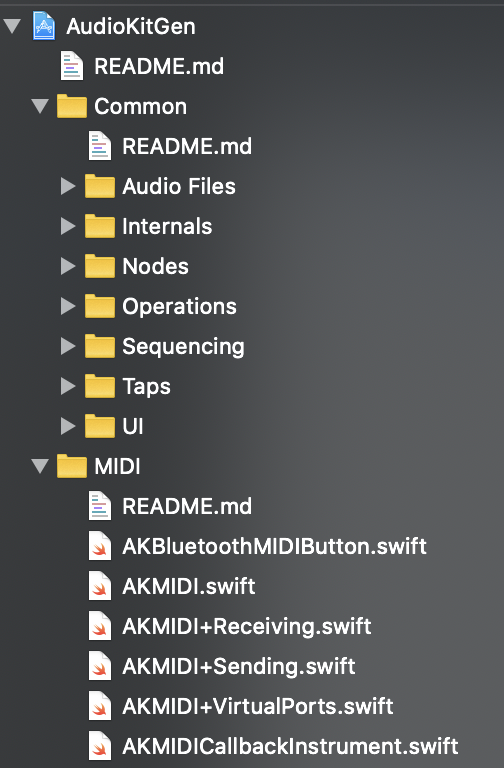
In other words MIDI is no longer a subdirectory of Common in the generated Xcode project as soon as I add the Common/MIDI/README.md fileGroup.
Contributor guide
First steps
- Read the whole issue, then the project's contributing guide.
- Comment on the issue to say you are picking it up — it saves two people doing the same work.
- Fork the repository and make your change on a branch.
- Open a pull request that references the issue number.
Research direction
Reproduce the issue with the listed fileGroups entries for README.md, Common/README.md, and Common/MIDI/README.md, then inspect the generated Xcode project’s file browser hierarchy. The fix is complete when adding the nested MIDI README keeps MIDI under Common instead of moving it to the top level.
Written by the indexing model from the issue text.
Assessment
- Tech stack
- swift
- Domain
- build-system, cli
- Issue type
- Bug
- Difficulty
- 4/5
- Estimated time
- 3-5 days
- Activity status
- Stale
- Clarity
- Mostly clear
- Newbie friendliness
- 45/100