yonaskolb / yonaskolb/XcodeGen
How to use projectReferences?
Nobody has claimed this yet.
- Dominant language
- Swift
- Stars
- 8.8k
- Forks
- 908
- Avg merge
- 17d 14h
- Merged PRs (30d)
- 2
Description
Hi:
I have been trying to use the new projectReferences option, but I could not make it work (Xcodegen 2.10.1). After adding the projectReferences and the scheme, the target of the referenced project is marked as missing:
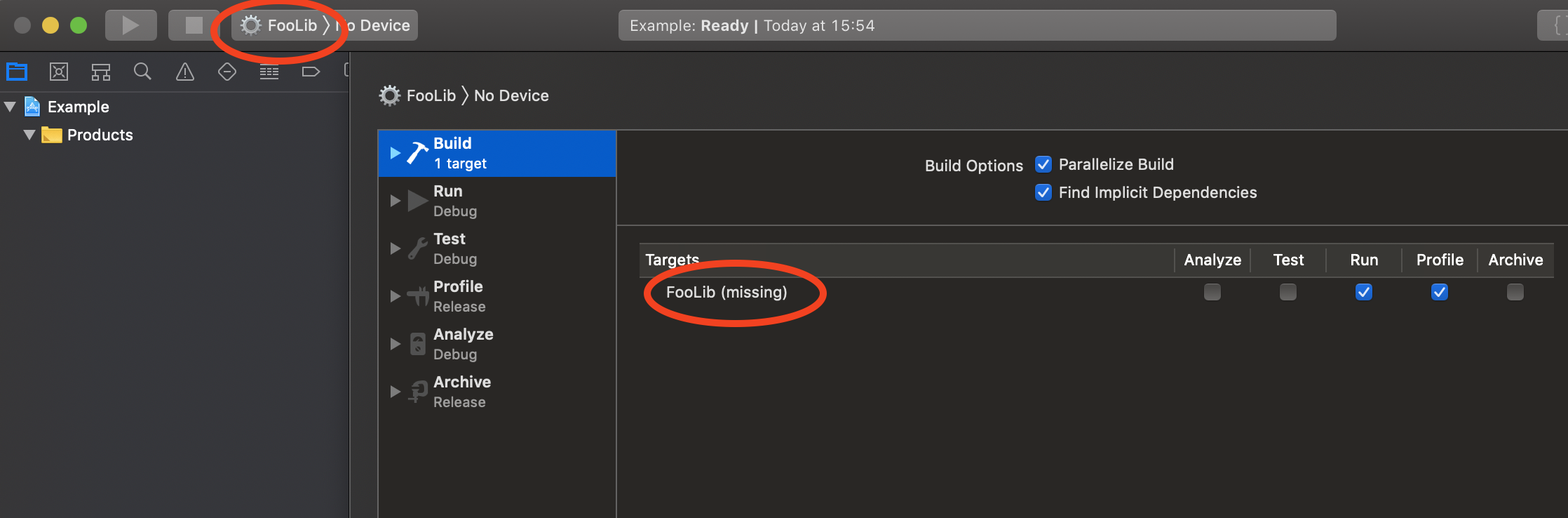
The project.yml:
name: Example

options:
  minimumXcodeGenVersion: 2.10.1

projectReferences:
  FooLib:
    path: FooLib/FooLib.xcodeproj

schemes:
  FooLib:
    build:
      targets:
        FooLib/FooLib: ["run"]
Is this a bug, or am I missing something?
Here is the example project: https://github.com/acecilia/XcodeGenProjectReference
Thanks!
Contributor guide
First steps
- Read the whole issue, then the project's contributing guide.
- Comment on the issue to say you are picking it up — it saves two people doing the same work.
- Fork the repository and make your change on a branch.
- Open a pull request that references the issue number.
Research direction
Start with the linked XcodeGenProjectReference example and its project.yml, focusing on the projectReferences entry for FooLib and the FooLib/FooLib.xcodeproj path. Reproduce the generated scheme and investigate why FooLib/FooLib is marked missing; done means the referenced target resolves correctly or the required configuration is documented.
Written by the indexing model from the issue text.
Assessment
- Tech stack
- swift
- Domain
- build-system, cli
- Issue type
- Bug
- Difficulty
- 3/5
- Estimated time
- 1-2 days
- Activity status
- Stale
- Clarity
- Mostly clear
- Newbie friendliness
- 35/100