APIM Analytics with Choreo cloud need name config
Nobody has claimed this yet.
- Dominant language
- CSS
- Stars
- 99
- Forks
- 708
- Avg merge
- 1d 7h
- Merged PRs (30d)
- 22
Description
Description:
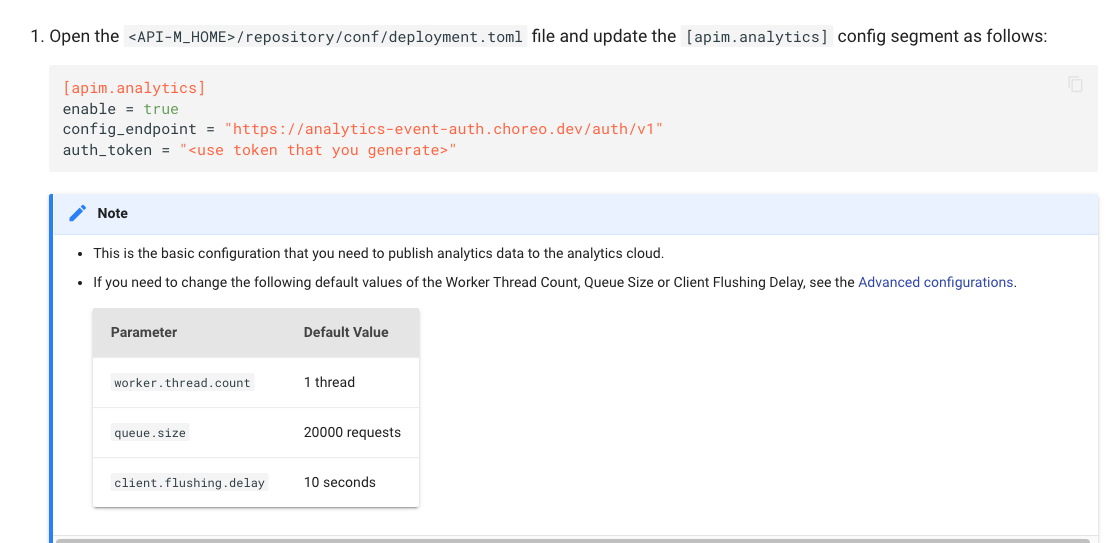
When configuring APIM anlytics with Choreo Cloud ( with this document - https://apim.docs.wso2.com/en/4.0.0/api-analytics/getting-started-guide/) In the Step 3 Number 1 step, only below configs are suggested to add.
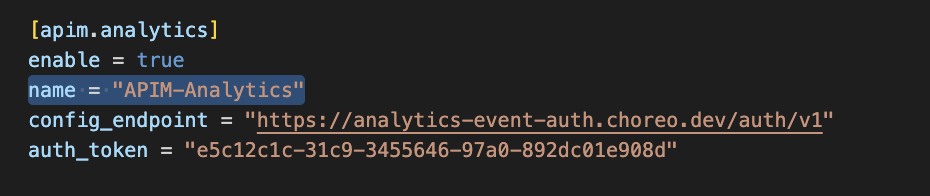
But without the "name" config under that ( as shown below in image), APIM Sever is giving an NPE and does not publish data as well.
Suggested Labels:
Suggested Assignees:
Affected Product Version:
OS, DB, other environment details and versions:
Steps to reproduce:
Related Issues:
Contributor guide
No contributing guide indexed for this repository
First steps
- Read the whole issue, then the project's contributing guide.
- Comment on the issue to say you are picking it up — it saves two people doing the same work.
- Fork the repository and make your change on a branch.
- Open a pull request that references the issue number.
Research direction
Open the APIM Analytics getting-started guide linked in the issue and go to Step 3, Number 1. Compare the documented configuration with the issue’s second image, then update the instructions to include the required "name" config so the documented setup matches the working configuration.
Written by the indexing model from the issue text.
Assessment
- Domain
- documentation
- Issue type
- Documentation
- Difficulty
- 2/5
- Estimated time
- Under an hour
- Activity status
- Stale
- Clarity
- Clearly specified
- Newbie friendliness
- 68/100