wp-media / wp-media/imagify-plugin
Undefined request (404 error) on Divi when using WebP <picture> tag method
Nobody has claimed this yet.
- Dominant language
- PHP
- Stars
- 82
- Forks
- 31
- Avg merge
- 5d 10h
- Merged PRs (30d)
- 9
Description
Describe the bug
When using Divi theme and activate WebP display using tag method, there is failed request in console (https://example.com/undefined), also visible in GTMetrix like this:

And in console it looks like this:
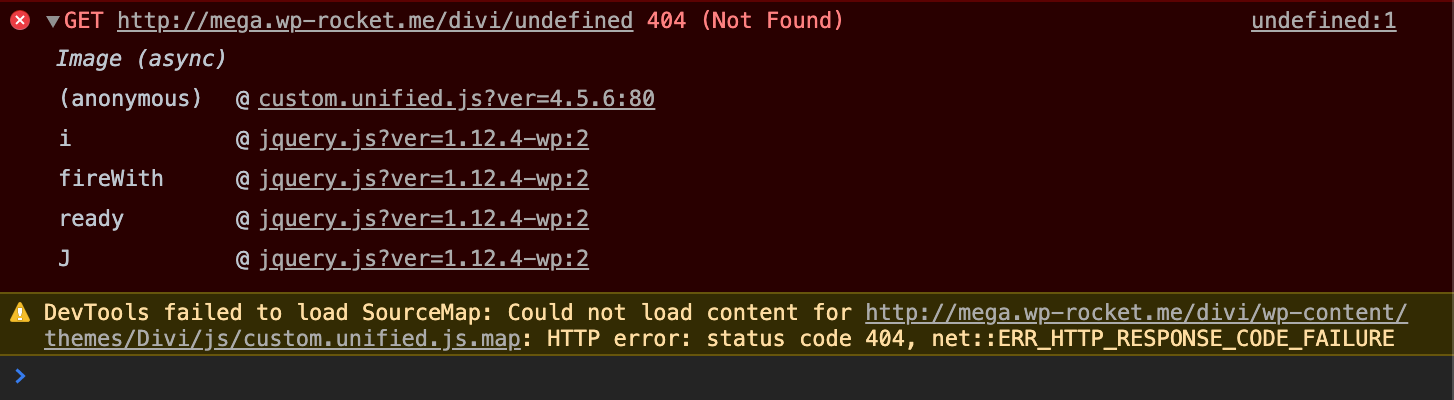
The problem is related to Divi's custom.unified.js file, line 80. When unminified, this function looks like this:
t("#logo").length &&
                            ((q = t("#logo").attr("src")),
                            (Q = function () {
                                var e,
                                    n,
                                    r,
                                    i = t("#logo"),
                                    o = "svg" === i.attr("src").substr(-3, 3);
                                t("body").append(t("<div />", { id: "et-define-logo-wrap", style: "position: fixed; bottom: 0; opacity: 0;" })),
                                    (e = t("#et-define-logo-wrap")),
                                    o && e.addClass("svg-logo"),
                                    e.html(i.clone().css({ display: "block" }).removeAttr("id")),
                                    (n = e.find("img").width()),
                                    (r = e.find("img").height()),
                                    i.attr({ "data-actual-width": n, "data-actual-height": r }),
                                    e.remove(),
                                    A(!0);
                            }),
                            (($ = new Image()).onLoad = Q),
                            ($.onload = Q),
                            ($.src = q)),
And it looks like a problem in this part ($.src = q).
If this function is completely removed, the issue is gone. I guess Imagify fetch this dynamically when nothing is defined yet, so the error occurs.
Steps to reproduce the behavior:
-
Activate Divi theme (or make sure it is active)
-
Activate WebP display option ( tag method) in Imagify settings
-
Visit the site (front-end) and check Console output or test website in GTMetrix
Contributor guide
No contributing guide indexed for this repository
First steps
- Read the whole issue, then the project's contributing guide.
- Comment on the issue to say you are picking it up — it saves two people doing the same work.
- Fork the repository and make your change on a branch.
- Open a pull request that references the issue number.
Research direction
Reproduce the front-end failure with Divi active and Imagify's WebP method enabled, then inspect Divi's custom.unified.js around line 80 and the related Imagify output. Done means the page no longer requests an undefined URL while retaining the WebP display behavior; the payload names no project test to run.
Written by the indexing model from the issue text.
Assessment
- Tech stack
- javascript
- Domain
- frontend, web-dev
- Issue type
- Bug
- Difficulty
- 4/5
- Estimated time
- 3-5 days
- Activity status
- Stale
- Clarity
- Mostly clear
- Newbie friendliness
- 30/100