wordpress-mobile / wordpress-mobile/WordPress-iOS
Share Extension: Improve offline error message and placement
Nobody has claimed this yet.
- Dominant language
- Swift
- Stars
- 3.9k
- Forks
- 1.2k
- Avg merge
- 23h 51m
- Merged PRs (30d)
- 58
Description
In the share extension, when the user is offline, let's put a better message on the site picker screen than "no available sites":
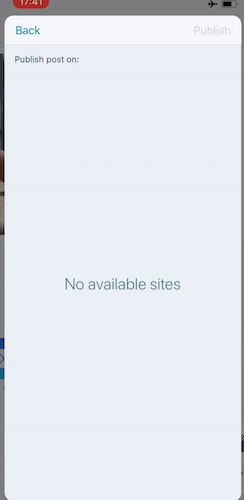
Also, when the user activates the refresh control, the error text shifts down. To reproduce:
- Go into airplane mode
- Try to share a photo through the new share extension
- Reach the site selector
- See “No available sites” as we’re offline
- Drag down to refresh the list
The label moves down a bit and stays there no matter how many times I drag down to refresh.
Contributor guide
First steps
- Read the whole issue, then the project's contributing guide.
- Comment on the issue to say you are picking it up — it saves two people doing the same work.
- Fork the repository and make your change on a branch.
- Open a pull request that references the issue number.
Research direction
Reproduce the issue in the share extension's site picker by following the airplane-mode and pull-to-refresh steps in the report. Locate the offline error label and refresh behavior, then verify that the message is clearer than "No available sites" and remains correctly placed after repeated refreshes.
Written by the indexing model from the issue text.
Assessment
- Tech stack
- ios, swift
- Domain
- mobile-dev
- Issue type
- Bug
- Difficulty
- 3/5
- Estimated time
- 1-2 days
- Activity status
- Stale
- Clarity
- Mostly clear
- Newbie friendliness
- 45/100