wordpress-mobile / wordpress-mobile/WordPress-iOS
No user feedback when activating a theme from the theme browser
Open
Nobody has claimed this yet.
[Pri] Medium
[Type] Bug
Themes
- Dominant language
- Swift
- Stars
- 3.9k
- Forks
- 1.2k
- Avg merge
- 23h 51m
- Merged PRs (30d)
- 58
Description
Expected behavior
Activating a theme from the theme browser should provide feedback to the user while the selected theme is loaded
Actual behavior
No feedback is provided to users until the theme is actually activated
Steps to reproduce the behavior
- Go to "My Site/Themes" to visualize the theme browser
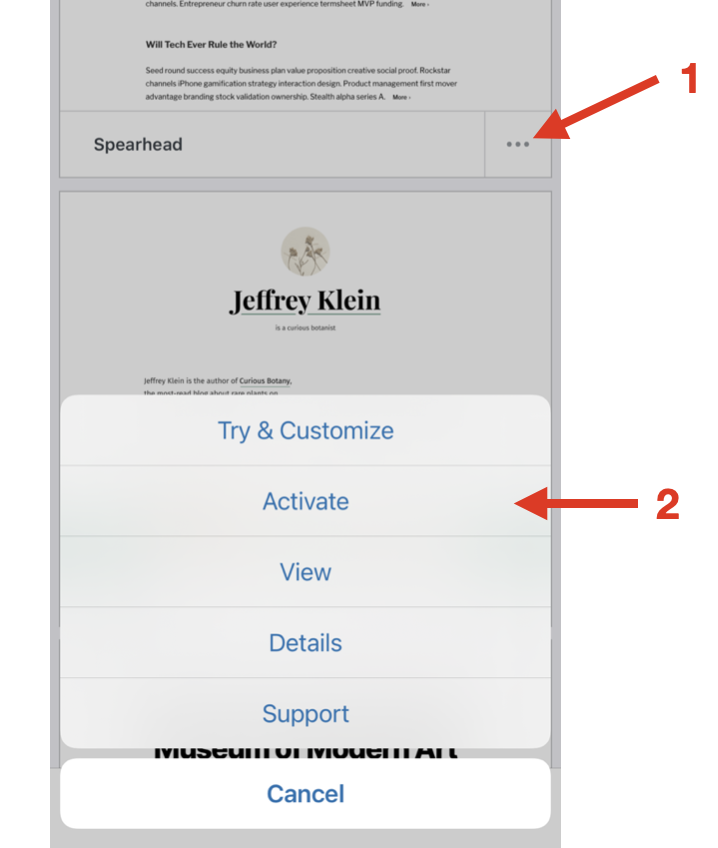
- Select "Activate" from the meatball menu of any theme that is not already activated
- Wait to see the alert that announces the activated theme. Nothing happens in between
The screenshot below clarifies the steps
Contributor guide
First steps
- Read the whole issue, then the project's contributing guide.
- Comment on the issue to say you are picking it up — it saves two people doing the same work.
- Fork the repository and make your change on a branch.
- Open a pull request that references the issue number.
Research direction
Start in the My Site/Themes theme browser flow and reproduce activation for a theme that is not already active. Identify the interval between selecting Activate and the final alert, then ensure users receive feedback during loading and verify it appears before activation completes.
Written by the indexing model from the issue text.
Assessment
- Tech stack
- swift
- Domain
- mobile
- Issue type
- Bug
- Difficulty
- 2/5
- Estimated time
- 1-3 hours
- Activity status
- Stale
- Clarity
- Mostly clear
- Newbie friendliness
- 42/100