wordpress-mobile / wordpress-mobile/WordPress-iOS
Core Data migration fails silently
Nobody has claimed this yet.
- Dominant language
- Swift
- Stars
- 3.9k
- Forks
- 1.2k
- Avg merge
- 23h 51m
- Merged PRs (30d)
- 58
Description
This can only be reproduced if the app is migrating from a database with preexisting validation errors like the database described in https://github.com/wordpress-mobile/WordPress-iOS/issues/12028#issuecomment-557591559 where some of the AbstractPost rows have no blog. The blog is a required property in the Core Data model.
Expected behavior
I'm not entirely sure how to approach this. I only have questions. Should we stop the app from running? Should we show an error to the user? What are the user's options if an error happens?
Actual behavior
The app runs normally after the migration. However, when inspecting the database, I found that some parts of the migration were not executed. The following are some examples.
Heavyweight migrations are not executed
BlogToBlogMigration87to88 prefills the Blog.mobileEditor property with either “aztec“ or “gutenberg”. The values just end up being NULL:
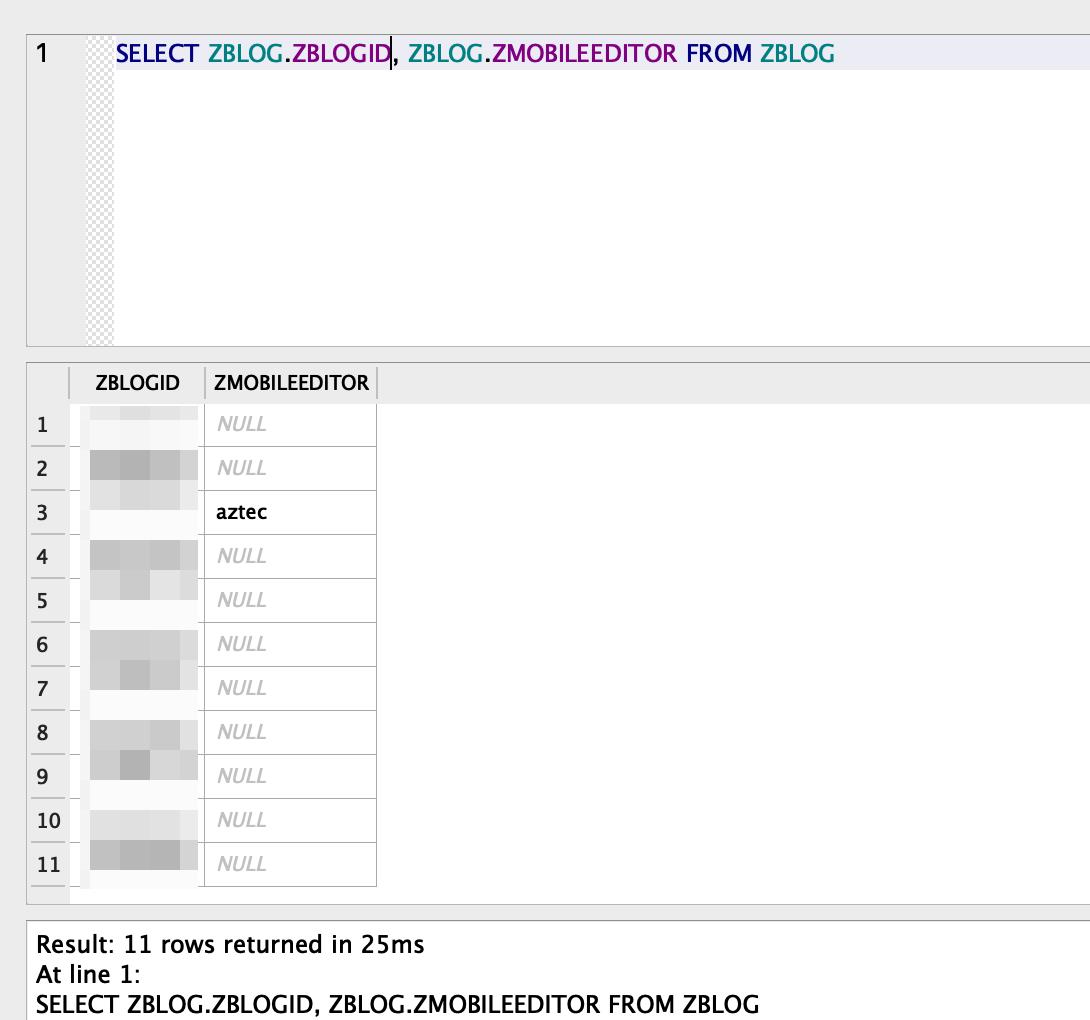
Custom mappings are not executed
The WordPress 92 migration creates an AbstractPost.statusAfterSync property. It has a custom mapping that copies the existing values of AbstractPost.status to statusAfterSync. That doesn't happen. The values are just NULL:
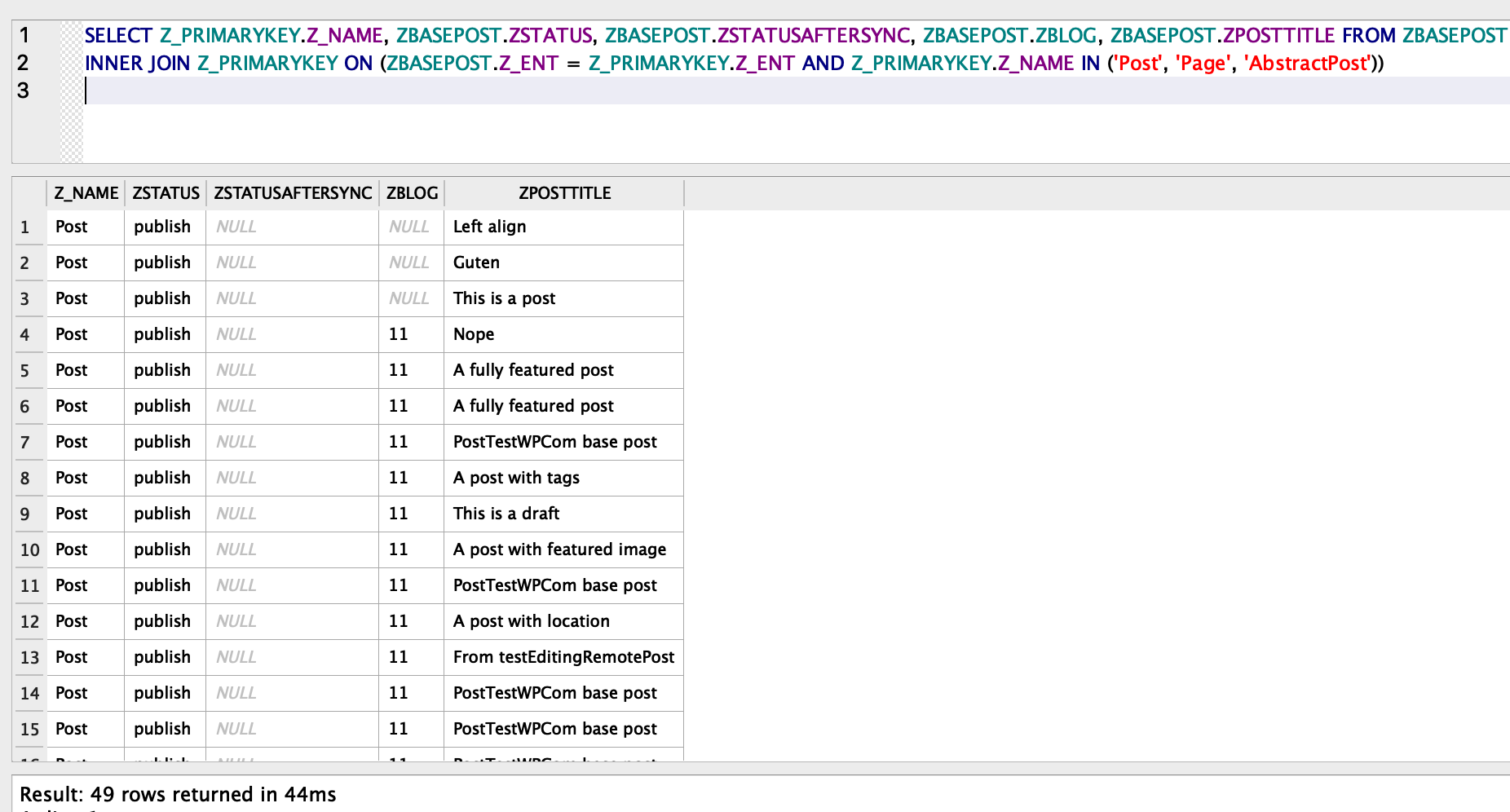
Curiously, the AbstractPost.statusAfterSync property was created.
Steps to reproduce the behavior
The steps involve migrating from WPiOS 12.7 to the most recent develop at the time of this writing, 1523fd2683. There is a working test/working-12.7 branch which compiles on Xcode 10.3. WPiOS 12.7 uses the WordPress 87 Core Data model.
- Using
test/working-12.7and Xcode 10.3, run the app on iPhone XS 12.4 simulator. Make sure to delete any existing apps beforehand. - Log in and browse a Post List to download
AbstractPostrecords. - Stop the app.
- Open the app's
WordPress.sqlitedatabase and set one of theZBASEPOSTrow'sZBLOGvalue toNULL. Save the database changes. - Using
developand the recent Xcode, run the app on the same simulator. This will automatically migrate the database from 87 to the recent version (93 at the time of this writing). - Stop the app.
- Open the app's
WordPress.sqlitedatabase and investigate. You may run the SQL statements shown above.
Notes
#12995 could help us get some more information if this happens.
FYI @astralbodies @koke I'd like to hear your opinion on how we should proceed with this. 🙂
Contributor guide
First steps
- Read the whole issue, then the project's contributing guide.
- Comment on the issue to say you are picking it up — it saves two people doing the same work.
- Fork the repository and make your change on a branch.
- Open a pull request that references the issue number.
Research direction
Reproduce the migration using the test/working-12.7 branch and the steps in this issue, then inspect BlogToBlogMigration87to88.swift, MIGRATIONS.md, and the behavior noted in #12995. Establish what should happen when required Core Data values are invalid, and verify that heavyweight and custom mappings either complete or surface an actionable failure.
Written by the indexing model from the issue text.
Assessment
- Tech stack
- swift
- Domain
- databases, mobile-dev
- Issue type
- Bug
- Difficulty
- 5/5
- Estimated time
- Over a week
- Activity status
- Stale
- Clarity
- Needs clarification
- Newbie friendliness
- 25/100