wordpress-mobile / wordpress-mobile/WordPress-iOS
Search: Add "search"/"done" button to keyboard when searching (for a site address, domain, username)
Nobody has claimed this yet.
- Dominant language
- Swift
- Stars
- 3.9k
- Forks
- 1.2k
- Avg merge
- 23h 51m
- Merged PRs (30d)
- 58
Description
Expected behavior
When there's a search feature in the app, I expect an obvious Search or Done button to appear on the keyboard, to make it clear that I have to tap it to complete the search. Here's an example from Reader > Search:

Actual behavior
In some searches, there isn't any button like that:
- Create a WordPress.com site: search for the site address
- Register a custom domain: search for the domain
- Create a WordPress.com account: search for a new username
In these cases, I often expect the app to update the search results as I type, and sit for a moment after entering my search before I realize I need to tap the "Enter" button on the keyboard:
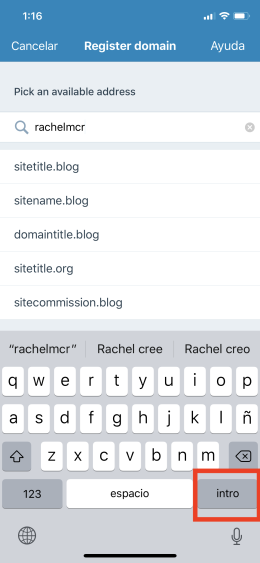
Tested on iPhone XS, iOS 12.1, WPiOS 11.3.0.20181119
Contributor guide
First steps
- Read the whole issue, then the project's contributing guide.
- Comment on the issue to say you are picking it up — it saves two people doing the same work.
- Fork the repository and make your change on a branch.
- Open a pull request that references the issue number.
Research direction
Start by locating the search input implementations for site-address creation, custom-domain registration, and username creation in the WordPress-iOS app. Compare their keyboard behavior with Reader > Search. Done means each listed search shows an obvious Search or Done keyboard button and the button completes the search as expected on iOS.
Written by the indexing model from the issue text.
Assessment
- Tech stack
- swift
- Domain
- mobile
- Issue type
- Bug
- Difficulty
- 3/5
- Estimated time
- 1-2 days
- Activity status
- Stale
- Clarity
- Mostly clear
- Newbie friendliness
- 35/100