wordpress-mobile / wordpress-mobile/WordPress-Android
Confusing UI in post image editor
Open
Nobody has claimed this yet.
[Type] Enhancement
Media
Posting/Editing
- Dominant language
- Kotlin
- Stars
- 3.2k
- Forks
- 1.4k
- Avg merge
- 1d 11h
- Merged PRs (30d)
- 69
Description
This is the UI that appears when tapping on an image in the post editor
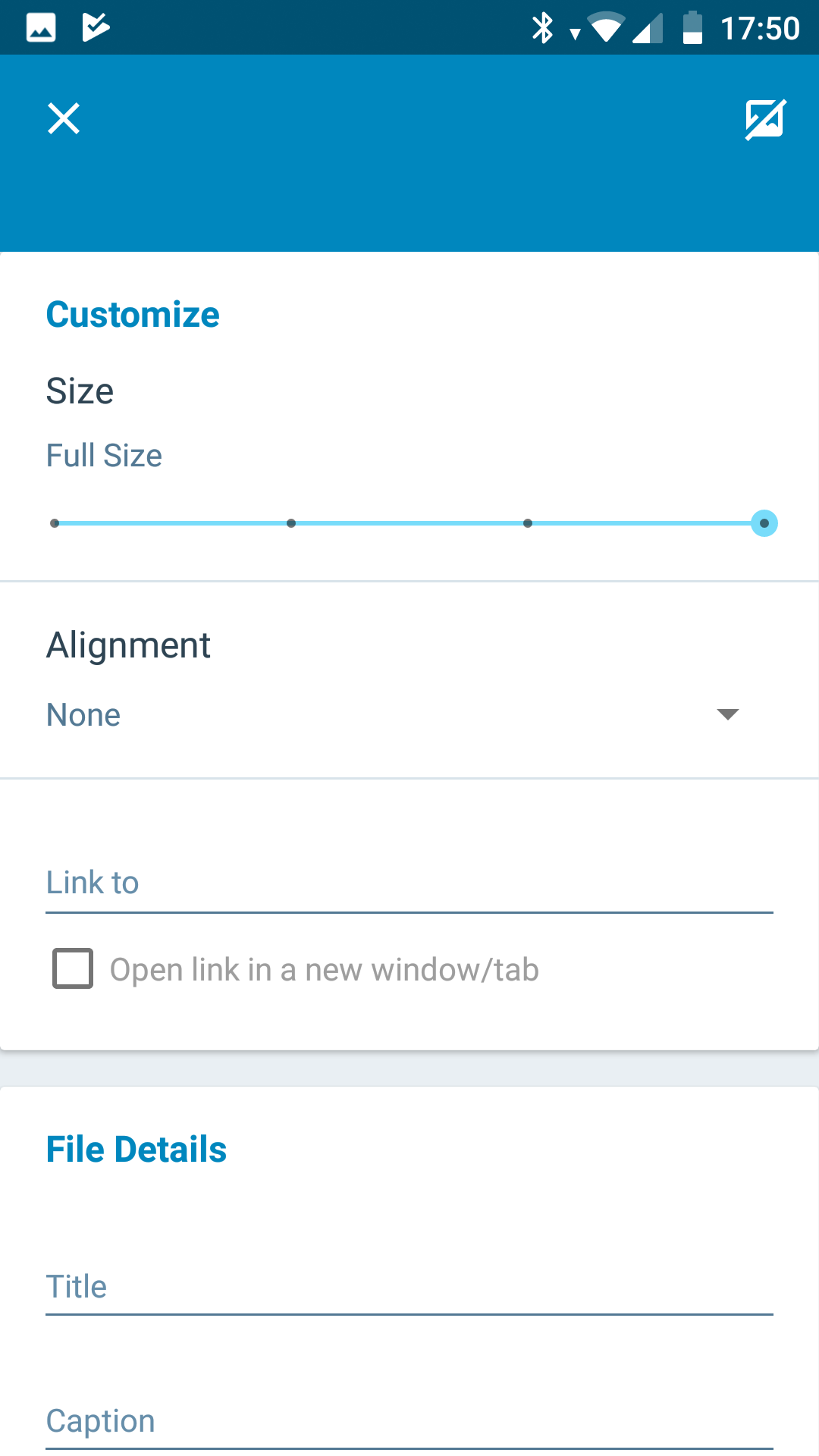
Expected behavior
I expect a checkmark/save button exit/save the settings or a checkmark on the right, and an X on the left.
Actual behavior
The top right corner has a button to remove the image from the post.
The top left is an X button that saves/closes the window, which I found very confusing.
In the IOS app, the option to remove the image appears in a dropdown, that also contains the option to edit the image settings.
Steps to reproduce the behavior
Tap on an image in the post editor
Tested on [device], Android [version]
Mi A1, Oreo 8.1. App version: 10.9.1
Contributor guide
First steps
- Read the whole issue, then the project's contributing guide.
- Comment on the issue to say you are picking it up — it saves two people doing the same work.
- Fork the repository and make your change on a branch.
- Open a pull request that references the issue number.
Assessment
This issue has not been assessed yet.