wordpress-mobile / wordpress-mobile/WordPress-Android
Update Add New Site Dialog to AppCompatDialogFragment
Nobody has claimed this yet.
- Dominant language
- Kotlin
- Stars
- 3.2k
- Forks
- 1.4k
- Avg merge
- 1d 11h
- Merged PRs (30d)
- 69
Description
Expected
The Add New Site dialog is the same across all Android versions.
Observed
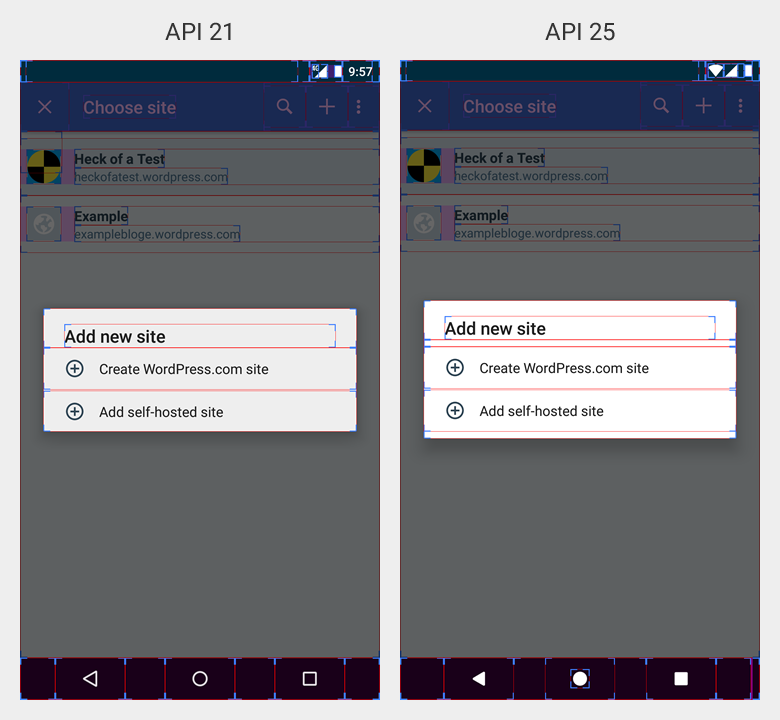
The Add New Site dialog is different across some Android versions. See the screenshots below for illustration.
Note
One solution could be to update the AddSiteDialog inheritance from DialogFragment to AppCompatDialogFragment. This has not been verified, but should be tested.
Reproduced
- Use device running API 21.
- Go to My Site tab.
- Tap Switch Site button in top card view.
- Tap Add New Site action in top toolbar.
- Notice dialog is slightly scrollable with no bottom or top padding.
- Use device running API 25.
- Go to My Site tab.
- Tap Switch Site button in top card view.
- Tap Add New Site action in top toolbar.
- Notice dialog is not scrollable with bottom and top padding.
Tested
Google Pixel 2 on Android 5.1.1 with WordPress 10.9.1
Google Pixel 2 on Android 7.1.2 with WordPress 10.9.1
Contributor guide
First steps
- Read the whole issue, then the project's contributing guide.
- Comment on the issue to say you are picking it up — it saves two people doing the same work.
- Fork the repository and make your change on a branch.
- Open a pull request that references the issue number.
Research direction
Start with the AddSiteDialog entry point and reproduce the Add New Site flow on API 21 and API 25 as described. Test whether changing its dialog implementation resolves the differing scrollability and top or bottom padding, and verify that the dialog appears consistently across both Android versions.
Written by the indexing model from the issue text.
Assessment
- Tech stack
- android
- Domain
- mobile
- Issue type
- Bug
- Difficulty
- 2/5
- Estimated time
- 1-2 days
- Activity status
- Stale
- Clarity
- Mostly clear
- Newbie friendliness
- 45/100