wordpress-mobile / wordpress-mobile/WordPress-Android
Reader: Enhanced reading settings
Open
Nobody has claimed this yet.
[Status] Stale
[Type] Enhancement
Reader
- Dominant language
- Kotlin
- Stars
- 3.2k
- Forks
- 1.4k
- Avg merge
- 1d 11h
- Merged PRs (30d)
- 69
Description
We should consider enhanced reading settings in the Reader, such as:
- A Safari-style toggle to switch between the web and reader view
- Pocket/Kindle-style text controls in the reader view
Example of how this is done in Robinhood:
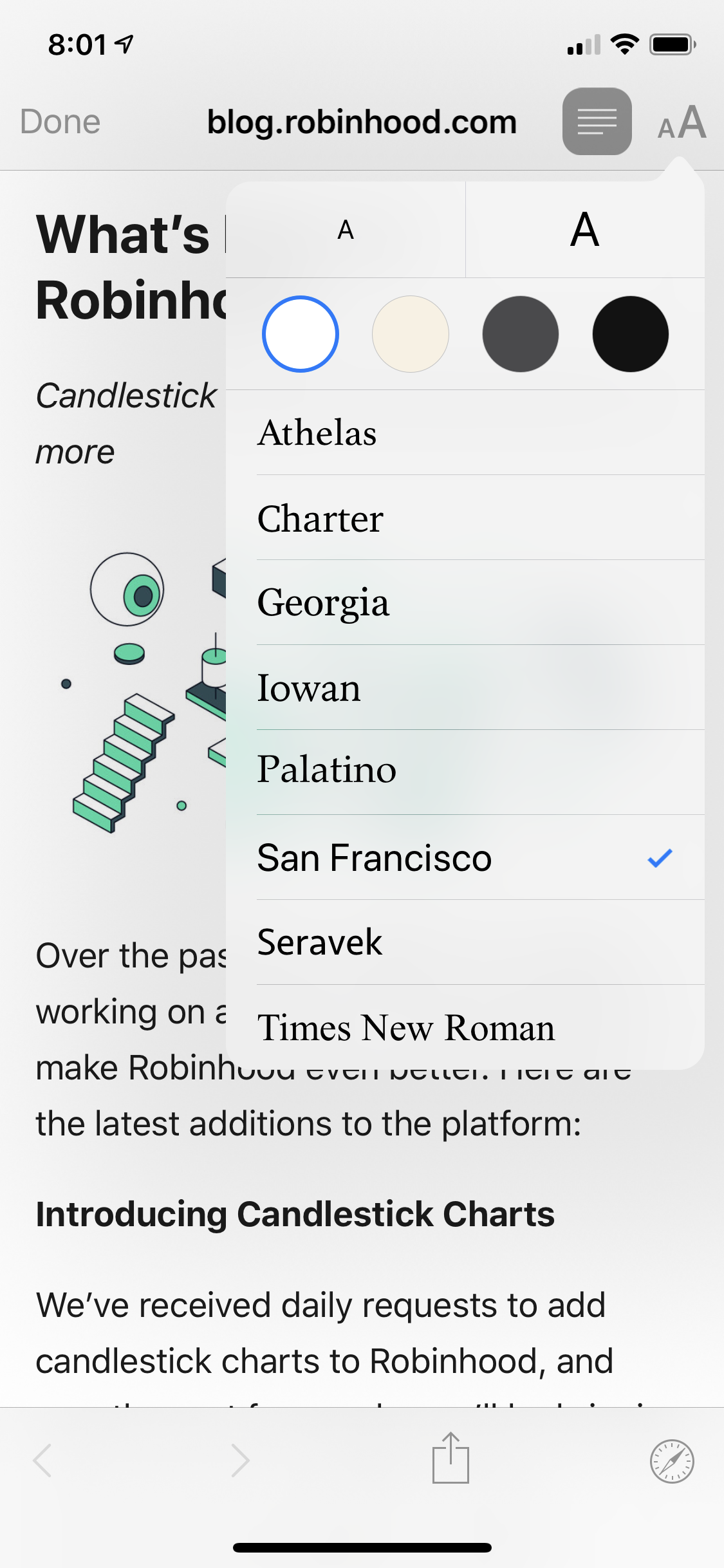
(Previous discussion for internal ref: p4a5px-2gl-p2)
Contributor guide
First steps
- Read the whole issue, then the project's contributing guide.
- Comment on the issue to say you are picking it up — it saves two people doing the same work.
- Fork the repository and make your change on a branch.
- Open a pull request that references the issue number.
Research direction
No source files or tests are identified. Begin by locating the Reader implementation and reviewing the prior internal discussion plus the Safari, Robinhood, Pocket, and Kindle examples. Done should be a specific, agreed scope for the reader toggle and text controls before implementation begins.
Written by the indexing model from the issue text.
Assessment
- Tech stack
- android, kotlin
- Domain
- mobile
- Issue type
- Feature
- Difficulty
- 5/5
- Estimated time
- Over a week
- Activity status
- Stale
- Clarity
- Needs clarification
- Newbie friendliness
- 25/100