wordpress-mobile / wordpress-mobile/WordPress-Android
Explain "Pingbacks" in Settings
Open
Nobody has claimed this yet.
[Status] Needs Copy Review
[Type] Enhancement
Design Needed
Site Management
- Dominant language
- Kotlin
- Stars
- 3.2k
- Forks
- 1.4k
- Avg merge
- 1d 11h
- Merged PRs (30d)
- 69
Description
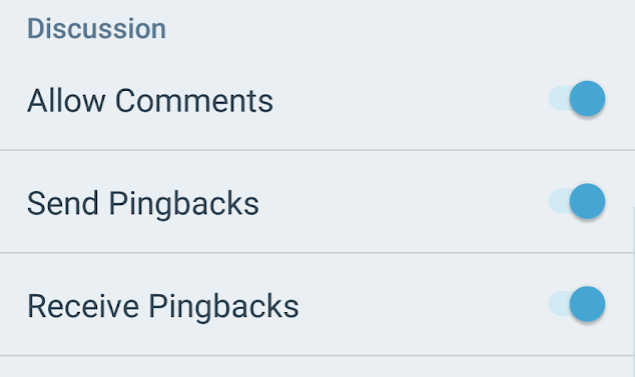
In Settings we have "Send Pingbacks" and "Receive Pingbacks". For a new (or even more experienced?) user "pingbacks" doesn't mean anything.
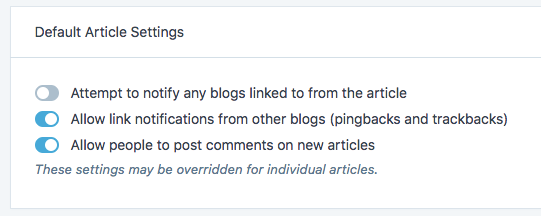
Toggles in Calypso are little bit clearer:
Tested on Mi A1, Android 8
Contributor guide
First steps
- Read the whole issue, then the project's contributing guide.
- Comment on the issue to say you are picking it up — it saves two people doing the same work.
- Fork the repository and make your change on a branch.
- Open a pull request that references the issue number.
Research direction
Start in the Android Settings UI that contains the “Send Pingbacks” and “Receive Pingbacks” toggles, then review the existing labels and nearby explanatory text. Update the wording so a new user can understand what sending and receiving pingbacks mean, and verify both settings on an Android device.
Written by the indexing model from the issue text.
Assessment
- Tech stack
- android, kotlin
- Domain
- content, mobile
- Issue type
- Documentation
- Difficulty
- 2/5
- Estimated time
- 1-3 hours
- Activity status
- Stale
- Clarity
- Mostly clear
- Newbie friendliness
- 45/100