wordpress-mobile / wordpress-mobile/WordPress-Android
Block Editor: Cover block overlay opacity not working when it has no media
Nobody has claimed this yet.
- Dominant language
- Kotlin
- Stars
- 3.2k
- Forks
- 1.4k
- Avg merge
- 1d 11h
- Merged PRs (30d)
- 69
Description
Expected behavior
For a Cover block without any media (no image, nor video) when overlay opacity is set to any number below 100% it correctly displays the color + opacity in the Android app editor.
Actual behavior
The overlay opacity is only correctly displayed IF the Cover block has media, otherwise two things happen:
- the Android editor does NOT show the overlay opacity setting in the Block settings
- the Android editor does NOT render the overlay opacity correctly, showing a block with 100% opacity with the solid overlay color
Screenshots of the behavior
The screenshots below were all taken with the Cover Block in the same state, with overlay opacity = 10%.
| Web Editor | Web Preview | App Editor (bug) | App Preview |
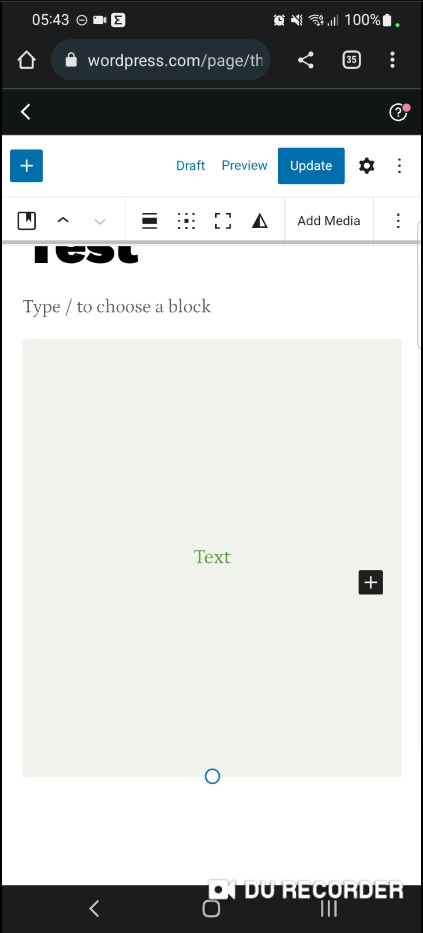 | 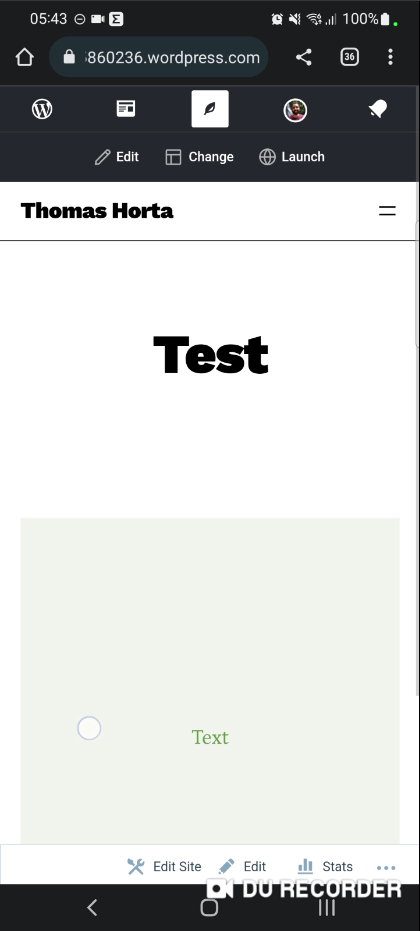 | 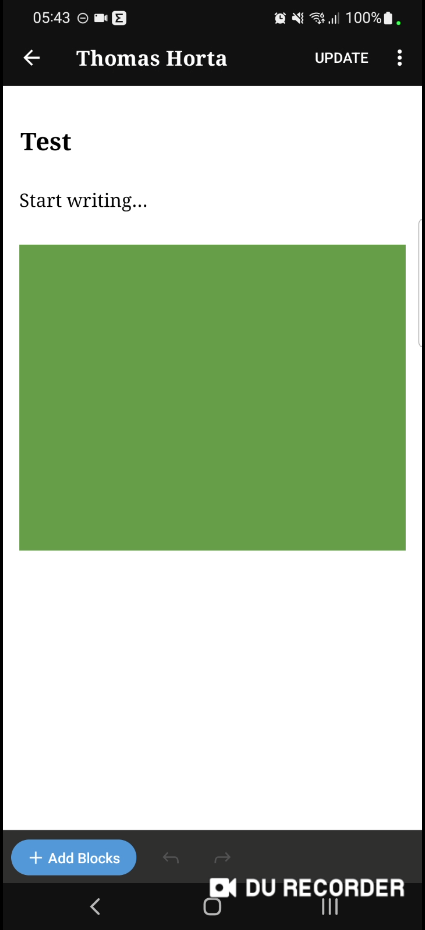 | 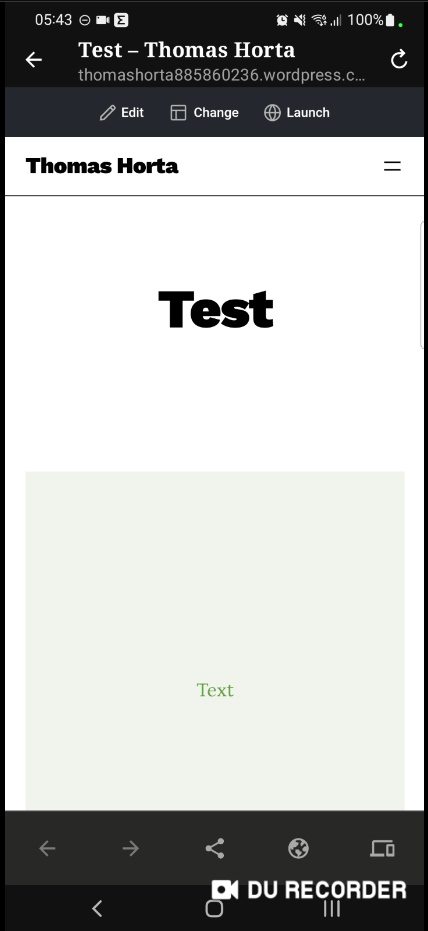 |
Steps to reproduce the behavior
I was able to find a couple of ways to reproduce it:
First Way - All inside WordPress Android App
- Open WordPress Android app and Log In to your account
- Choose a page / create a new page
- Add the Cover block to it
- Set any media for the cover block
- Set a text inside the Cover block (just for better visibility on the bug)
- Set the paragraph block text color
- Open Cover block options
- Check that you have the option of setting an overlay opacity
- Set an overlay color to the same color as the paragraph text color set on step 5
- Set overlay opacity to something low, like 10%
- Check that editor looks as expected: background media, with an overlay, with a text on top of it
- Tap to see the preview
- Check that preview looks as expected: background media, with an overlay, with a text on top of it
- Open Cover block options
- Tap on "Clear Media" to remove the media
- Check that editor DOES NOT look as expected: solid overlay color with no transparency, text with same color (impossible to see)
- Open Cover block options
- Check that "Overlay Opacity" option is not there anymore
- Tap to see the preview
- Check that preview LOOKS as expected: overlay color WITH previously set transparency, text with same color (but possible to see, thanks to overlay opacity)
Video for First Way
https://user-images.githubusercontent.com/5091503/199263078-3ec8b231-1178-4344-a01b-ca1d59d2386b.mp4
Second Way - WordPress Web Editor (on mobile or computer) + Android app
- Open WordPress Web on your device browser and the Android app as well, and Log In to your account in both places
- Web Editor: Choose a page / create a new page
- Web Editor: Add a Cover block to it
- Web Editor: Choose a color for the cover block (don't add any media)
- Web Editor: Set a text inside the Cover block (just for better visibility on the bug)
- Web Editor: Set the paragraph block text color
- Web Editor: Open Cover block options
- Web Editor: Check that you have the option of setting an overlay opacity
- Web Editor: Set overlay color to the same color as the paragraph text color set on step 5
- Web Editor: Set overlay opacity to something low, like 10%
- Web Editor: Check that editor looks as expected: background media, with an overlay, with a text on top of it
- Web Editor: Tap to see the preview
- Web Editor: Check that preview looks as expected: background media, with an overlay, with a text on top of it
- Web Editor: Hit "Update" to save the changes
- App Editor: Refresh the Pages list
- App Editor: Select the same page you edited using the Web Editor
- App Editor: Check that editor DOES NOT look as expected: solid overlay color with no transparency, text with same color (impossible to see)
- App Editor: Open Cover block options
- App Editor: Check that "Overlay Opacity" option is not there
- App Editor: Tap to see the preview
- App Editor: Check that preview LOOKS as expected: overlay color WITH previously set transparency, text with same color (but possible to see, thanks to overlay opacity)
Video for Second Way
https://user-images.githubusercontent.com/5091503/199266600-12d8ece6-1d19-4dab-b552-401d6eb6fb42.mp4
Tested on Samsung S21+, Android 12, WPAndroid 21.0-rc-1
Contributor guide
First steps
- Read the whole issue, then the project's contributing guide.
- Comment on the issue to say you are picking it up — it saves two people doing the same work.
- Fork the repository and make your change on a branch.
- Open a pull request that references the issue number.
Research direction
Reproduce the issue in the WordPress Android app using a Cover block without media, then compare the editor with the preview after setting a low overlay opacity. The fix is done when the Overlay Opacity setting remains available and the editor renders the saved opacity correctly with and without media.
Written by the indexing model from the issue text.
Assessment
- Tech stack
- android, kotlin
- Domain
- mobile-dev
- Issue type
- Bug
- Difficulty
- 4/5
- Estimated time
- 3-5 days
- Activity status
- Stale
- Clarity
- Mostly clear
- Newbie friendliness
- 45/100