wordpress-mobile / wordpress-mobile/WordPress-Android
Notification Settings: On/Off toggle hides WordPress.com notification settings, but turns off Push notifications
Nobody has claimed this yet.
- Dominant language
- Kotlin
- Stars
- 3.2k
- Forks
- 1.4k
- Avg merge
- 1d 11h
- Merged PRs (30d)
- 69
Description
Expected behavior
Since I am in the "Notifications" tab of the app, which displays WordPress.com notifications, I expected this toggle to turn on/off all WordPress.com notifications.
Actual behavior
This toggle turns off push notifications from the app.
In addition, this toggle hides all WordPress.com notification settings.
This is counterproductive, since the toggle does not turn off WordPress.com notifications.
Steps to reproduce the behavior
- Head into Notifications > ⚙️ (Settings).
- Check that the on/off toggle is set to on (green).
- Make a comment or like a post of yours, from another account.
- Note that you get a push notification, and a WordPress.com notification - under the bell icon in the app.
- Back in Notifications > ⚙️ (Settings), set the on/off toggle to off (grey). Note the displayed description of this setting.
- Make a comment or like a post of yours, from another account.
- Note that you still get a WordPress.com notification - under the bell icon in the app.
- Note that you do not get a push notification.
This behavior is quite confusing. Turning the setting “off” doesn’t stop WordPress.com notifications from appearing in the Notifications tab, but it stops the user from accessing settings related to those WordPress.com notifications.
We need to differentiate more clearly between Push Notifications and WordPress.com Notifications.
Ideally, settings for push notifications would not live here, but in Me > App Settings. And settings for push notifications should in no way effect WordPress.com notifications.
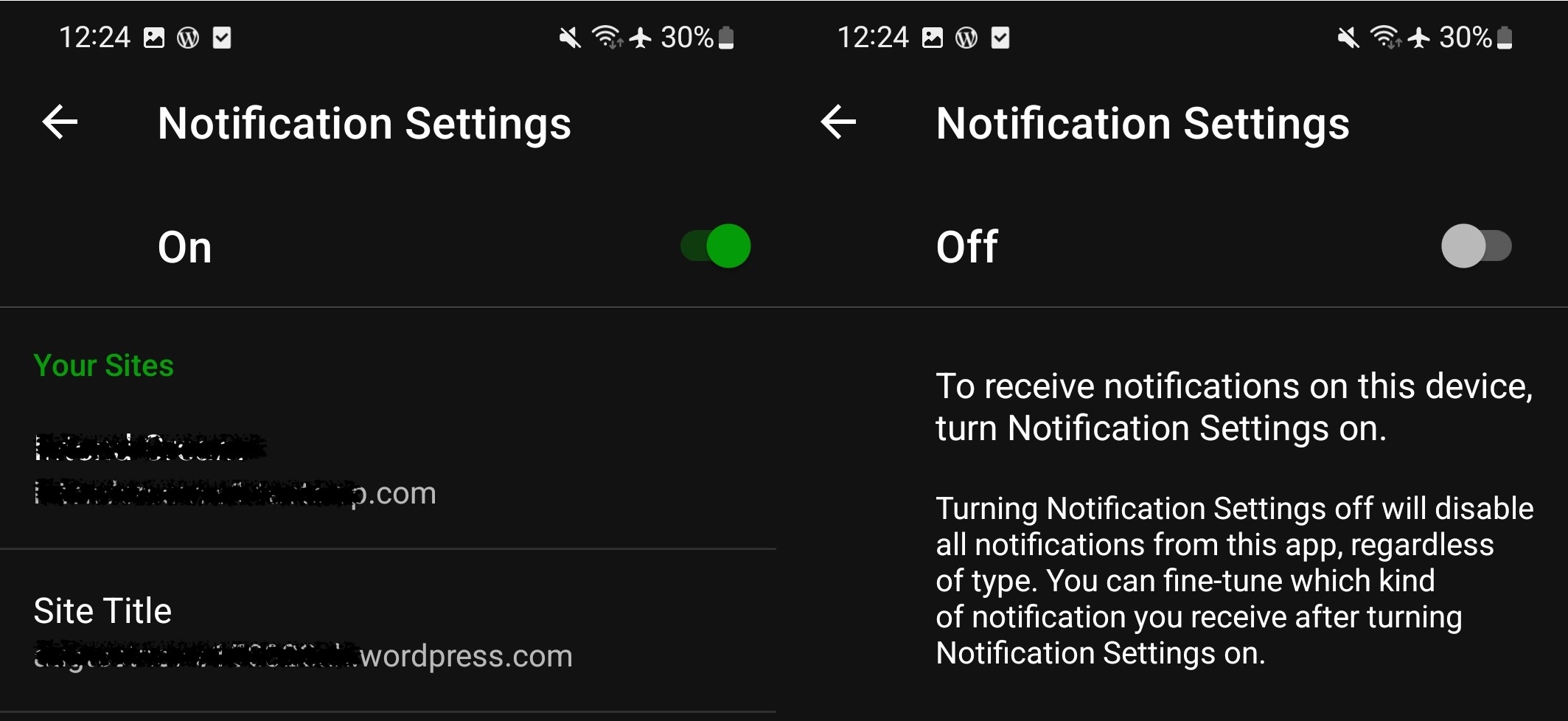
Tested on Samsung Galaxy S21, Android 12, WPAndroid 21.0-rc-3
Found during usability exploration: pdcxQM-1ff-p2
Contributor guide
First steps
- Read the whole issue, then the project's contributing guide.
- Comment on the issue to say you are picking it up — it saves two people doing the same work.
- Fork the repository and make your change on a branch.
- Open a pull request that references the issue number.
Research direction
Start at Notifications > Settings and reproduce the difference between push notifications and WordPress.com notifications using the listed steps. Trace where the on/off toggle controls push notifications and hides the WordPress.com settings. Done means the settings clearly distinguish these notification types and changing push settings does not affect WordPress.com notifications.
Written by the indexing model from the issue text.
Assessment
- Tech stack
- android, kotlin
- Domain
- mobile
- Issue type
- Bug
- Difficulty
- 4/5
- Estimated time
- 3-5 days
- Activity status
- Stale
- Clarity
- Mostly clear
- Newbie friendliness
- 35/100