wordpress-mobile / wordpress-mobile/WordPress-Android
Login: "not a WordPress site" error sometimes displays incorrectly
Nobody has claimed this yet.
- Dominant language
- Kotlin
- Stars
- 3.2k
- Forks
- 1.4k
- Avg merge
- 1d 11h
- Merged PRs (30d)
- 69
Description
Expected behavior
If I enter the URL for a WordPress site that blocks the app's requests for any reason, I expect to receive a helpful error message that informs me why I'm not able to log into that site via the app.
Actual behavior
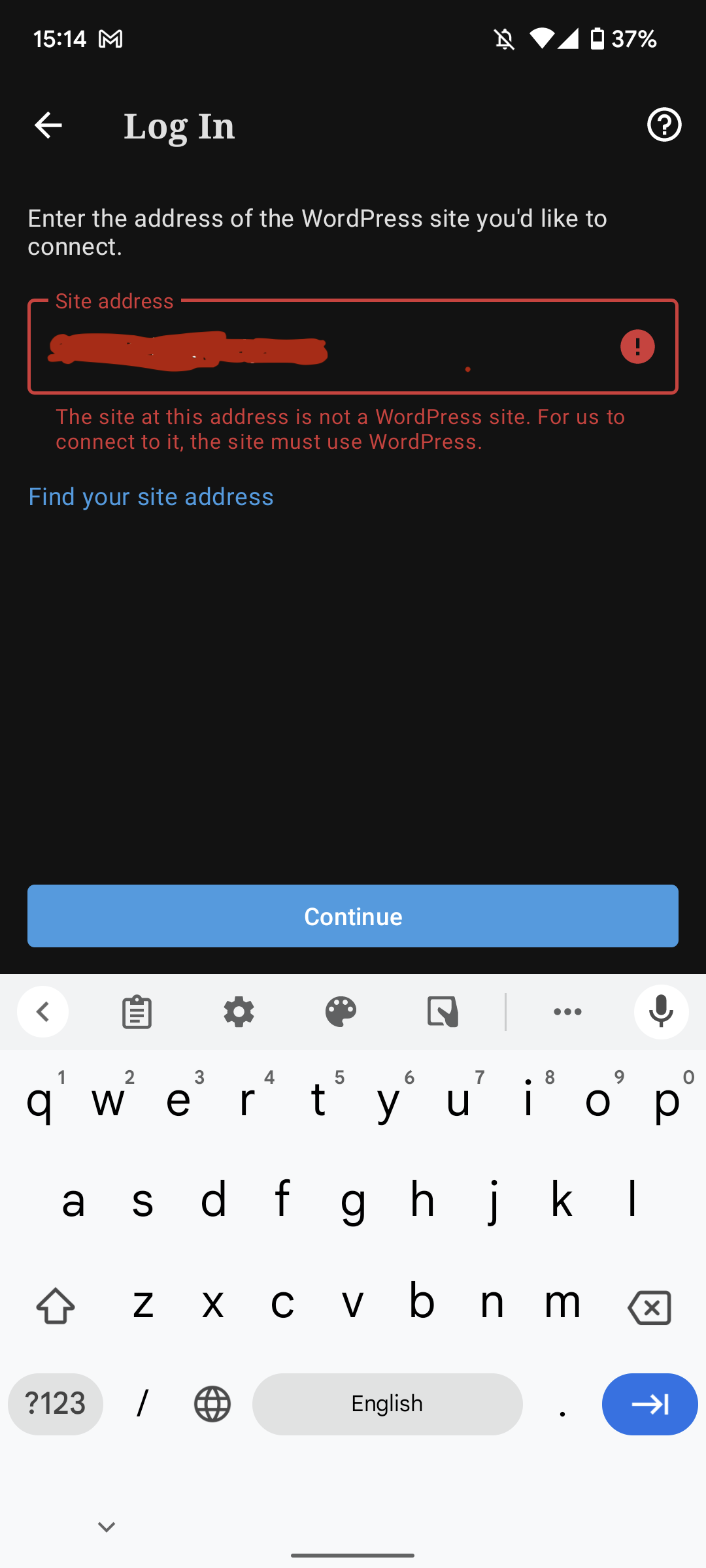
Recent app reviews at pbArwn-4xZ-p2 clued us into the fact that there are some scenarios in which the following error displays when users attempt to log into self-hosted WordPress sites:
"The site at this address is not a WordPress site. For us to connect to it, the site must use WordPress."
For example, the user in 5170539-zd-woothemes was seeing the above error even though there site is using WordPress, but was blocked due to an inability to connect via cURL.
Screenshot:
Previous related issues:
- https://github.com/wordpress-mobile/WordPress-Android/issues/8459
- https://github.com/wordpress-mobile/WordPress-Android/issues/12401
- iOS version: https://github.com/wordpress-mobile/WordPress-iOS/issues/18497
Steps to reproduce the behavior
A URL for testing can be found at pbArwn-4xZ-p2#comment-5712 and/or 5170539-zd-woothemes (not included in this ticket to protect user privacy):
- Navigate to the app's login screen and select the "Log in by entering site address" option.
- Submit the test URL.
Note, more work needs to be done to identify the exact issues a site must have to reproduce this error, as disabling XML-RPC isn't enough to reproduce.
Tested on Pixel 6, Android 12, WPAndroid 19.7
Contributor guide
First steps
- Read the whole issue, then the project's contributing guide.
- Comment on the issue to say you are picking it up — it saves two people doing the same work.
- Fork the repository and make your change on a branch.
- Open a pull request that references the issue number.
Research direction
Start at the login screen's site-address flow and reproduce the issue with the referenced test URL or support cases. Trace how blocked connections and non-WordPress responses become the displayed error, then verify that connection failures receive a helpful explanation without misidentifying the site.
Written by the indexing model from the issue text.
Assessment
- Tech stack
- android, kotlin, wordpress
- Domain
- authentication, mobile
- Issue type
- Bug
- Difficulty
- 4/5
- Estimated time
- 3-5 days
- Activity status
- Stale
- Clarity
- Needs clarification
- Newbie friendliness
- 35/100