wordpress-mobile / wordpress-mobile/WordPress-Android
Site Posts: Publishing a draft post when system clock is modified queues the post indefinitely
Open
Nobody has claimed this yet.
[Pri] Low
[Type] Bug
Post Status
Posts + Pages
- Dominant language
- Kotlin
- Stars
- 3.2k
- Forks
- 1.4k
- Avg merge
- 1d 11h
- Merged PRs (30d)
- 69
Description
Refs p5T066-2Ra-p2#comment-10749
Expected behavior
- The post should be published immediately.
- Tapping on More > Copy Link should copy a link to the published post. E.g.
https://<my-site>.wordpress.com/2021/12/02/post-slug.
Actual behavior
- The post is placed in the "Published" section, but it's always in the "Queued post" state.
- The Copy Link menu copies what seems to be a trashed post:
https://<my-site>.wordpress.com/2021/12/02/__trashed.
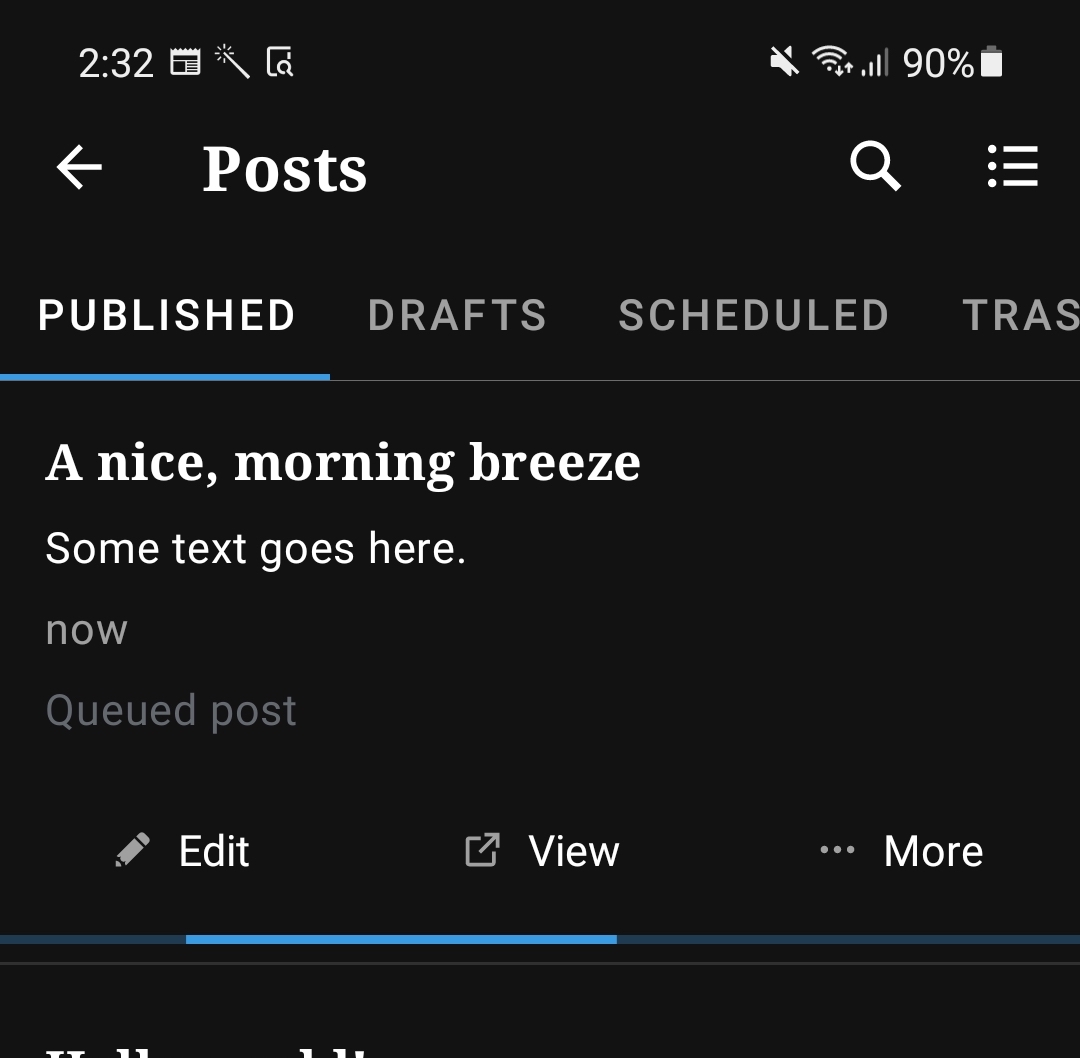
Steps to reproduce the behavior
NOTE: I do think this is an edge case that probably could have a low impact since it requires the phone's system clock to be modified to an earlier time – which is not a normal condition for regular users.
- Set the system clock to an earlier time.
- Create a post, and save it as a draft.
- Publish the draft post immediately.
- Observe that the post is moved to the Published section, with the "queued post" state.
- Tap on More > Copy Link, and paste it somewhere. Observe that the copied link contains
__trashedat the end.
Some more information regarding this:
- This happened while I was on a self-hosted site.
- In the admin dashboard, the post shows up as Published. It's also viewable from the web.
- After I properly corrected my system clock, I couldn't replicate this behavior.
- I haven't tried to replicate this in WP.com hosted site.
Tested on Samsung A52s, Android 11, WPAndroid 18.8
Contributor guide
First steps
- Read the whole issue, then the project's contributing guide.
- Comment on the issue to say you are picking it up — it saves two people doing the same work.
- Fork the repository and make your change on a branch.
- Open a pull request that references the issue number.
Research direction
Start by reproducing the issue on WPAndroid 18.8 with an Android device clock set earlier, then follow the draft publishing flow into the Published section and the More > Copy Link action. Done means the draft publishes immediately and Copy Link returns the published post URL without the __trashed suffix.
Written by the indexing model from the issue text.
Assessment
- Tech stack
- android, kotlin
- Domain
- mobile
- Issue type
- Bug
- Difficulty
- 4/5
- Estimated time
- 3-5 days
- Activity status
- Stale
- Clarity
- Mostly clear
- Newbie friendliness
- 35/100