wordpress-mobile / wordpress-mobile/WordPress-Android
Onboarding Improvements: Hide "Choose a site" and the "OR" divider on the Epilogue screen when there are no sites
Open
Nobody has claimed this yet.
[Pri] Medium
[Type] Bug
- Dominant language
- Kotlin
- Stars
- 3.2k
- Forks
- 1.4k
- Avg merge
- 1d 11h
- Merged PRs (30d)
- 69
Description
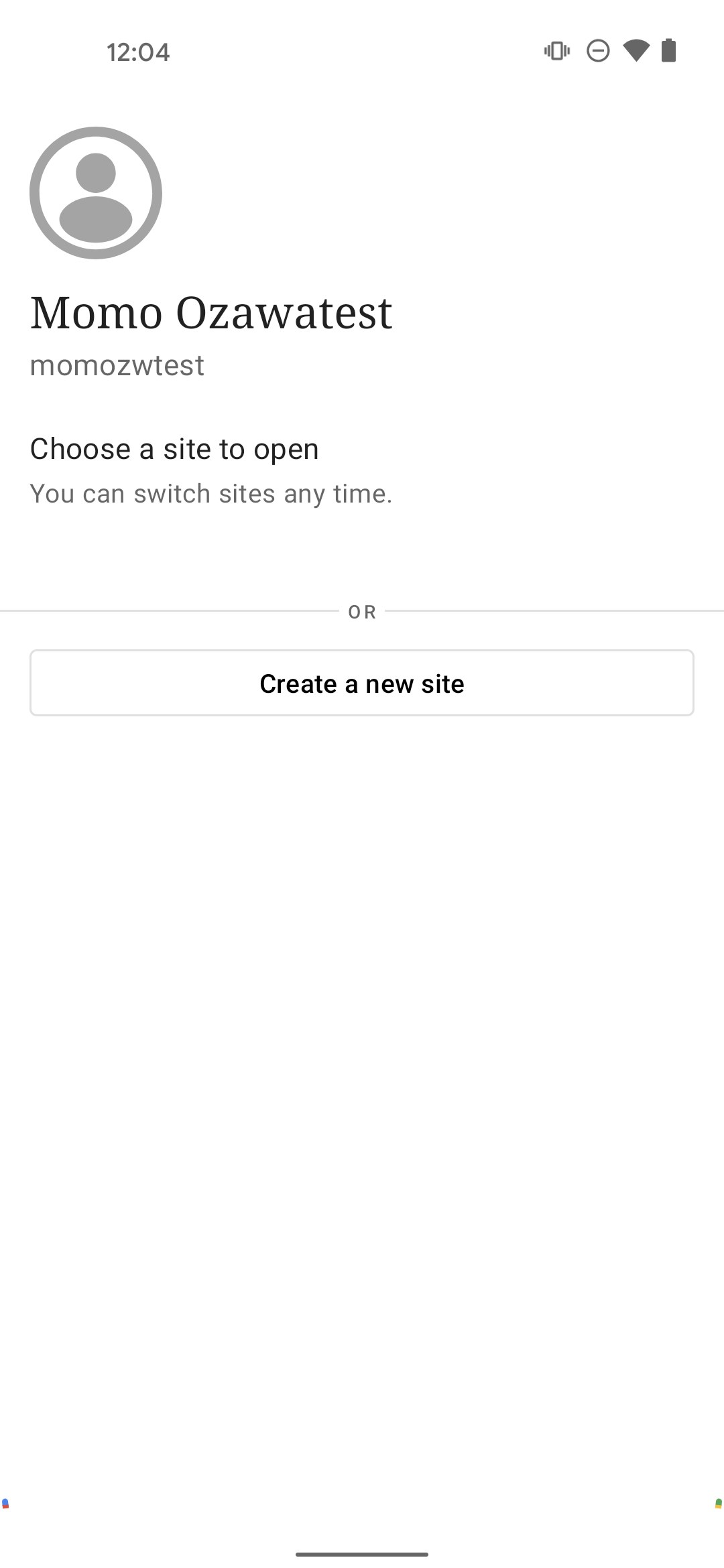
Thanks @pachlava for finding this!
Ref: p1637317113044600-slack-C027K4MNPGQ
Expected behavior
If a user has no sites yet, the following should be hidden in the Epilogue:
Choose a site to openheader----- OR -----divider
Actual behavior
If a user has no sites yet, the following are still shown in the Epilogue:
Choose a site to openheader----- OR -----divider
Steps to reproduce the behavior
- Log in to an account with no sites
- Make sure you see the Post Signup Interstitial screen
- Log out and in again
- Notice the
Choose a site to openheader and----- OR -----divider are shown even thought it doesn't really makes sense given the context
Contributor guide
First steps
- Read the whole issue, then the project's contributing guide.
- Comment on the issue to say you are picking it up — it saves two people doing the same work.
- Fork the repository and make your change on a branch.
- Open a pull request that references the issue number.
Research direction
Reproduce the Post Signup Interstitial and Epilogue flow with an account that has no sites, following the listed login and logout steps. Inspect the Epilogue screen's handling of the site list and verify that both the “Choose a site to open” header and the OR divider are absent when no sites exist.
Written by the indexing model from the issue text.
Assessment
- Tech stack
- android, kotlin
- Domain
- mobile-dev
- Issue type
- Bug
- Difficulty
- 2/5
- Estimated time
- 1-3 hours
- Activity status
- Stale
- Clarity
- Mostly clear
- Newbie friendliness
- 45/100